Recloser Setting Summary
Description
With the Recloser Setting Summary dialog, you can deploy the 7SC80 device as a recloser control relay.
NOTE
If the following 3 conditions are met, the function is available:
•
The 10th number of the MLFB is B, C, or E.
•
The 15th number of the MLFB is A or B.
•
The 16th number of the MLFB is 1, 3, 4, or 5.
The Recloser Setting Summary dialog contains all parameters associated of the recloser application. You can
set parameters in the dialog and save your settings, then, DIGSI copies the values of the parameters to the
SIPROTEC standard parameters automatically. There is no need to set parameters in standard dialogs.
NOTE
The copy is unidirectional. If you change the settings of the standard parameters in standard dialogs, the
values of the related parameters in the Recloser Setting Summary dialog will not be changed.
Setting Notes
General
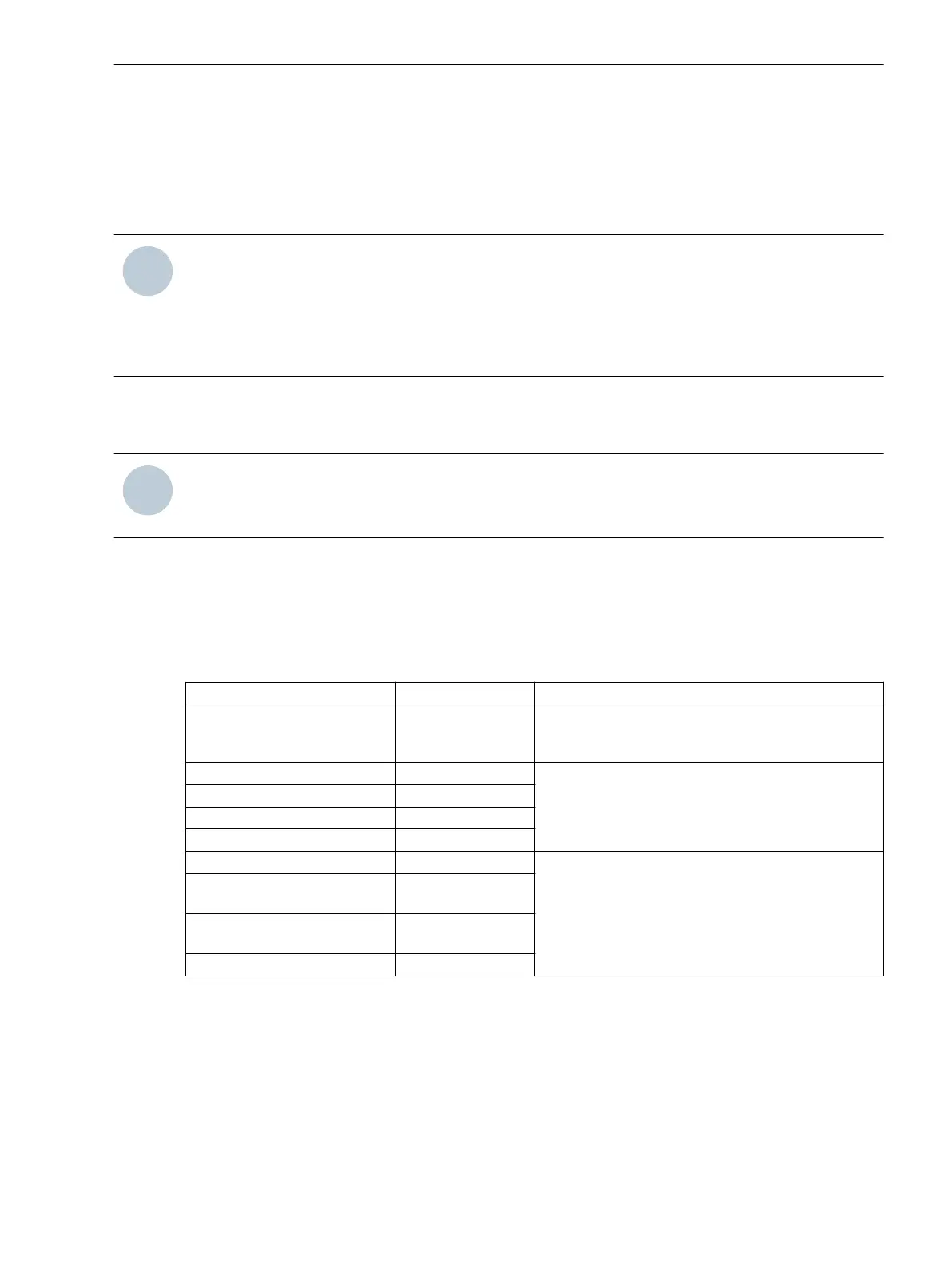
If you want to set parameters related to a function in the Recloser Setting Summary dialog, you must set the
function to All curve or Enabled as the following table shows in the Functional Scope dialog.
Function Name
Value Description
79 Auto-Reclose Function Enabled You can find related parameters of this function in
the Reclosing tab of the Recloser Setting Summary
dialog.
50/51 All Curves You can find related parameters of these 4 functions
in the Overcurrent tab of the Recloser Setting
Summary dialog.
50N/51N All Curves
67, 67-TOC All Curves
67N, 67N-TOC All Curves
Cold Load Pickup Enabled You can find related parameters of these 4 functions
in the Others tab of the Recloser Setting Summary
dialog.
81 Over/Underfrequency
Protection
Enabled
81 Over/Underfrequency Prot.
Side2
Enabled
Trip Single Mode Enabled
Parameters
You can find the Recloser Setting Summary function in all setting groups. The following is an example of the
function in the Setting Group A dialog.
2.29
2.29.1
2.29.2
Functions
2.29 Recloser Setting Summary
SIPROTEC Compact, 7SC80, Manual 403
E50417-G1140-C486-A8, Edition 07.2017



 To Next Page