CHAPTER 9 Cleaning and Maintenance
Sysmex XE-5000 Instructions for Use 9-45
Revised April 2007 EU
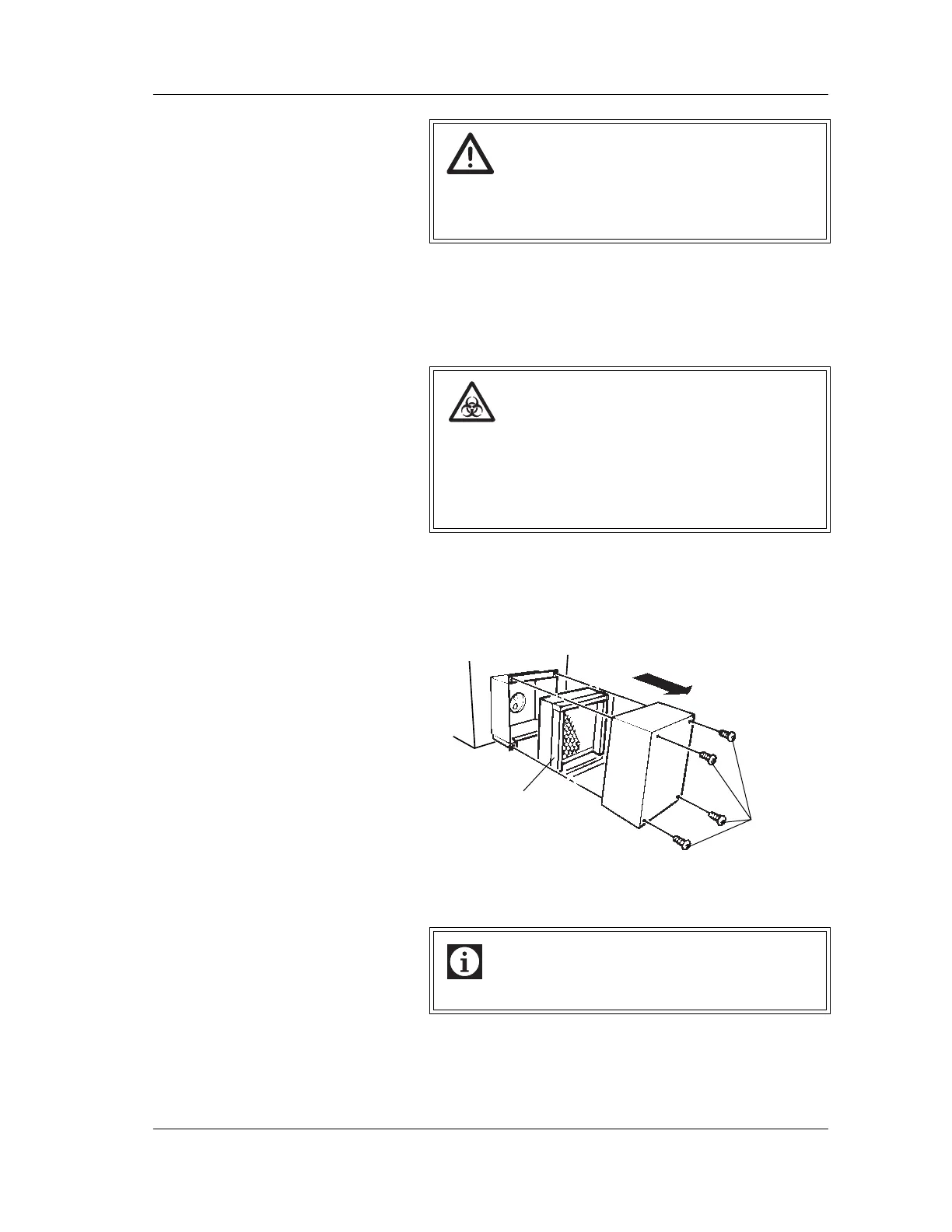
9.20 Replacing the HEPA filter (option)
When the HEPA filter is used, replace it once a year by the
following procedure.
1. Turn OFF the power of Pneumatic Unit and make sure
that the Pneumatic Unit pressure gauge shows “0”.
2. Remove the screws of the filter cover and remove the filter
cover.
3. Remove the HEPA filter and replace it with a new one.
Pay attention to the installation direction.
4. Install the filter cover and fix it with the screws.
Warning!
• For the continued protection against risk of fire,
replace only with fuse of the specified type and
current ratings.
Risk of infection
When replacing the HEPA filter, always wear gloves.
And after completion of the analysis, be sure to wash
your hands with disinfectant.
If your hands are contaminated by blood, you might be
infected by pathogen, etc.
Information
Install the HEPA filter with its groove facing downward.
Screws
HEPA Filter



 To Next Page