CHAPTER 6 Operation
Sysmex XE-5000 Instructions for Use 6-21
Revised July 2007
7. Remove the cap carefully in order not to splash the blood.
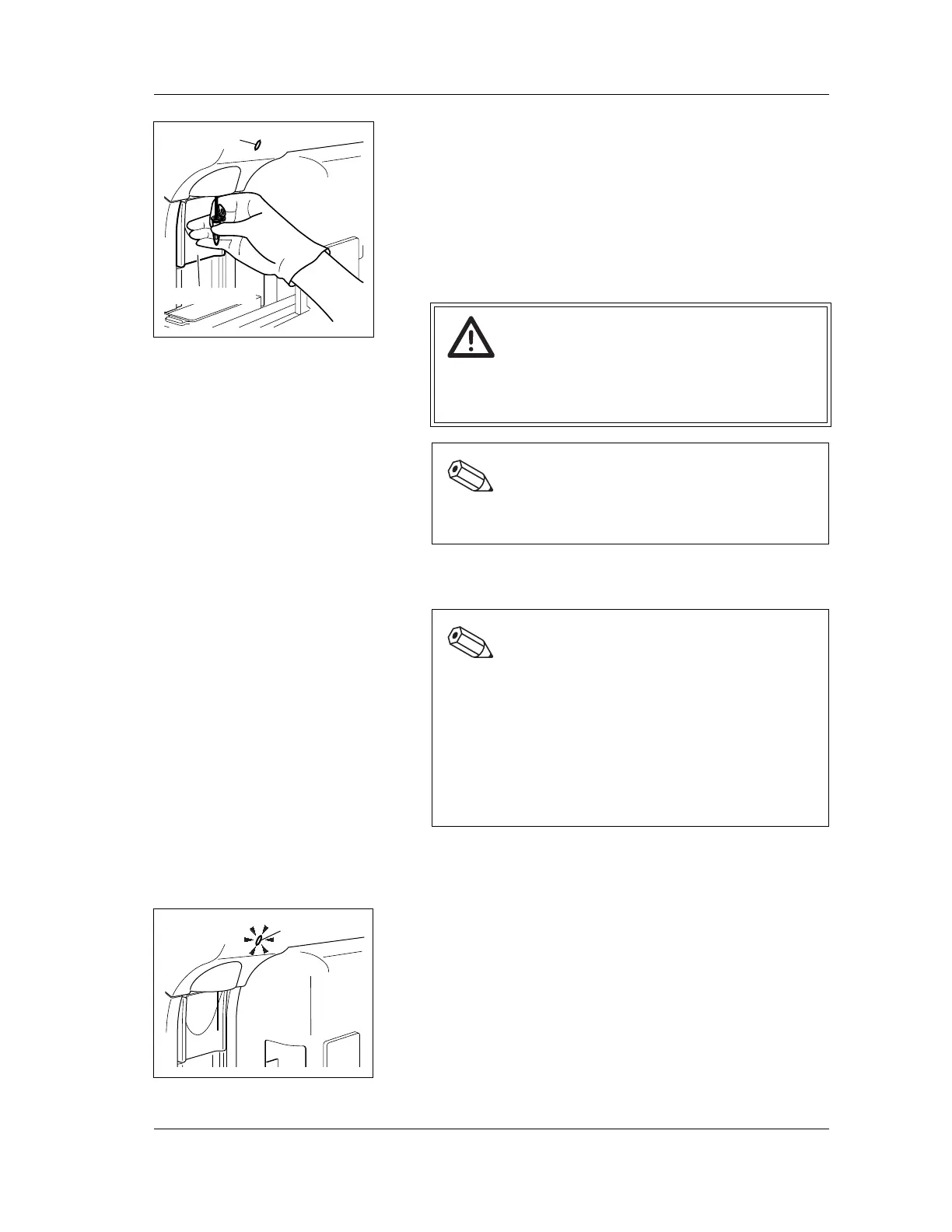
8. Hold the sample tube under the manual aspiration pipette
so that the tip of the pipette is at the bottom of the sample
tube; then press the START switch.
Do not remove the microtube while the READY LED is
blinking; sample is being aspirated.
9. After the READY LED turns off (and a short beep sounds
two times), remove the microtube.
10. When the READY LED turns on again, prepare a next
sample and repeat steps 7-9.
6.19 Sample analysis in sampler mode
1. Make sure that the instrument is in READY status.
The READY LED should be lit.
2. Press the SAMPLER key on the Main Unit panel keypad.
The Sampler Setting screen will appear on the LCD.
Caution!
To remove the microtube, pull straight down to prevent
bending the manual aspiration pipette.
Otherwise the blood may scatter.
Note:
The manual aspiration pipette is automatically rinsed,
and does not need to be wiped manually.
Note:
• If sample ID number is not set, they are automatically
assigned sequentially. (Automatic increment
function)
• For the parameters that can be analyzed in capillary
mode, see “Chapter 1: 1.3 Measurement
parameters”.
• IMI channel analysis is not performed in capillary
mode
.
READY LED
START Switch
READY LED



 To Next Page