CHAPTER 9 Cleaning and Maintenance
Sysmex XE-5000 Instructions for Use 9-9
Revised April 2007
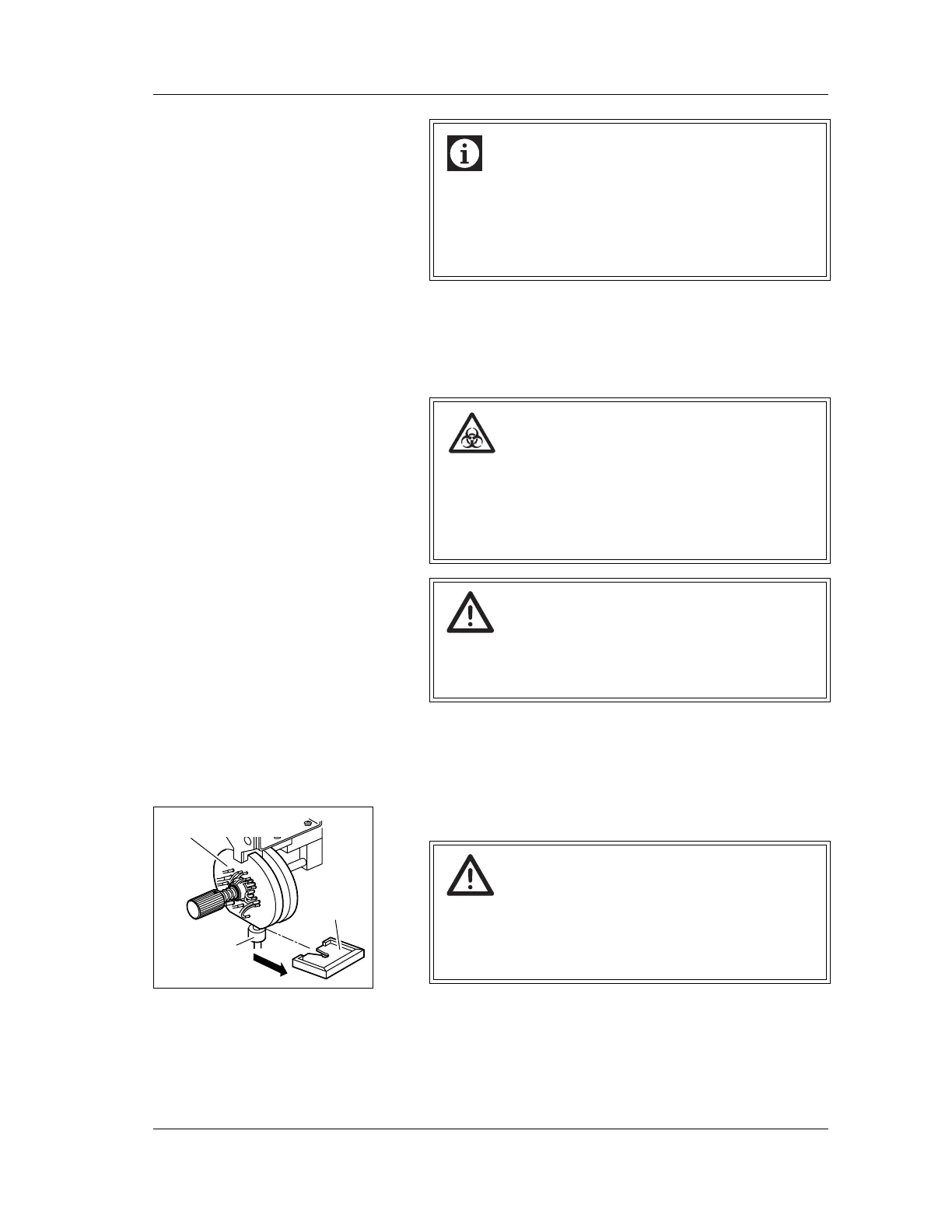
9.5 Cleaning the sample rotor valve tray
If the sample rotor valve tray has dirt, clean the tray by the
following procedure.
1. Turn OFF the power of the Main Unit and Pneumatic Unit,
and wait several minutes until the pressure gauge points
at “0”.
2. Open the Main Unit front cover.
3. Remove the sample rotor valve tray.
Information
Make sure that the rinse cup is pushed all the way up
with the manual aspiration pipette inserted.
If the power is turned on with the manual rinse cup
lowered, an error will occur, making it impossible to
continue operation.
Risk of infection
When cleaning the sample rotor valve tray, always
wear gloves. After completion of the operation, wash
your hands with disinfectant.
If your hands are contaminated by blood, you might be
infected by pathogen, etc.
Warning!
Before operating with the front cover open, be sure to
set the stop bar. Otherwise, the cover can drop down
and injure your head.
Caution!
When removing the tray, take care not to loosen the
pipette fixing screw.
If an analysis is made with the screw loosened, air
bubbles can enter the pipette and affect the data.
Sample rotor valve
Pipette fixing
screw
Tray



 To Next Page