CHAPTER 3 Design and Function
3-16 Sysmex XE-5000 Instructions for Use
Revised April 2007
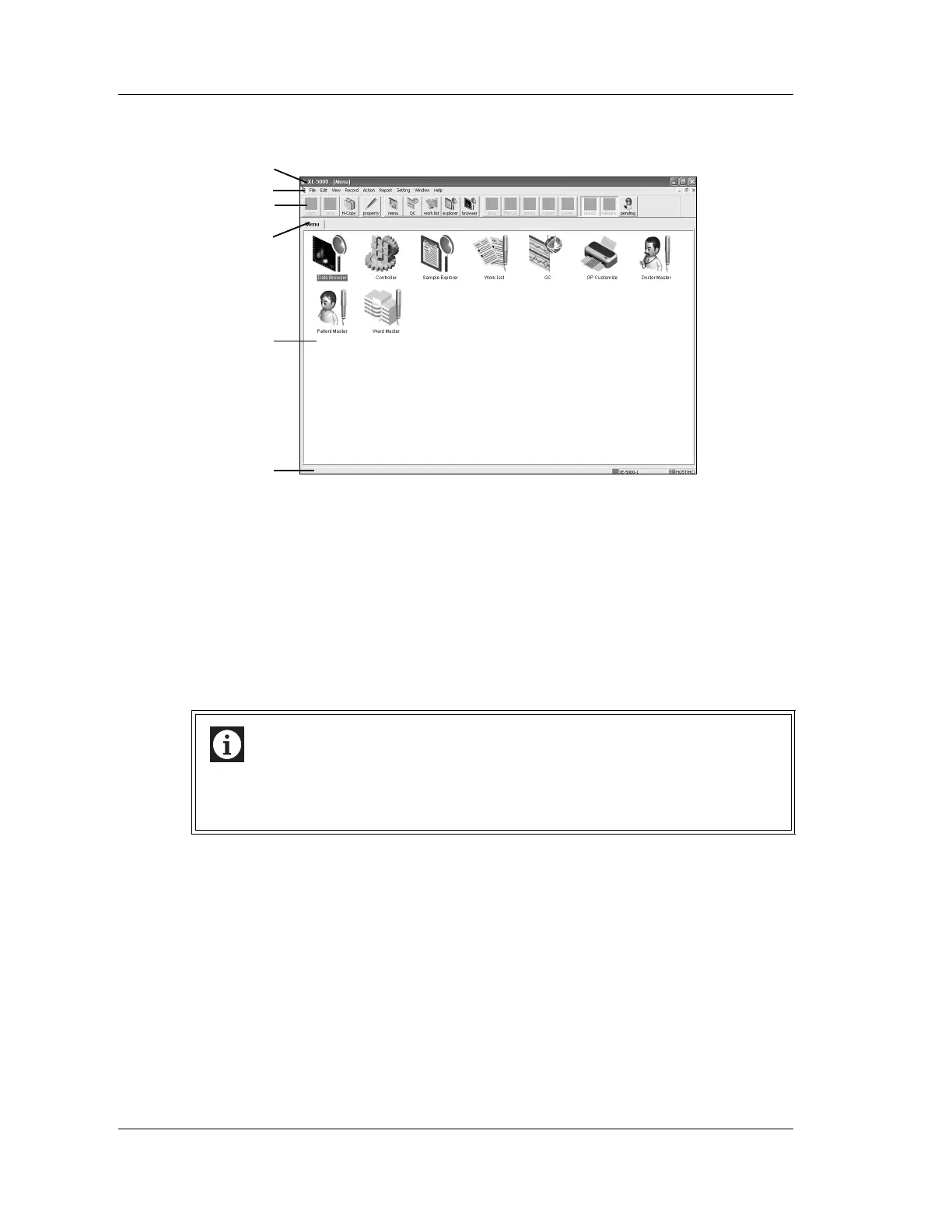
Summary of the Information Processing Unit (IPU) display screen
1 Title bar
Displays the instrument name, display window name, No. of stored data, etc.
2 Menu bar
Displays the following:
• File • Report
• Edit • Settings
• View • Window
• Record • Help
• Action
There are submenus for each menu item. A pull down menu will be displayed when the
mouse is left clicked over the menu item.
3 Tool bar
The tool bar contains those pull down submenu items that are used comparatively often.
Double-click the icon on the tool bar will immediately execute that submenu action.
Inactive tool bar buttons are displayed in gray.
4Tab
The names of windows indicating menu icons are displayed.
When there are several windows, select a desired tab to change over the windows.
5 Window (View)
Operations are performed in these areas or windows.
Information
There may be some menu that cannot be selected, depending on the functions
currently effective.
Only menu items displayed in black may be selected.
3
1
2
4
5
6



 To Next Page