4.2 Loading Paper
101
4
Loading Paper and Usable Paper Types
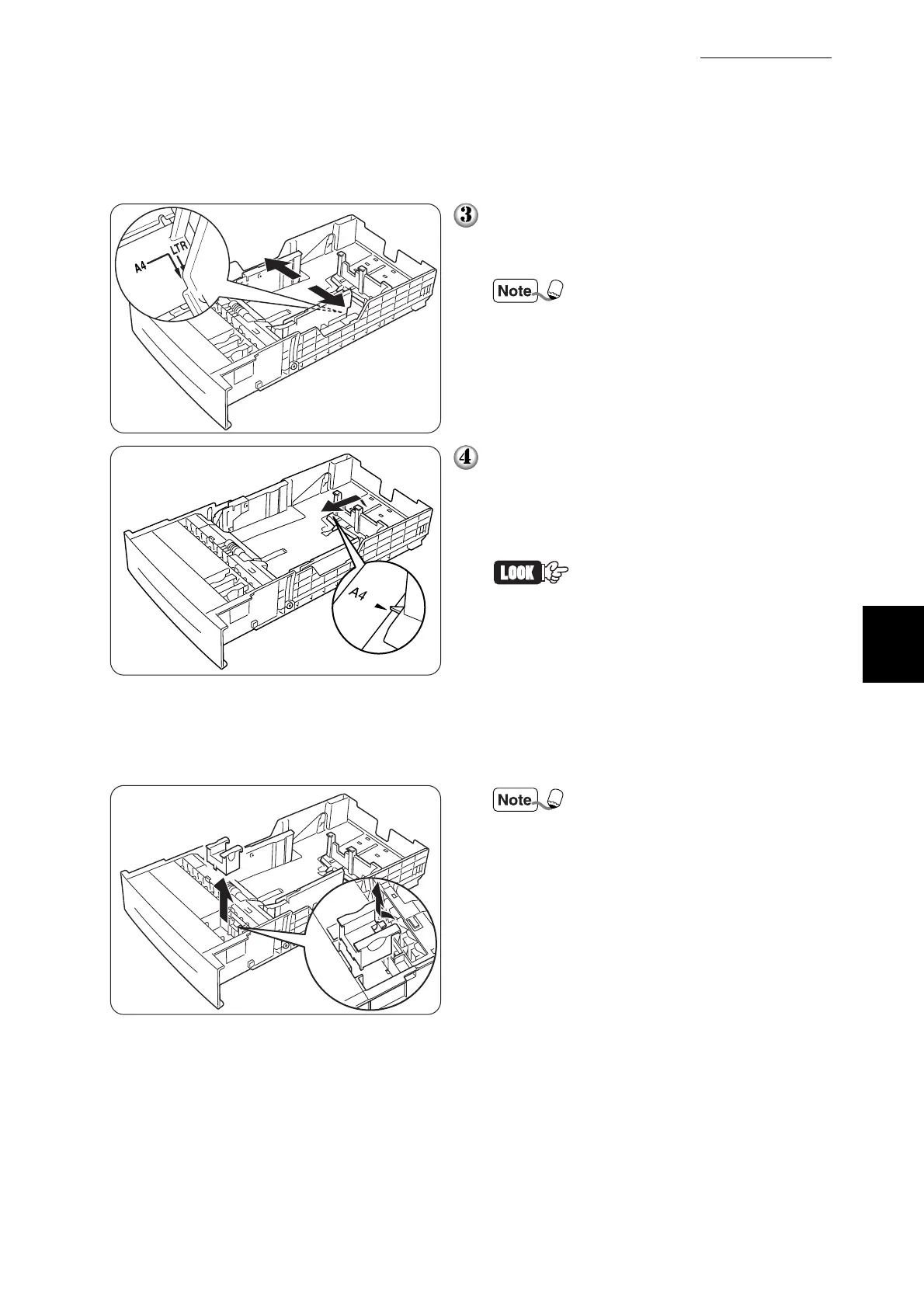
Move the side paper guide out so as to
align it with the appropriate paper size
mark (A4 in this example).
Proper guide position differs
between A4 and Letter. Align
the side guide to the size mark
corresponding to the paper size
that you want to load.
Grip the end paper guide with your fin-
gers and gently lift it up. Insert the pins at
the bottom of the guide in the holes cor-
responding to the paper size that you
want to load (A4 in this example).
• Make sure that the end guide
is properly inserted into the
holes corresponding to the
appropriate paper size.
• Only a small amount of move-
ment of the end paper guide
can make automatic paper
size detection impossible. If
this occurs, move the end
paper guide all the way to its
outermost position again,
then realign it with the appro-
priate paper size mark.
To set A5 paper, use the pro-
vided A5 spacer.
①
Remove the A5 spacer from
the tray.



 To Next Page