1.2 Configuring the Printer
15
Printer System Settings
1
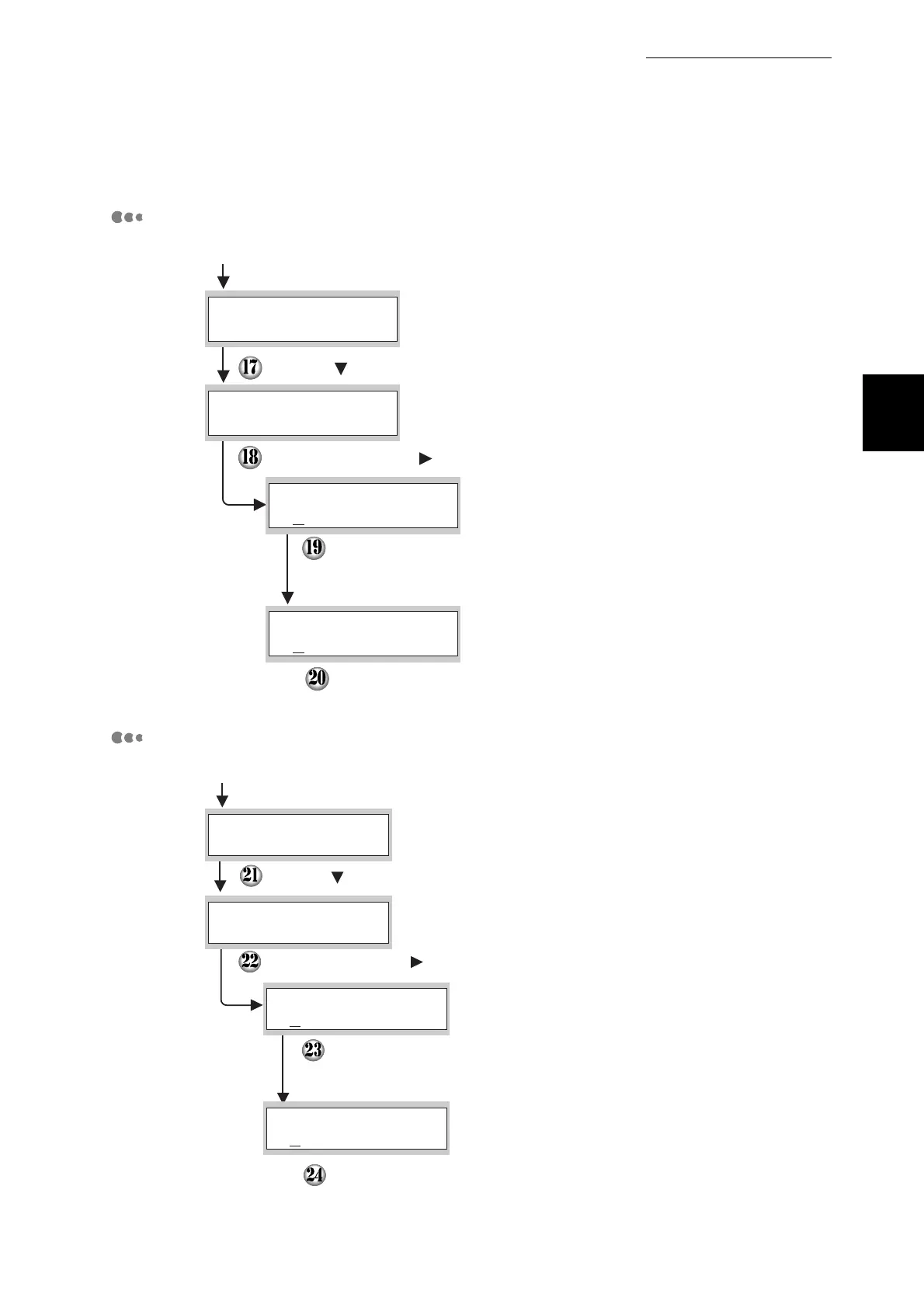
Setting the Subnet Mask
Setting the Gateway Address
Continued from the previous step
Press the button once.
Press the Set/Eject or button once.
Set the required subnet mask using the same key
presses detailed in steps 12 to 15 shown above
Press the Cancel/Back or W button once.
The lower line of the screen returns to "Subnet Mask".
IP Address
TCP/IP
Subnet Mask
TCP/IP
000. 000. 000. 000
*
Subnet Mask
255. 255. 255. 000
*
Subnet Mask
Continued from the previous step.
Press the button once.
Press the Set/Eject or button once.
Set the required Gateway Address using the same key
presses detailed in steps 12 to 15 shown above.
The panel will advise "Reboot Printer to take effect.
Power the printer off, wait 20 seconds, power it back on.
Subnet Mask
TCP/IP
Gateway Address
TCP/IP
000. 000. 000. 000
*
Gateway Address
129. 249. 242. 254
*
Gateway Address



 To Next Page