Printer System Settings
2
1
1.1
Adjusting Color
Registration
Follow the procedure below to adjust the color registration when you first install the printer or
after moving it to a new location.
Refer to "5.2 Basic Menu Operation" and "Appendix B Control Panel Menu List" for information about the
operation of the control panel.
Printing the Color Registration Correction Chart
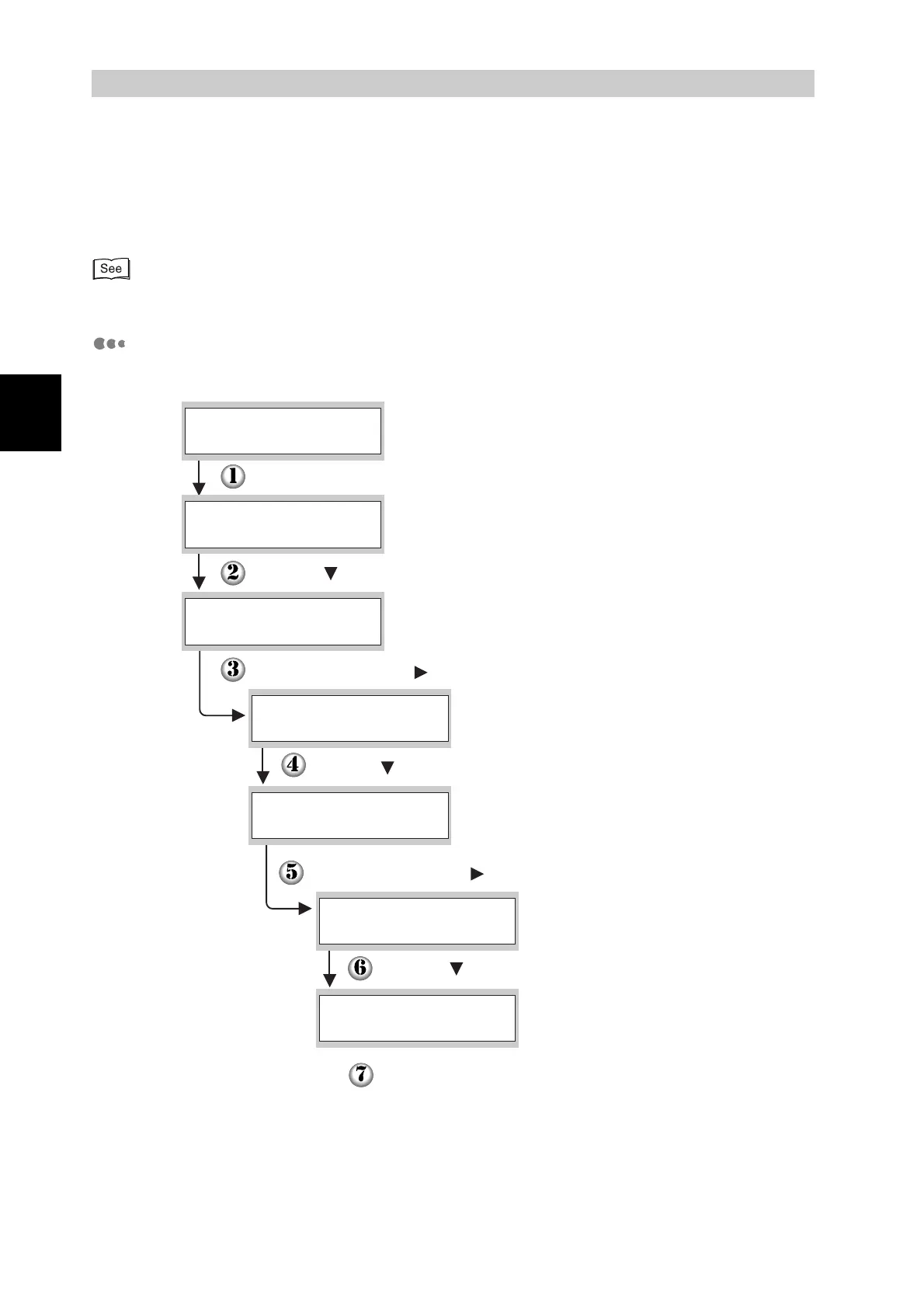
Use the control panel to print the Color Registration Correction Chart.
(Print screen. The printer is ready to print.)
Press the Menu button. The menu screen appears.
(Menu screen)
Press the Set/Eject or button once.
Press the button six times.
Press the Set/Eject or button once.
Press the button once.
Press the Set/Eject button twice.
The Color Registration Correction Chart is printed.
When printing is finished, the print screen reappears.
Press the button once.
Ready to Print
1:System
Menu
2:Maintenance
Menu
Init NVM
2:Maintenance
ColorRegiCorrect
2:Maintenance
AUTO
ColorRegiCorrect
Correction Chart
ColorRegiCorrect



 To Next Page