133
6
Troubleshooting
6.3
The Printer Does not Print
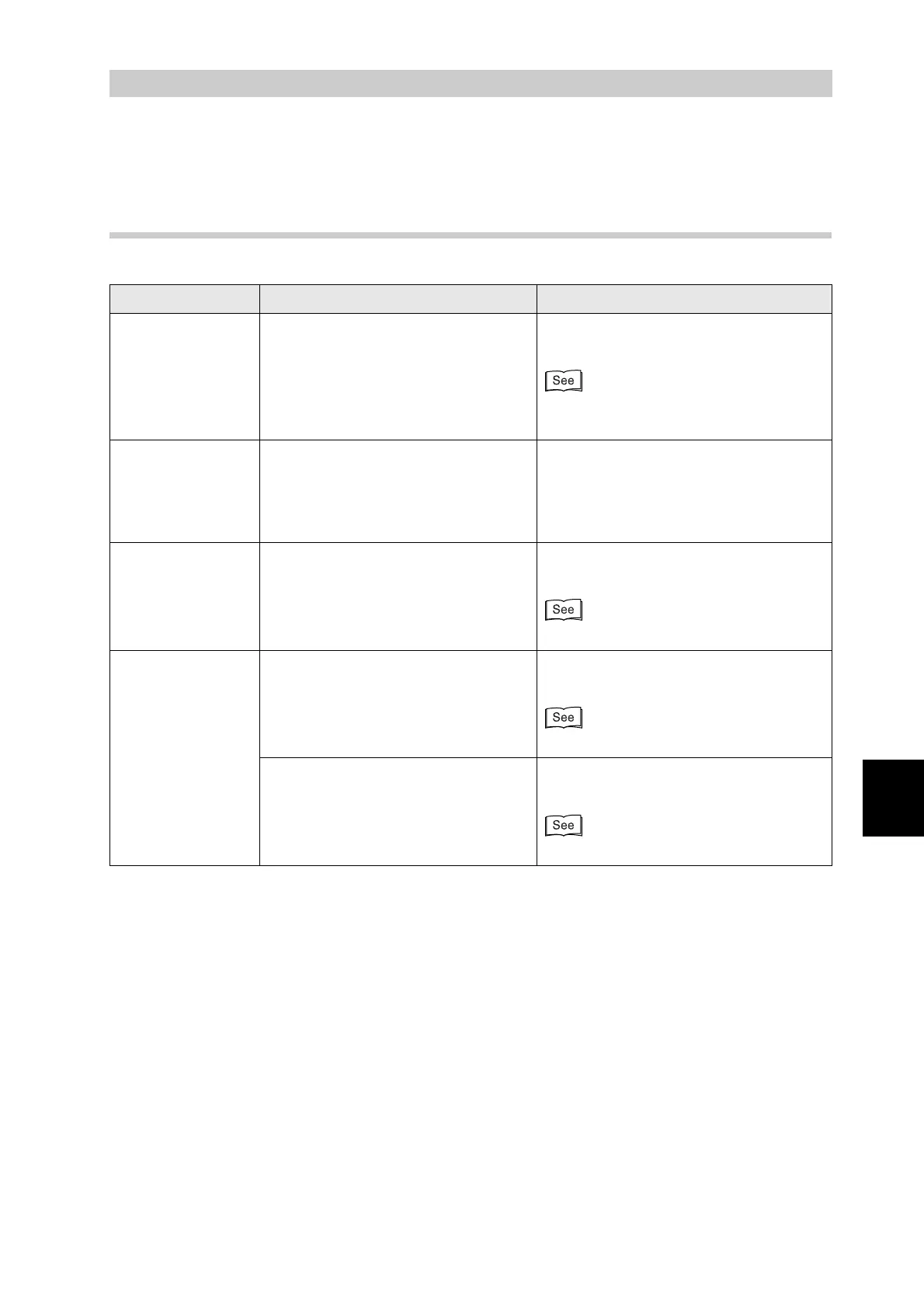
6.3.1 Indicators are Illuminated, Blinking or Off
Symptom Possible Cause Action
The Error indicator
is on
Is there an error message on the
control panel display?
Check the message and rectify the error
accordingly.
"6.7 When an Error Message Appears
on the Control Panel"
The Error indicator
is blinking
A problem that the user cannot rectify
has occurred.
Note the error code on the display,
switch off the printer immediately,
disconnect the power cord from the
outlet, and contact your Tally service or
dealer.
The Ready
indicator is off
Is the control panel display on the
menu screen?
Press the Menu button on the control
panel to go back to the print screen.
"5.1.3 Buttons"
The Ready
indicator does not
blink or light when
you try to print
Is the parallel, USB, or Ethernet
interface cable loose or
disconnected?
Switch off the printer and check the
interface cable. If necessary, reconnect.
Setup Guide
Is the optional network expansion
card loose or disconnected?
Switch off the printer and reinstall the
network expansion card into the printer.
Setup Guide



 To Next Page