5.2 Basic Menu Operation
116
5
Control Panel
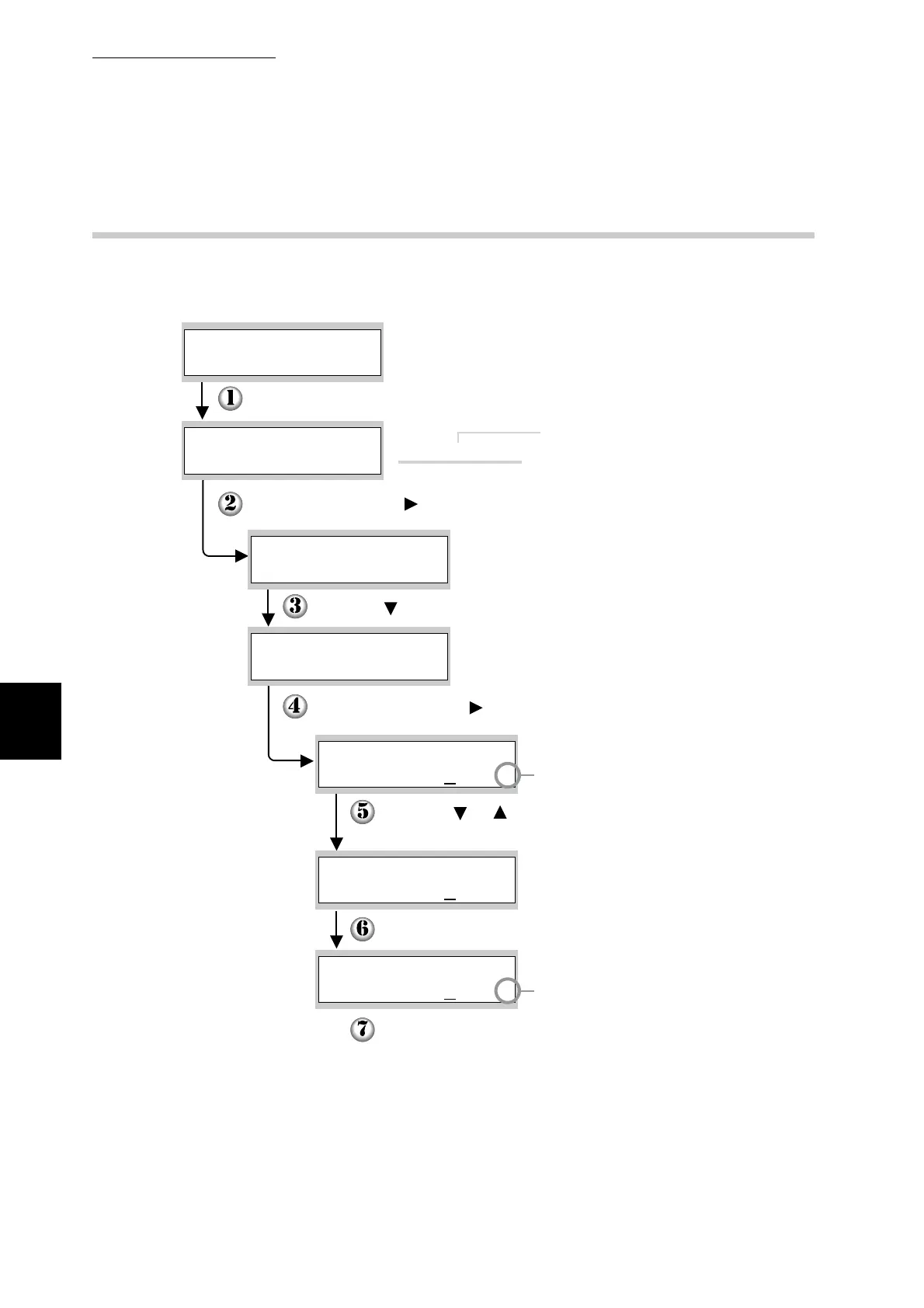
5.2.3 Example Operation
To illustrate operation, this section describes the necessary procedure to set
"Job Time-Out" to "60 sec." on the "1:System" menu.
Job Time-Out
Job Time-Out
Press the Menu button.
(The Print screen. The printer is ready to print.)
The printer cannot print when
you access the menu screen.
(The Menu screen)
Press the Set/Eject or button. The first level submenus appear.
Press the button until the desired submenu appears.
Press the Set/Eject or button. The next sublevel appears.
A "
*
" appears next to parameters
that are currently set.
Press the or buttons to set the parameter to the
desired value.
Press the Set/Eject button. The parameter is now set.
When the value is set,
a "
*
" appears next to it.
Press the Menu button.
The menu screen closes and the print screen reappears.
Job Time-Out
60sec.
*
Ready to Print
1:System
Menu
Power Save Timer
1:System
Job Time-Out
1:System
60sec.
*
300sec.
*



 To Next Page