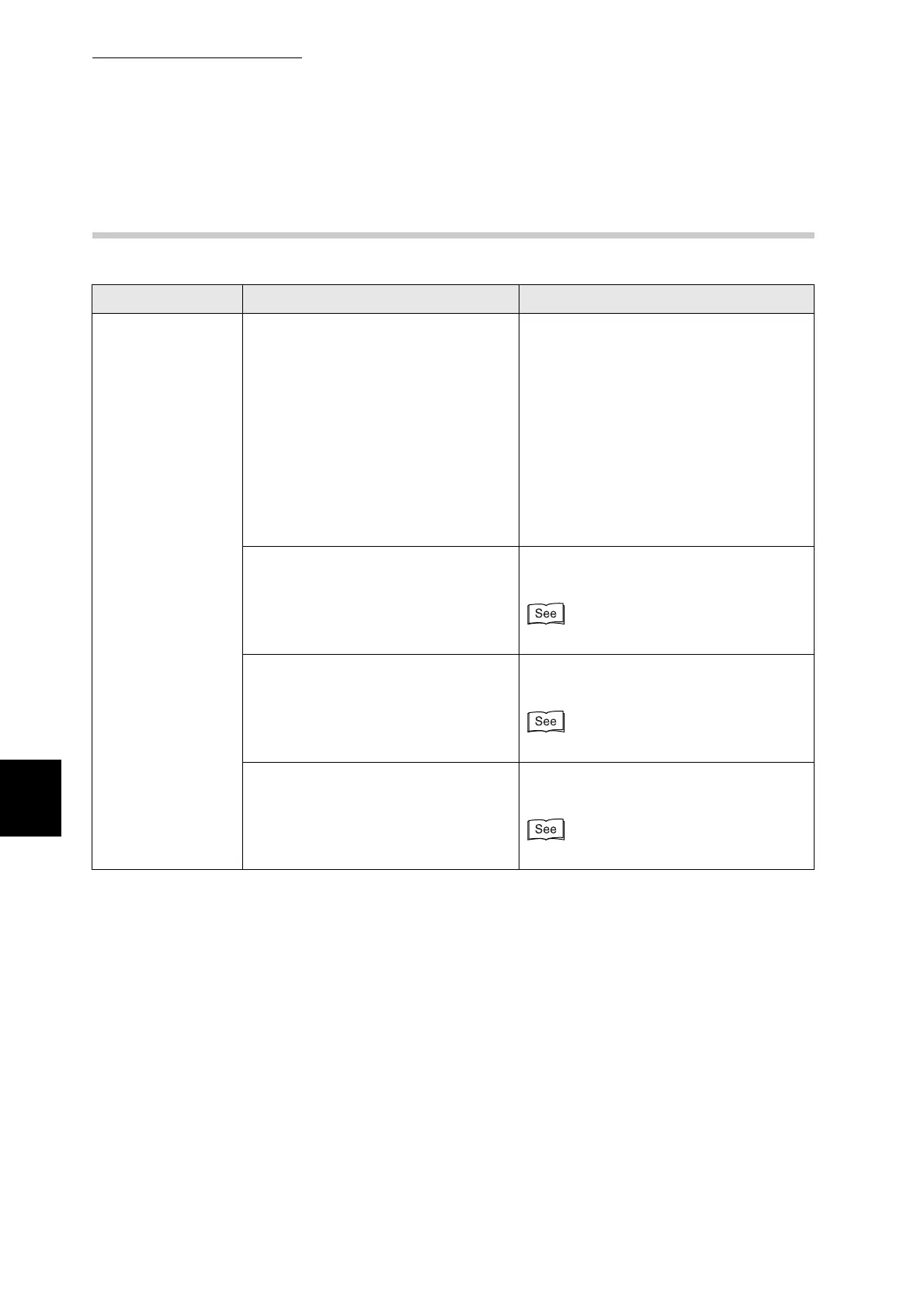
6.3 The Printer Does not Print
136
6
Troubleshooting
6.3.2 Cannot Print in Windows
Symptom Verification Action
The printer does
not print
Does "Pause Printing" appear in the
printer window?
When printing stops because of an error,
the printer sometimes switches to the
Pause Printing state. Follow the
procedure below to release the printer
from the Pause Printing state.
1) On the Start menu, point to Settings
and click Printers.
2) Double-click the appropriate printer.
3) In the printer window, click the Printer
menu.
4) On the Printer menu, if Pause Printing
is selected, click it to release.
Is the printer off? Press the "I" on the power switch to
switch on the printer.
"3.1.1 Switching On the Power"
Is the parallel, USB, or Ethernet
interface cable loose or
disconnected?
Switch off the printer and check the
interface cable. If necessary, reconnect.
Setup Guide
Is the optional network expansion
card loose or disconnected?
Switch off the printer and reinstall the
network expansion card into the printer.
Setup Guide



 To Next Page