132
6
Troubleshooting
6.2
No Power
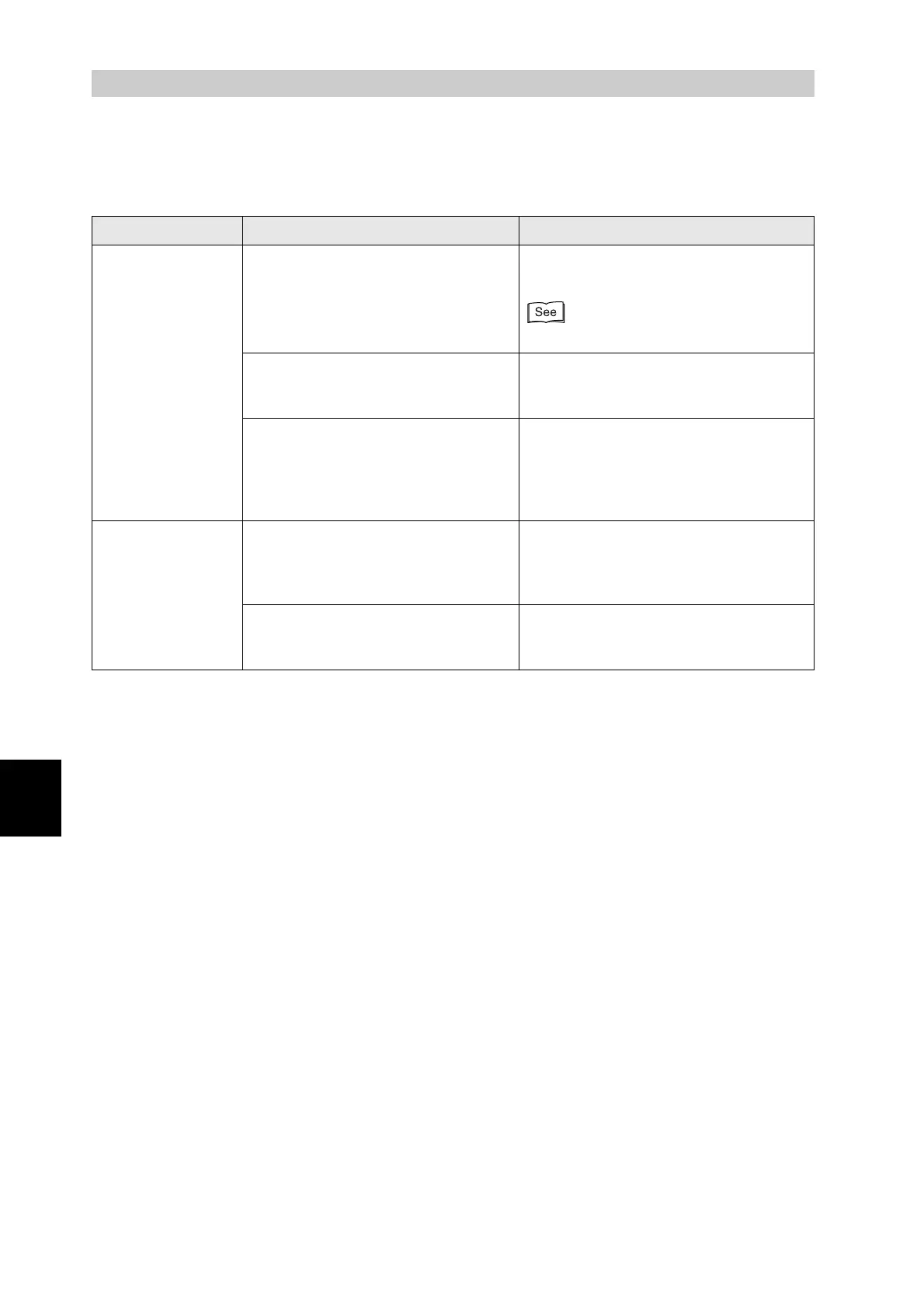
Symptom Possible Cause Action
No power Is the printer off? Press the "I" on the power switch to
switch on the printer.
"3.1.1 Switching On the Power"
Is the power cord loose or
disconnected?
Switch off the printer and connect the
power cord properly. Switch on the
printer again.
Is the printer connected to a properly
rated 220 to 240 V outlet?
Connect the printer to a 220 to 240 AC
outlet. Do not connect any other
equipment to the outlet.
Do not connect the printer to an auxiliary
power outlet on the rear of a computer.
The printer
frequently turns off
The printer is defective. Switch off the printer immediately,
disconnect the power cord from the
outlet, and contact your service
technician or dealer.
Is the power cord loose or
disconnected?
Switch off the printer and connect the
power cord properly. Switch on the
printer again.



 To Next Page