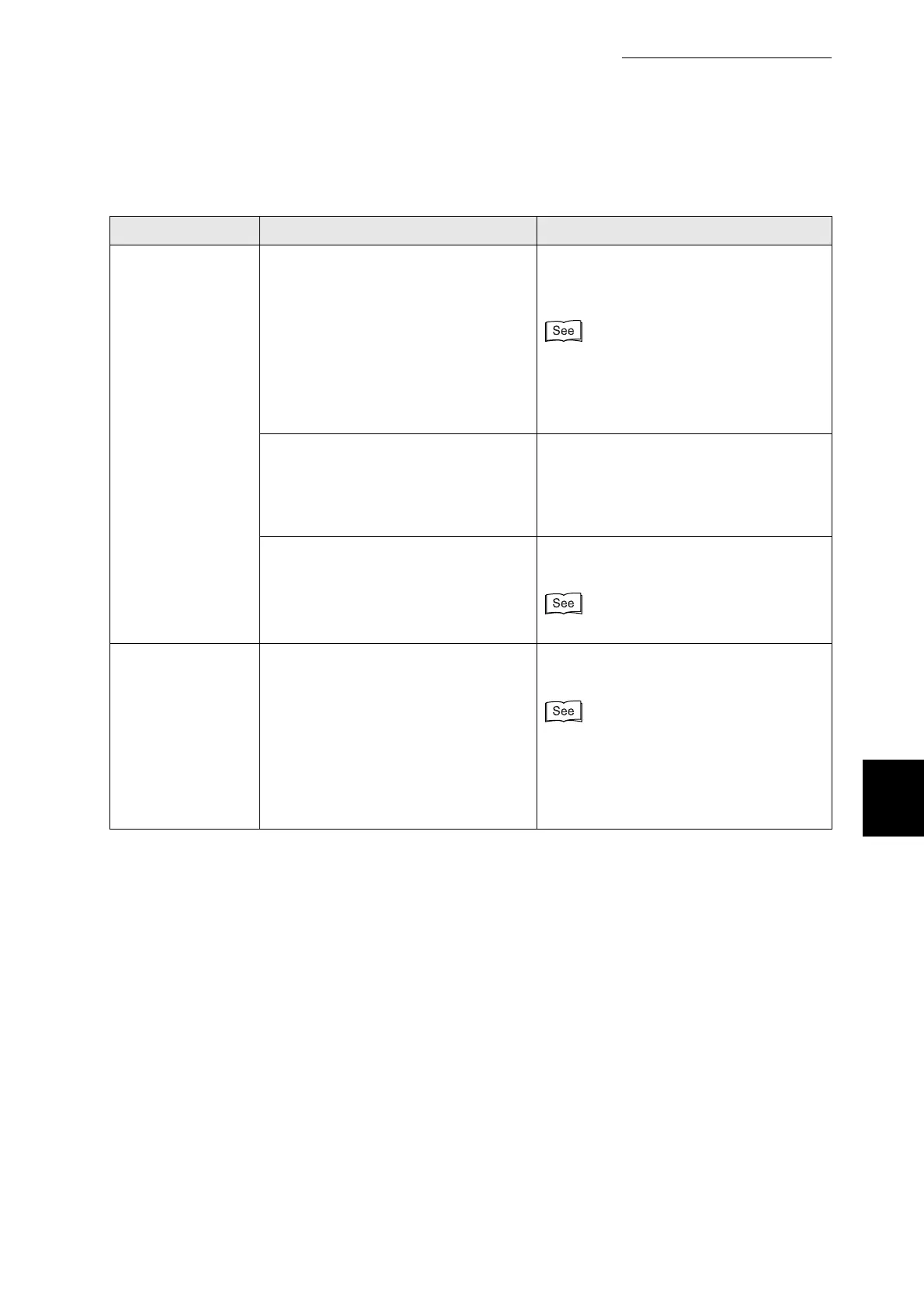
6.3 The Printer Does not Print
135
6
Troubleshooting
Condition Verification Solution
(Continued from
previous page)
The Ready
indicator does not
blink or light when
you try to print
Is the printer properly configured for
use through a network? (When on a
network.)
Print the Printer Settings list to check the
network settings.
Correct any inappropriate settings.
●
"8.4.1 Confirming Printer
Configuration and Network Settings"
●
"1.2 Configuring the Printer"
●
Network User Guide
The network has a problem. (When on
a network).
Check that the printer is on and execute
the print command from the computer
one more time.
If the problem persists, consult your
system administrator.
Is the printer off? Press the "I" on the power switch to
switch on the printer.
"3.1.1 Switching On the Power"
The Ready
indicator is on or
blinking, but paper
is not output
Data may still remain inside the
printer.
Select to abort the print job or forcibly
output the remaining data.
●
"3.4.2 Canceling Printing at the Control
Panel"
●
"6.9 Forcing the Printer to Print
Remaining Data (When Printing is
Halted)"



 To Next Page