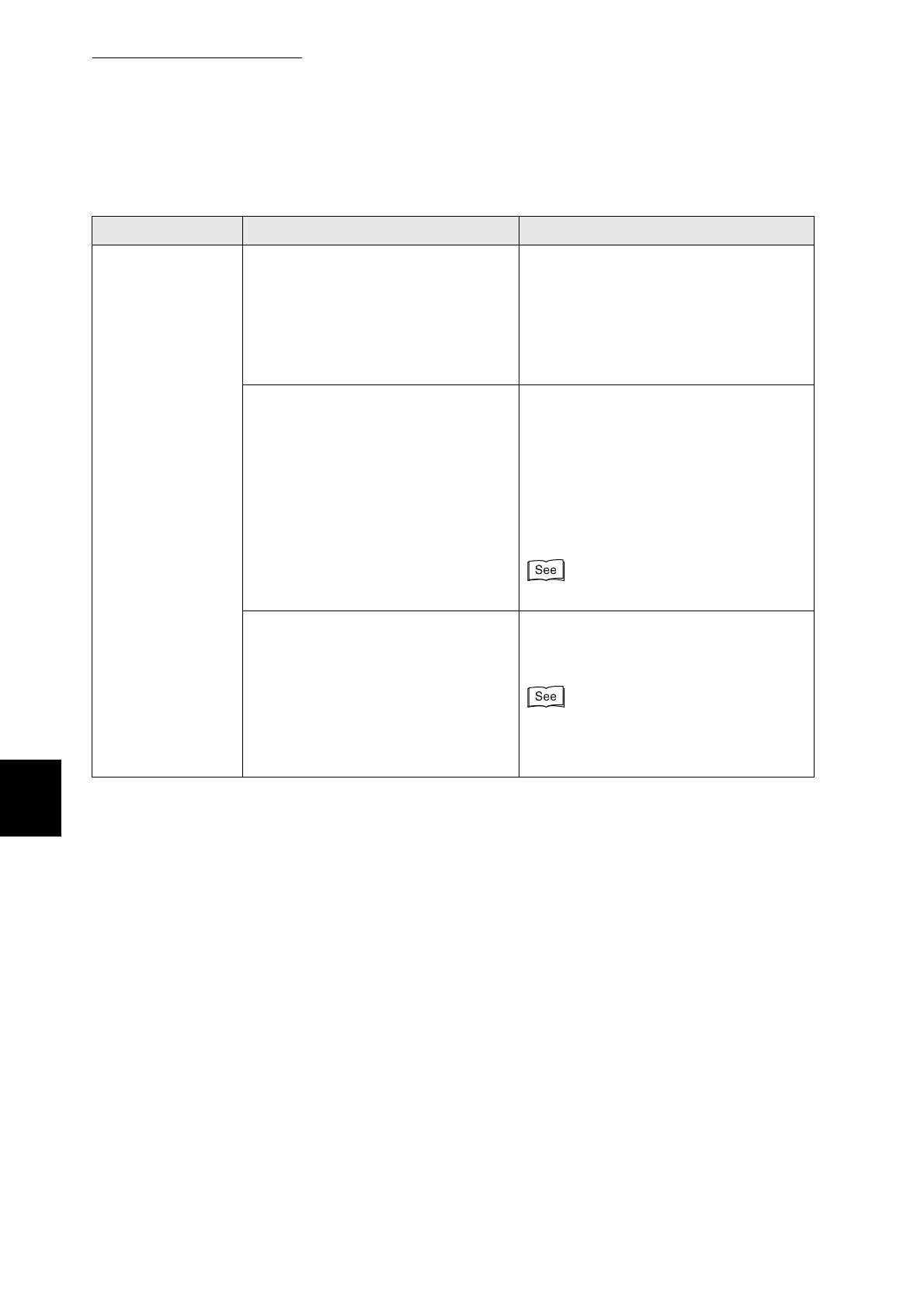
6.3 The Printer Does not Print
134
6
Troubleshooting
Condition Verification Solution
(Continued from
previous page)
The Ready
indicator does not
blink or light when
you try to print
Does the parallel, USB, or Ethernet
interface cable meet the required
printer specifications?
Use only the recommended parallel
interface cables for the printer.
10Base-T and 100Base-TX Ethernet
interface cables are compatible with the
printer. Use twisted pair cables suitable
for network connections. A Category 5
100Base-TX is required.
Is the computer configured correctly?
Check the following settings on your
computer and reconfigure any that are
not correct.
●
Make sure that the appropriate printer
driver for your operating system is
installed.
●
Make sure that the port is set correctly
in the printer driver.
"Chapter 2 Installing the Printer Driver"
Is the printer IP address correct?
(When using TCP/IP.)
Consult your system administrator to
obtain a valid IP address. Use the Printer
Settings list to confirm the IP address.
●
"8.4.1 Confirming Printer
Configuration and Network Settings".
●
"1.2.3 Setting the IP Address".



 To Next Page