4.2 Loading Paper
105
4
Loading Paper and Usable Paper Types
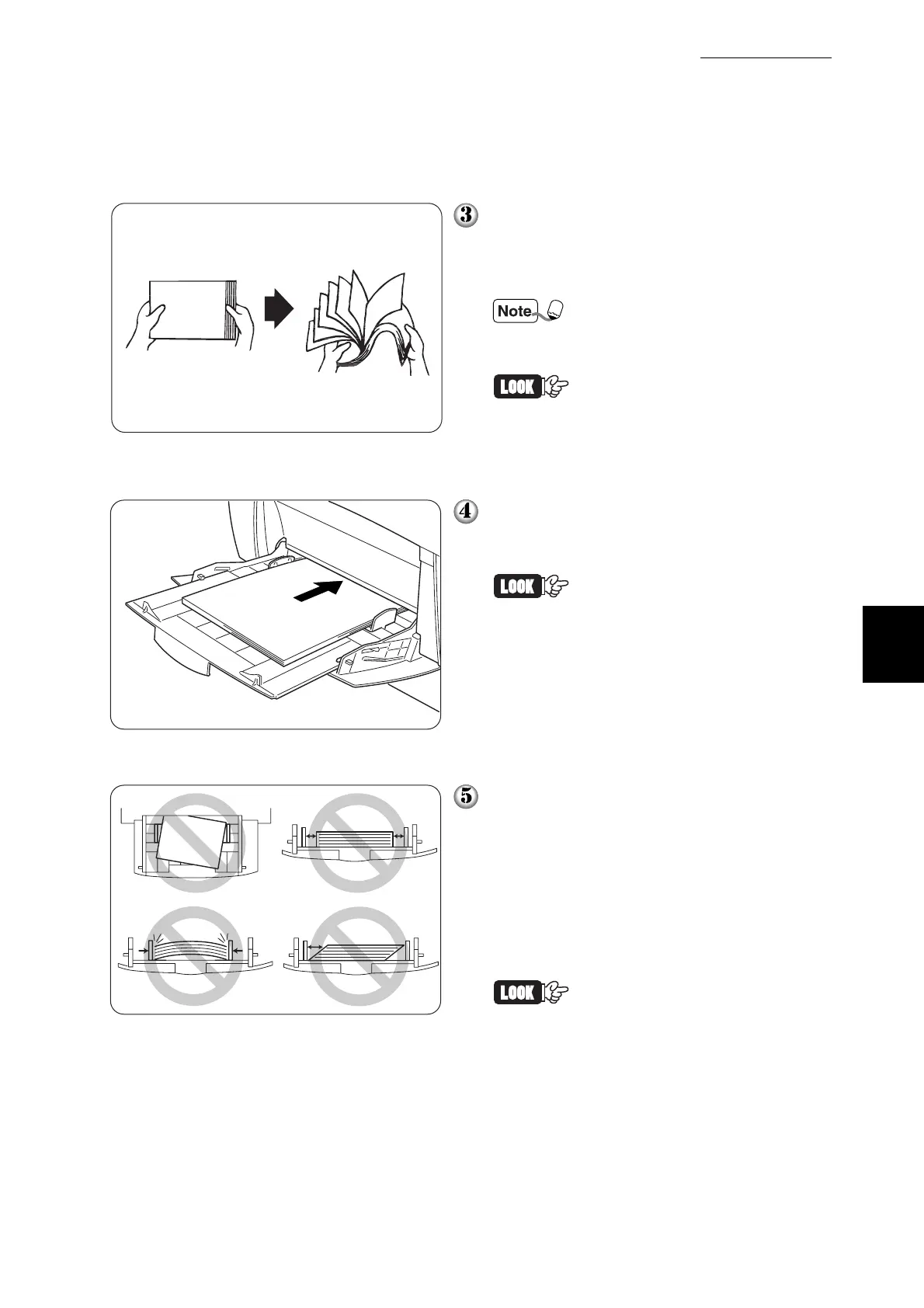
When using media such as transparency
sheets, label sheets, or envelopes, fan
the stack before loading so that there is
air between the sheets.
Fanning the stack helps pre-
vent paper jams caused when
more than one sheet feeds at
the same time.
• Do not fan plain paper before
loading.
• If the paper is poorly cut and
the edges are not clean,
remove any unsuitable sheets
before loading the paper.
Align the four corners of the paper stack
and insert it (print side down) until it
lightly touches the feeding slot.
• Do not use paper that is
folded, creased, or heavily
warped.
• Do not overload the paper
tray.
• When printing on sheets
longer than Legal portrait
(355.6mm), load the sheets
one at a time, and support the
sheet with your hands to
ensure proper feeding.
When loading paper, carefully align the
paper guides with the edges of the paper
so that there is a small gap between the
paper stack and the guides. Pushing the
paper guides too hard against the edge
of the paper stack can warp the paper
and cause paper jams.
Load the paper so that it is straight in the
tray.
If the paper is not loaded cor-
rectly, the printing position may
shift and cause incorrect print-
ing.



 To Next Page