5.2 Basic Menu Operation
114
5
Control Panel
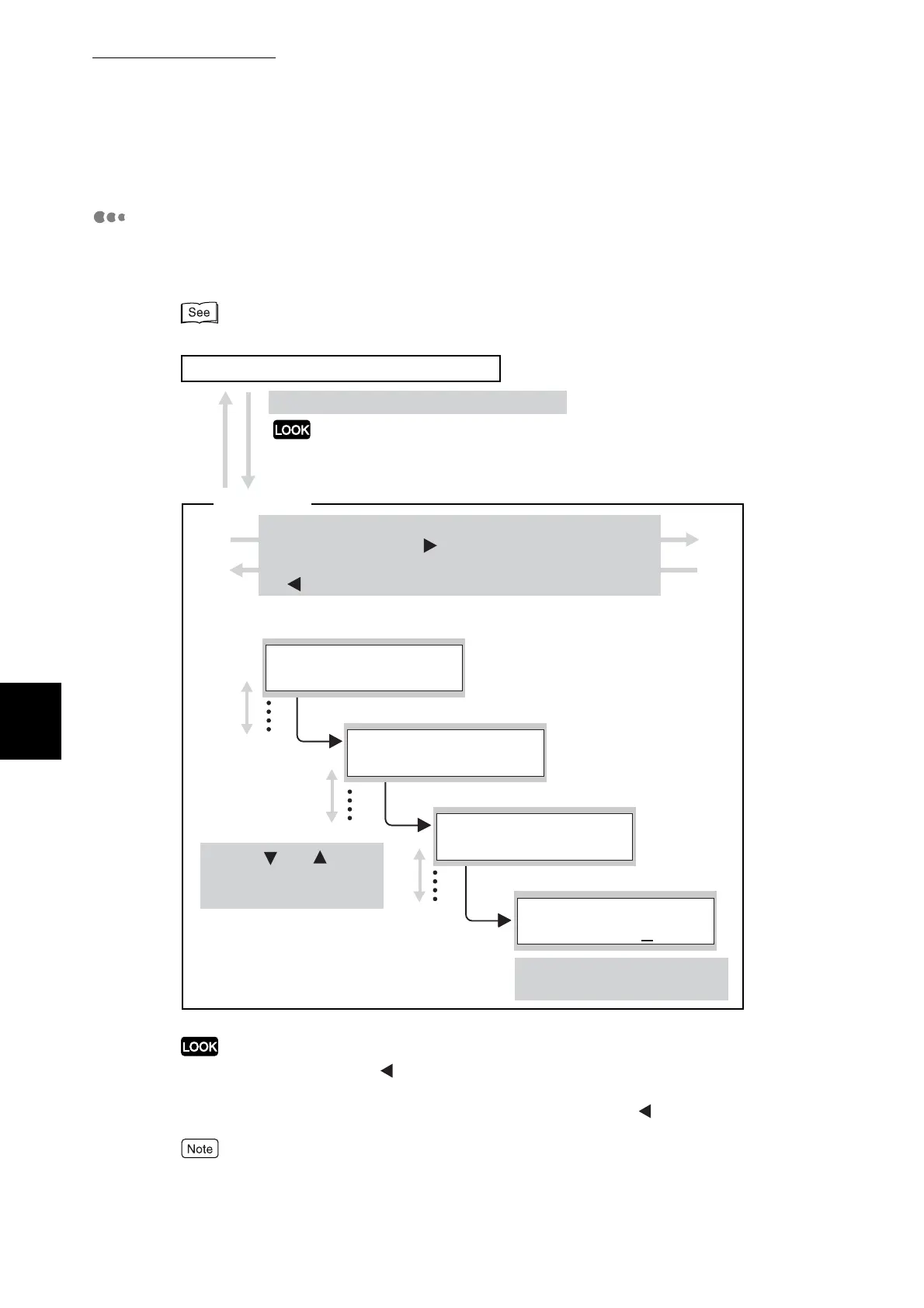
Example of Menu Levels and Basic Operations
To configure the printer, press the buttons described below to display and
change the level of individual menus.
For the general operational procedure, refer to "5.2.3 Example Operation".
Pressing the Cancel/Back or button returns you to the preceding menu or item. Once you
set a parameter with the Set/Eject button ("*" appears next to the set parameter), you cannot
return to the original settings even if you press the Cancel/Back or
button.
Some menus only have three levels. (They do not contain items.)
Press the Menu button to change screens.
The Menu button does not change the screen while the
printer is printing or when there is an error.
(Level 1) Main Menu
(Level 2) Submenu
(Level 3) Item
(Level 4) Parameter
To set a parameter, press the
Set/Eject button.
Print screen (the printer is ready to print)
Use the and
buttons to move between
menus and items.
To select a menu or item and move to the next level,
press the Set/Eject or button.
To go back to the preceding level, press the Cancel/Back
or button once.
Menu screen
1:System
Menu
Power Save Timer
1:System
Mode 1
Power Save Timer
Mode 1
3min.
*



 To Next Page