HANDLE AND CONTROLS
4262930-Rev A 6-11
6
Speed Paddle
Removal and Installation
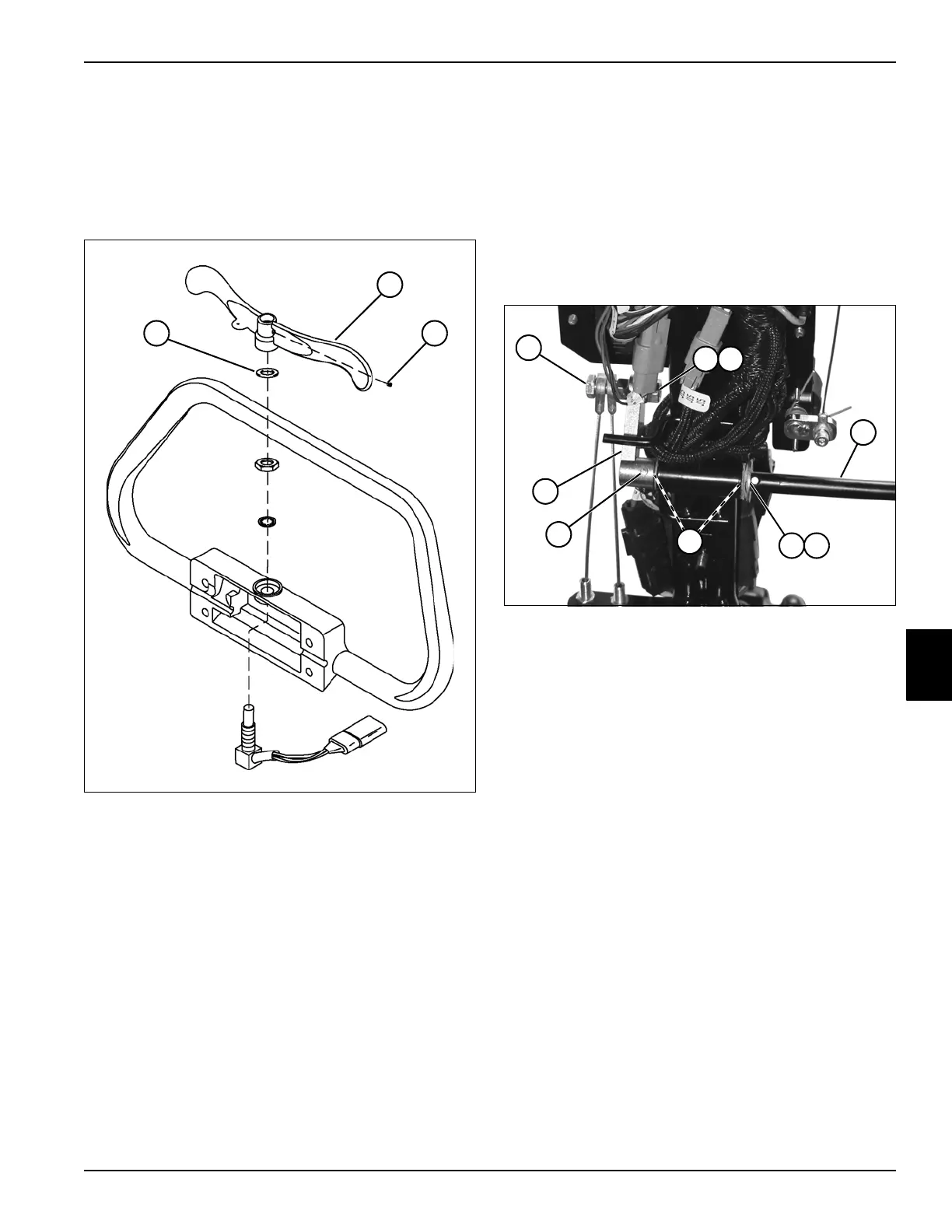
See Figure 6-23.
1. Park the mower safely. (See “Park Mower Safely” on
page 1-5.)
Figure 6-23
2. Loosen set screw (3), and remove speed paddle (2)
and spring washer (1).
Installation Note
Install speed paddle by reversing the order of removal.
Brake Control Lever
Removal and Installation
See Figure 6-24.
1. Park the mower safely. (See “Park Mower Safely” on
page 1-5.)
2. Release park brake.
3. Remove handle cover. (See “Handle Cover” on
page 6-4.)
Figure 6-24
4. Remove nut (2), lock washer (3), and screw (1) from
brake lever arm (9).
5. Using a punch, drive out pin (8) and remove lever
arm (9).
6. Slide brake lever (4) out, and remove spring washer
(5) and flat washer (6).
7. Inspect flanged bushings (7). Remove and replace
as needed.
Installation Notes
• Install brake control lever by reversing the order of
removal.
• Check and adjust park brake as needed. (See “Park
Brake Check and Adjustment” on page 7-4.)
TN0619
2
31
TN4641
2 3
8
4
5
7
9
1
6








 To Next Page