6-2 4262930-Rev A
HANDLE AND CONTROLS
6
Checks and Adjustments
Operator Presence Control (OPC)
Cable Adjustment
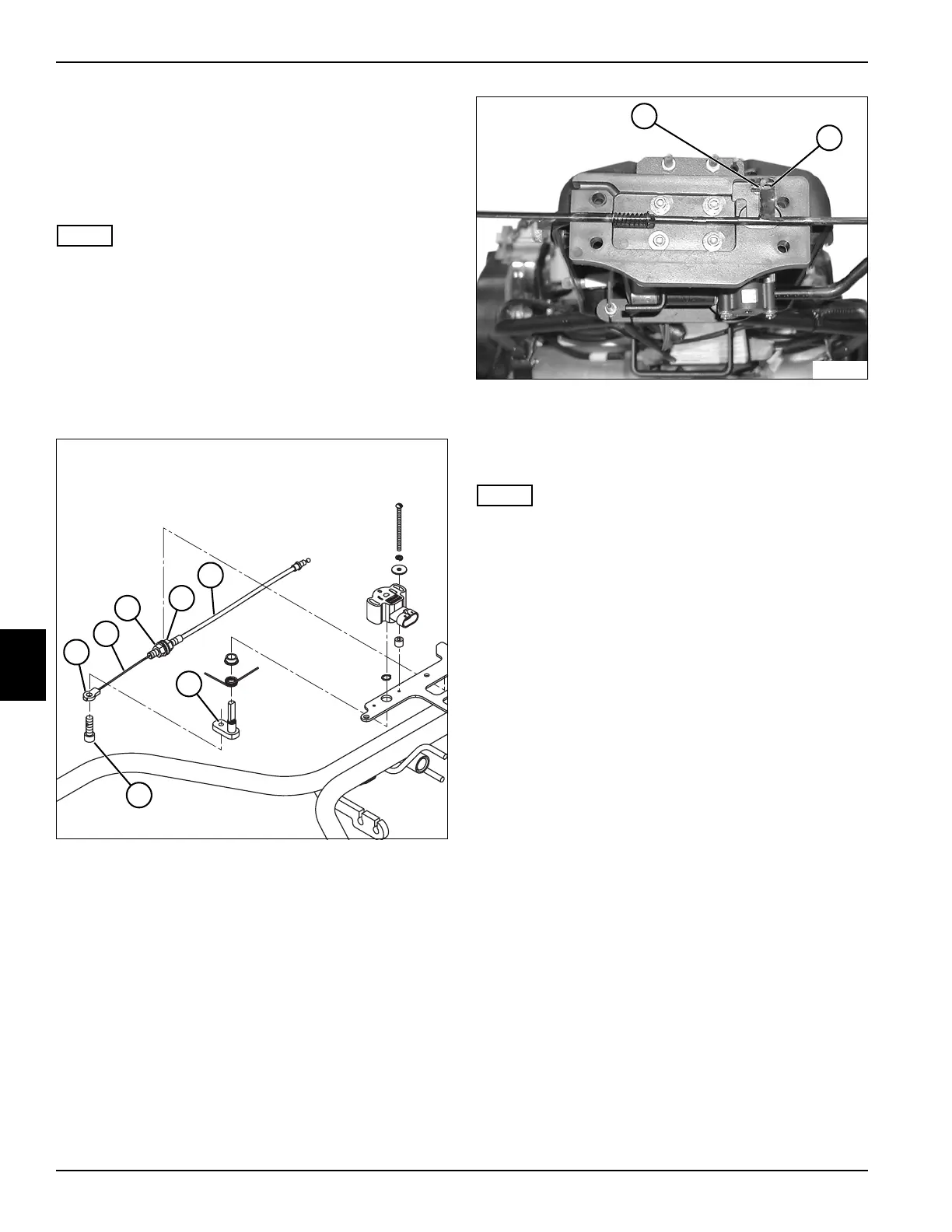
See Figures 6-1 and 6-2.
NOTE
Initial OPC cable adjustments are made at the mounting
bracket, prior to the OPC cable calibration procedure.
1. Park the mower safely. (See “Park Mower Safely” on
page 1-5.)
2. Remove the handle cover. (See “Handle Cover” on
page 6-4.)
3. Remove handle. (See “Handle and OPC Bail” on
page 6-8.)
Figure 6-1
Figure 6-2
4. Remove screw (7).
5. Pull OPC cable (2) until cable end (8) is contacting
OPC bail (9).
NOTE
Be sure OPC cable (2) does not move while adjusting
cable sheath (5).
6. Loosen nut (3).
7. Using nut (4), adjust cable sheath (5) until cable
eyelet (1) aligns with threaded hole in pivot arm (6).
8. Tighten nut (3), and install cable eyelet (1) using
screw (7).
9. Install handle. (See “Handle and OPC Bail” on
page 6-8.)
10. Install handle cover. (See “Handle Cover” on
page 6-4.)
11. Calibrate OPC bail. (See “Bail Lever Calibration” on
page 4-43.)
4
TN4438
5
3
2
1
7
6
TN0618
8
9








 To Next Page