4-60 4262930-Rev A
ELECTRICAL
4
Key Switch
Removal and Installation
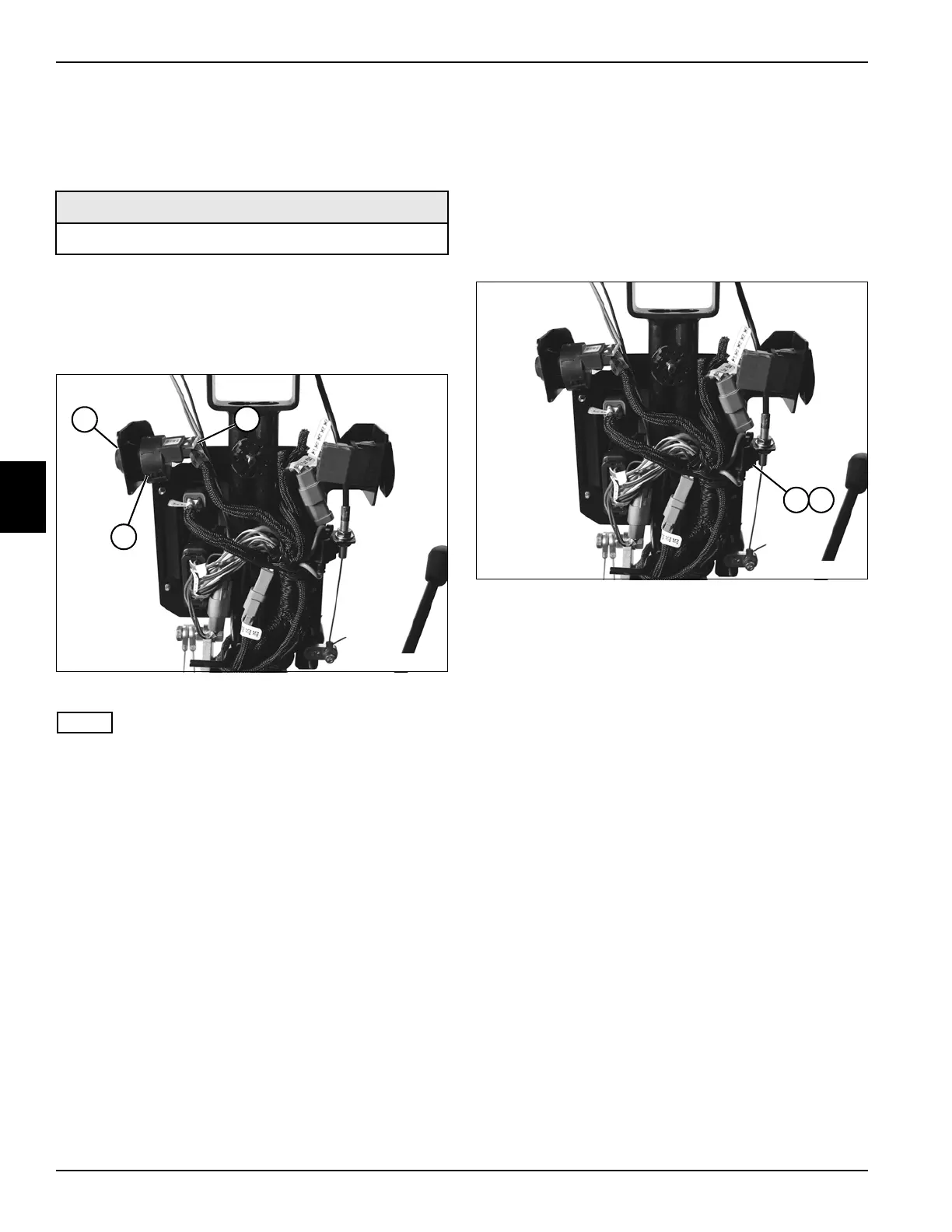
See Figure 4-46.
1. Park the mower safely. (See “Park Mower Safely” on
page 1-5.)
2. Remove handle cover. (See “Handle Cover” on
page 6-4.)
Figure 4-46
NOTE
Label all wires before disconnecting to ensure correct
installation.
3. Disconnect key switch connector (2).
4. Remove key switch nut (1) and key switch assembly
(3).
Installation Notes
• Install key switch by reversing the order of removal.
• Apply dielectric grease (Jacobsen PN 365422) to any
connectors removed.
• Install handle cover. (See “Handle Cover” on
page 6-4.)
30A Fuse
Removal and Installation
See Figure 4-47.
1. Park the mower safely. (See “Park Mower Safely” on
page 1-5.)
2. Remove handle cover. (See “Handle Cover” on
page 6-4.)
Figure 4-47
3. Remove the protective fuse cover (1) and remove
30A fuse (2).
Installation Note
Install 30A fuse by reversing the order of removal.
Required Materials
Dielectric Grease (Jacobsen PN 365422)
TN4629
1
2
3
TN4629
1 2








 To Next Page