6-10 4262930-Rev A
HANDLE AND CONTROLS
6
OPC Cable
Removal and Installation
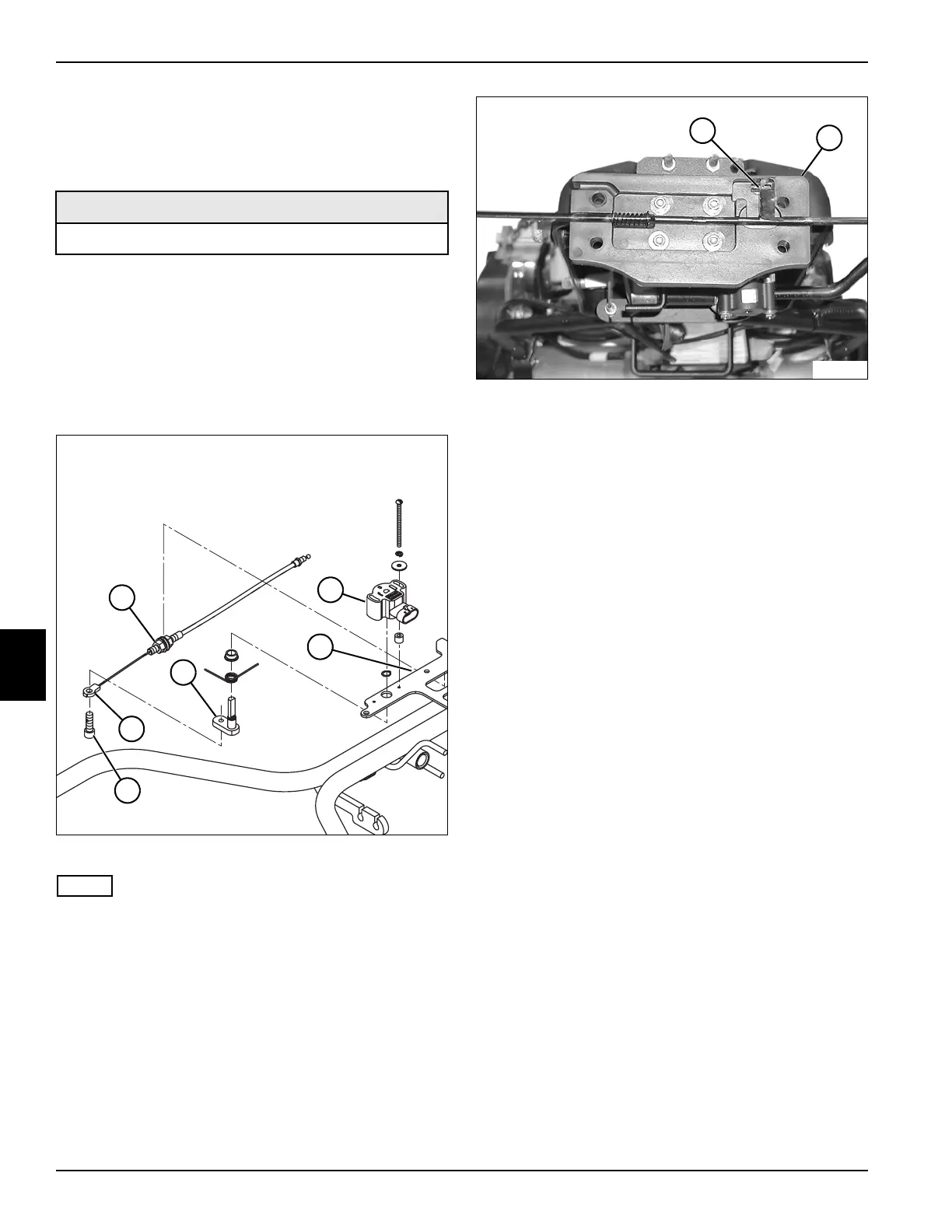
See Figures 6-21 and 6-22.
1. Park the mower safely. (See “Park Mower Safely” on
page 1-5.)
2. Remove handle cover. (See “Handle Cover” on
page 6-4.)
3. Remove handle and Operator Presence Control
(OPC) bail. (See “Handle and OPC Bail” on
page 6-8.)
Figure 6-21
NOTE
Label all wires before disconnecting to ensure correct
installation.
4. Disconnect wire harness connector from OPC bail
control (2).
5. Remove screw (6) and OPC cable end (5) from pivot
arm (4).
6. Loosen nut (1) and disengage OPC cable from
bracket (3).
Figure 6-22
7. Remove OPC cable (7) from tilt plate (8).
Installation Notes
• Install OPC cable by reversing the order of removal.
• Apply dielectric grease (Jacobsen PN 365422) to any
connectors removed.
• Adjust OPC cable. (See “Operator Presence Control
(OPC) Cable Adjustment” on page 6-2.)
Required Materials
Dielectric Grease (Jacobsen PN 365422)
TN4438
6
5
4
2
3
1
TN0618
7
8








 To Next Page