ELECTRICAL
4262930-Rev A 4-61
4
Mow Switch
Removal and Installation
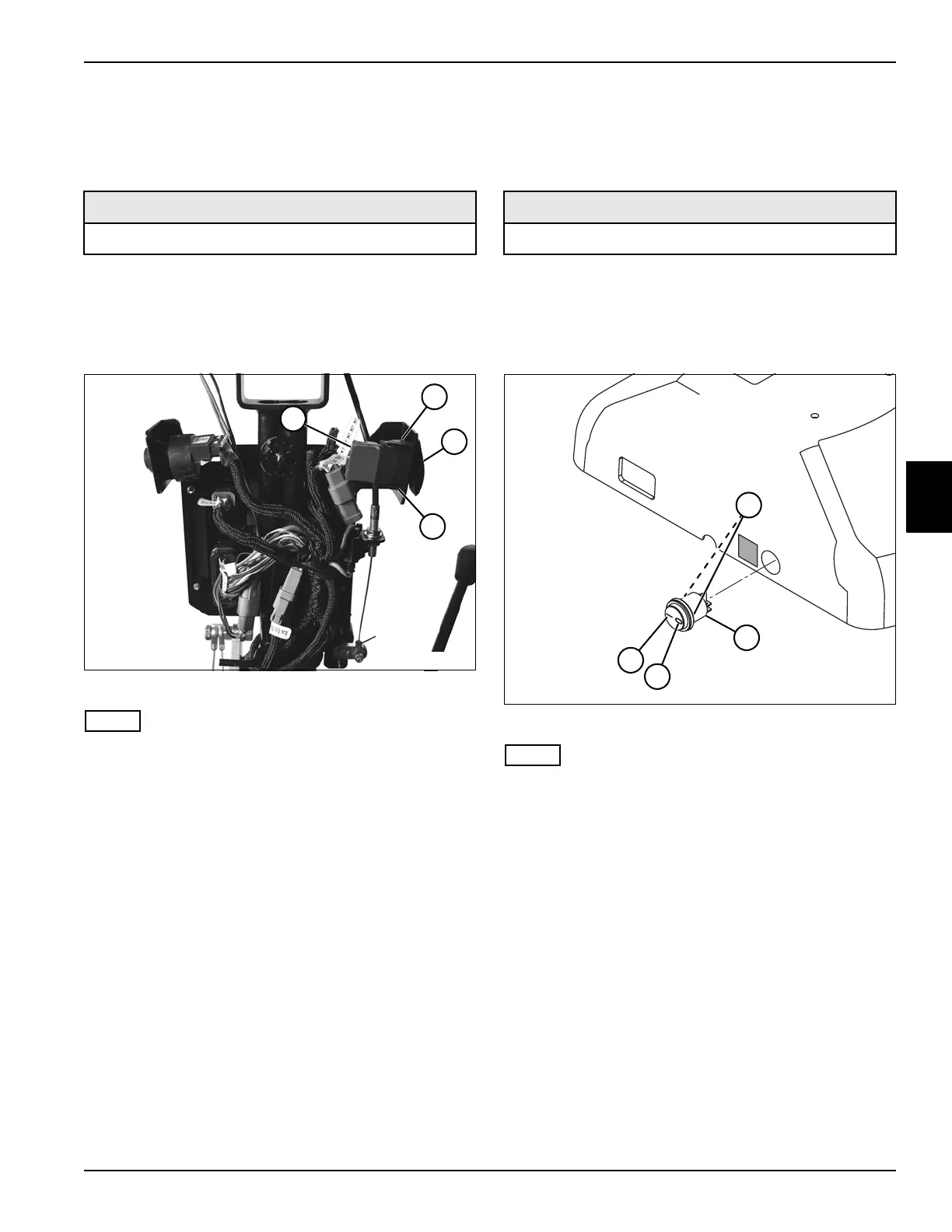
See Figure 4-48.
1. Park the mower safely. (See “Park Mower Safely” on
page 1-5.)
2. Remove handle cover. (See “Handle Cover” on
page 6-4.)
Figure 4-48
NOTE
Label all wires before disconnecting to ensure correct
installation.
3. Disconnect mow switch wire connector (1).
4. Depress mounting tabs (2) and remove mow switch
(3).
Installation Notes
• Install mow switch by reversing the order of removal.
• Apply dielectric grease (Jacobsen PN 365422) to any
connectors removed.
Light Switch
Removal and Installation
See Figure 4-49.
1. Park the mower safely. (See “Park Mower Safely” on
page 1-5.)
2. Remove handle cover. (See “Handle Cover” on
page 6-4.)
Figure 4-49
NOTE
Label both wires and terminal locations on switch before
disconnecting to ensure correct installation.
3. Disconnect light switch wire terminals.
4. Depress mounting tabs (1) and remove light switch
(2).
Installation Notes
• Install light switch by reversing the order of removal.
• Position light switch with the on side (4) of switch
facing toward the handle loop.
• Connect terminal on red wire to the off (3) side of
switch. Connect terminal on blue wire to the on (4)
side of switch.
• Ensure that wires are not pinched between cover
halves, and that wiring does not contact or interfere
with moving parts.
• Apply dielectric grease (Jacobsen PN 365422) to any
connectors removed.
Required Materials
Dielectric Grease (Jacobsen PN 365422)
TN4629
1
2
2
3
Required Materials
Dielectric Grease (Jacobsen PN 365422)
TN4602
2
1
3
4








 To Next Page