HANDLE AND CONTROLS
4262930-Rev A 6-3
6
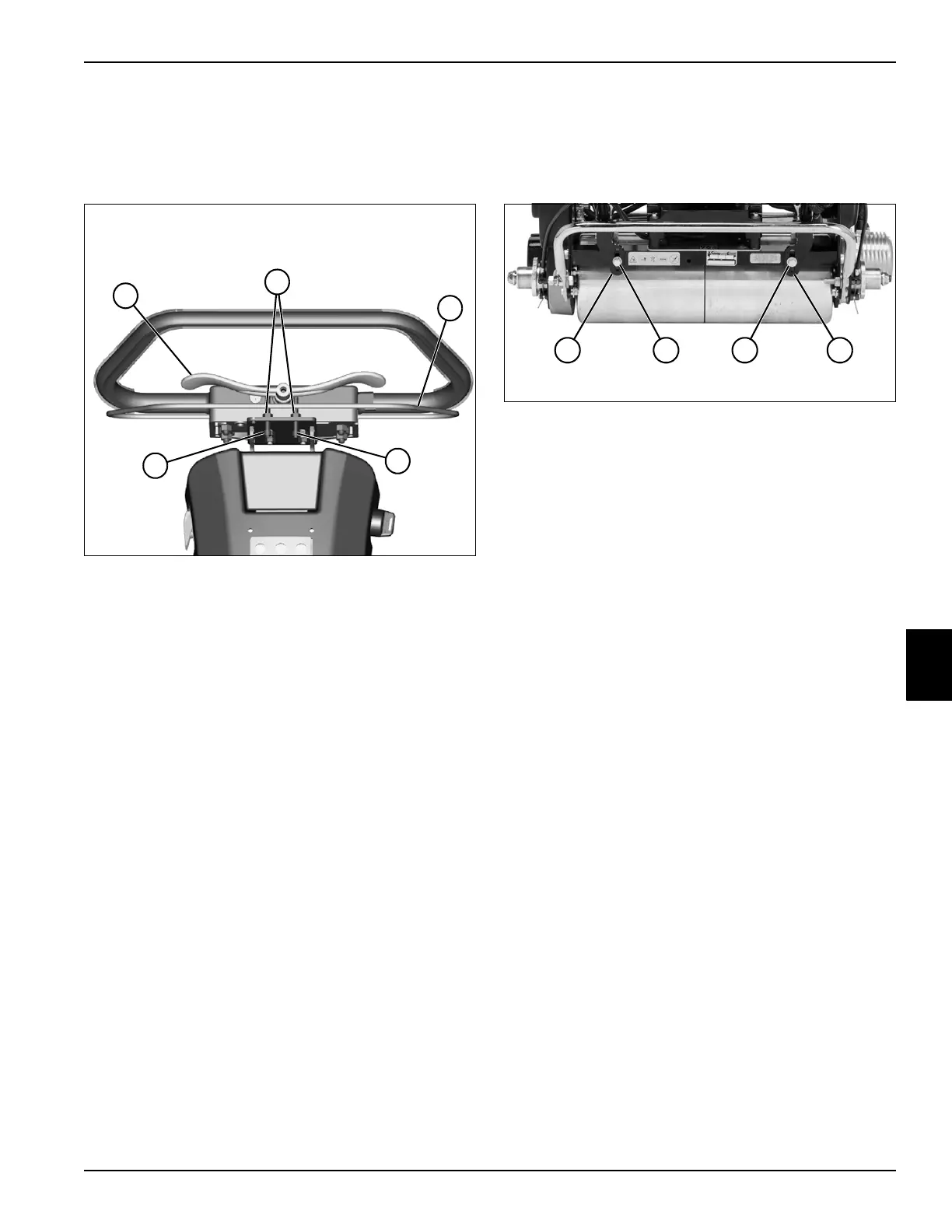
Speed Paddle Stop Adjustment
See Figure 6-3.
1. Park the mower safely. (See “Park Mower Safely” on
page 1-5.)
Figure 6-3
2. Loosen nuts (2).
3. Adjust positive paddle stop screw (4) until speed
paddle (1) is in a comfortable position, while set at
full max (+) speed.
4. Powerup machine and engage Operator Presence
Control (OPC) bail (3) and traction drive.
5. Adjust negative paddle stop screw (5) so traction
drum rotates as slowly as possible without stopping,
while speed paddle is in full slow (–) speed position.
6. Tighten nuts (2), and recheck settings.
7. Calibrate speed paddle. (See “Speed Paddle
Calibration” on page 4-43.)
Handle Height Adjustment
See Figure 6-4.
1. Park the mower safely. (See “Park Mower Safely” on
page 1-5.)
Figure 6-4
2. Loosen screws (2) on both sides of mower and
adjust handle stops (1) evenly until desired handle
height is obtained.
3. Tighten screws (2).
TN4388
1
3
2
5
4
TN4392
1 2 12








 To Next Page