EasyManua.ls Logo

Valleylab CUSA EXcel-8 - Page 118

Valleylab CUSA EXcel-8
239 pages
Print Icon
To Next Page IconTo Next Page
To Previous Page IconTo Previous Page
Loading...
User
Troubleshooting
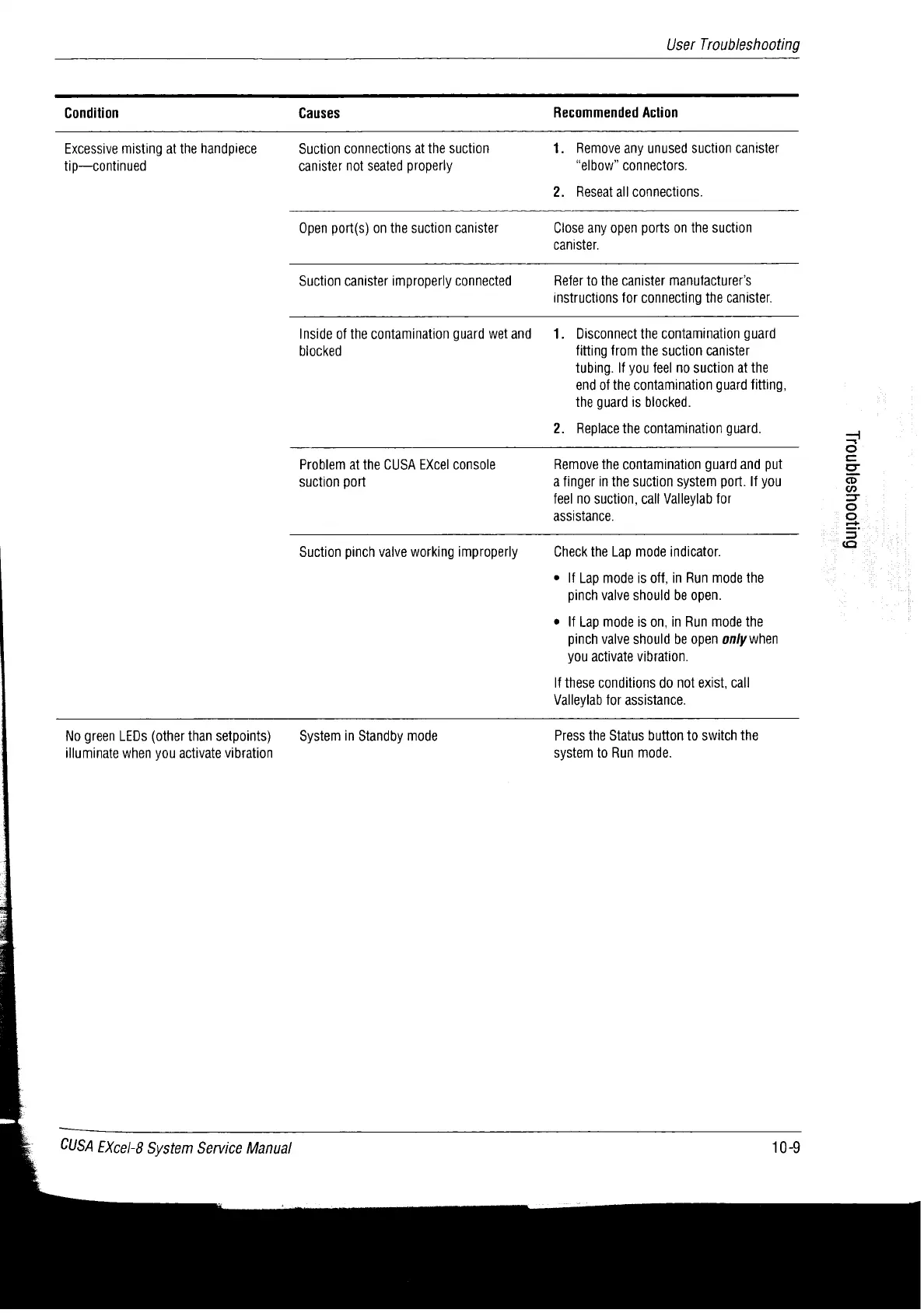
Condition
Causes
Recommended
Action
Excessive
misting
at
the
handpiece
Suction
connections
at
the
suction
1.
Remove
any
unused
suction
canister
tip—continued
canister
not
seated
properly
“elbow”
connectors.
2.
Reseat
all
connections.
Open
port(s)
on the
suction
canister
Close
any
open
ports
on
the
suction
canister.
Suction
canister
improperly
connected
Refer
to
the
canister
manufacturer’s
instructions
for
connecting
the
canister.
Inside
of
the
contamination
guard
wet
and
biocked
1.
Disconnect
the
contamination
guard
fitting
from
the
suction
canister
tubing.
lf
you
feel
no
suction
at
the
end
of
the
contamination
guard
fitting,
the
guard
is
blocked.
2.
Replace
the
contamination
guard.
Problem
at
the
CUSA
EXcel
console
suction
port
Remove
the
contamination
guard
and
put
a
finger
in
the
suction
system
port.
If
you
feel
no
suction,
call
Valleylab
for
assistance.
Suction
pinch
valve
working
improperly
Hurjooysejqnosy
Check
the
Lap
mode
indicator.
ο
If
Lap
mode
is
off,
in
Run
mode
the
pinch
valve
should
be
open.
ο
If
Lap
mode
is
on,
in
Run
mode
the
pinch
valve
should
be
open
only
when
you
activate
vibration.
If
these
conditions
do
not
exist,
call
Valleylab
for
assistance.
No
green
LEDs
(other
than
setpoints)
System
in
Standby
mode
illuminate
when
you
activate
vibration
Press
the
Status
button
to
switch
the
system
to
Run
mode.
CUSA
EXcel-8
System
Service
Manual
10-9

Table of Contents

Related product manuals