EasyManua.ls Logo

Valleylab CUSA EXcel-8 - Page 119

Valleylab CUSA EXcel-8
239 pages
Print Icon
To Next Page IconTo Next Page
To Previous Page IconTo Previous Page
Loading...
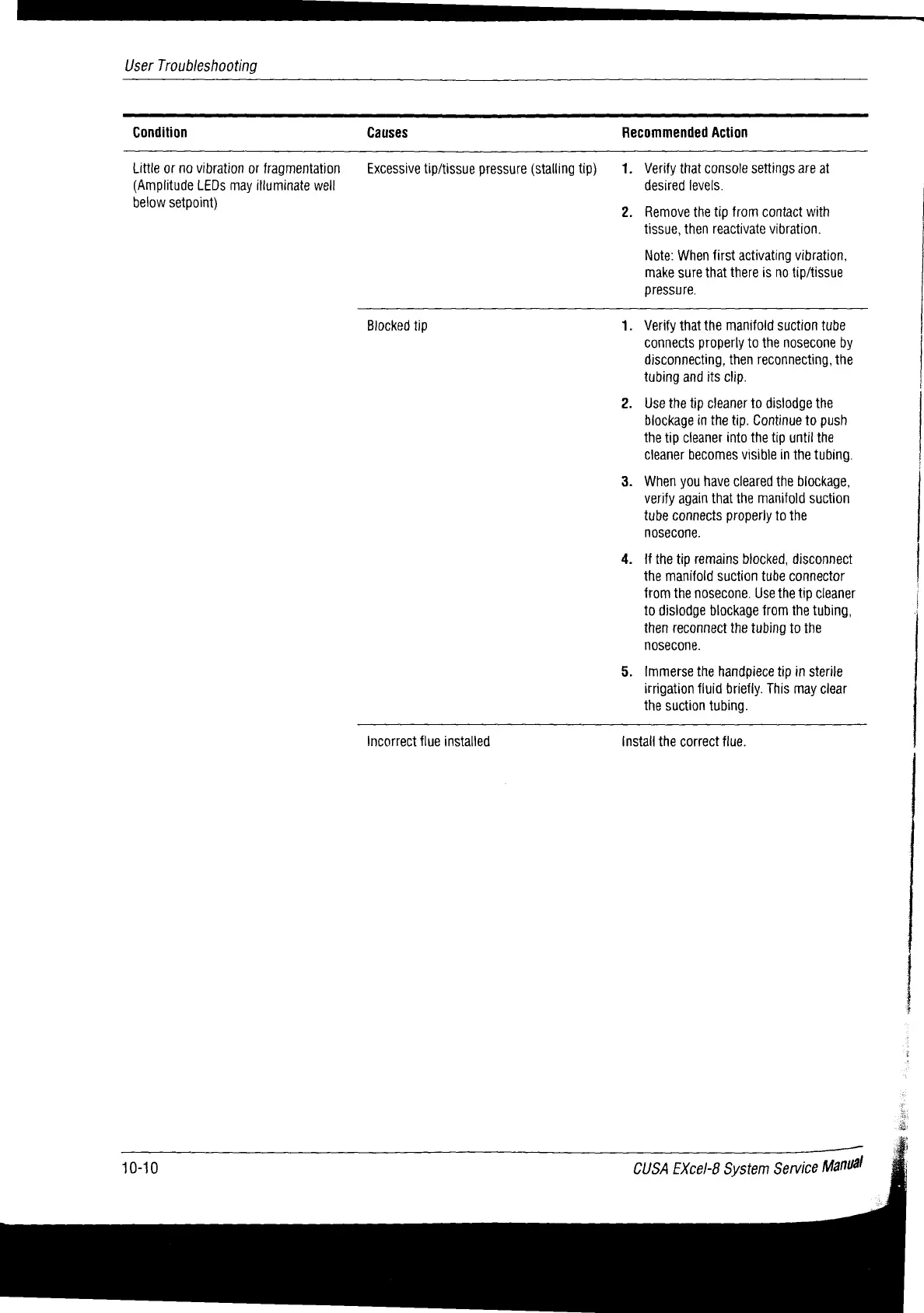
User
Troubleshooting
Condition
Causes
Recommended
Action
Little or
no
vibration
or
fragmentation
(Amplitude
LEDs
may
illuminate
well
below
setpoint)
Excessive
tip/tissue
pressure
(stalling
tip)
1.
Verify
that
console
settings
are
at
desired
levels.
Remove
the
tip
from
contact
with
tissue,
then
reactivate
vibration.
Note:
When
first
activating
vibration,
make
sure
that
there
is
no
tip/tissue
pressure.
Blocked
tip
.
Verify
that
the
manifold
suction
tube
connects
properly
to
the
nosecone
by
disconnecting,
then
reconnecting,
the
tubing
and
its
clip.
Use
the
tip
cleaner
to
dislodge
the
blockage
in
the
tip.
Continue
to
push
the
tip
cleaner
into
the
tip
until
the
Cleaner
becomes
visible
in
the
tubing.
When
you
have
cleared
the
blockage,
verify
again
that
the
manifold
suction
tube
connects
properly
to
the
nosecone.
If
the
tip
remains
blocked,
disconnect
the
manifold
suction
tube
connector
from
the
nosecone.
Use
the
tip
cleaner
to
dislodge
blockage
from
the
tubing,
then
reconnect
the
tubing
to
the
nosecone.
immerse
the
handpiece
tip
in
sterile
irrigation
fluid
briefly.
This
may
clear
the
suction
tubing.
Incorrect
flue
installed
install
the
correct
flue.
10-10
CUSA
EXcel-8
System
Service
Manuál
rr
mmm
mmm

Table of Contents

Related product manuals