EasyManua.ls Logo

Valleylab CUSA EXcel-8 - Page 125

Valleylab CUSA EXcel-8
239 pages
Print Icon
To Next Page IconTo Next Page
To Previous Page IconTo Previous Page
Loading...
Engineer
Troubleshooting
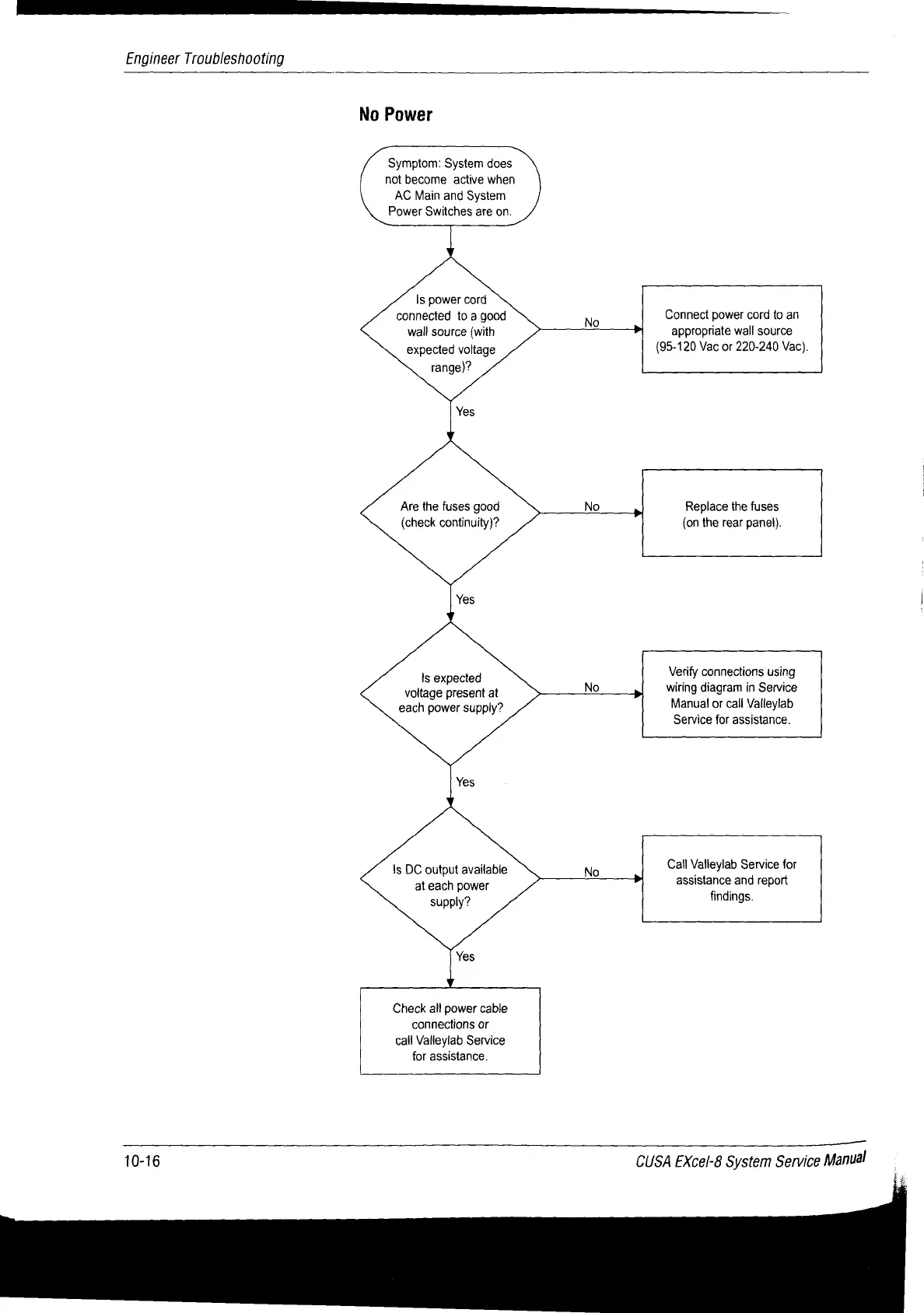
No
Power
Symptom:
System
does
not
become
active
when
AC
Main
and
System
Power
Switches
are
on.
Is
power
cord
connected
to
a
good
wall
source
(with
expected
voltage
range)?
Connect
power
cord
to
an
appropriate
wall
source
(95-120
Vac
or
220-240
Vac).
Are
the
fuses
good
(check
continuity)?
Replace
the
fuses
(on
the
rear
panel).
Verify
connections
using
wiring
diagram
in
Service
Manual
or
cali
Valleyiab
Service
for
assistance.
Is
expected
voltage
present
at
each
power
supply?
Call
Valleylab
Service
for
assistance
and
report
findings.
Is
DC
output
available
at
each
power
supply?
Check
all
power
cable
connections
or
call
Valleylab
Service
for
assistance.
10-16
CUSA
EXcel-8
System
Service
Manual

Table of Contents

Related product manuals