CANopen gateway
Wieland Electric GmbH | BA000970 | 11/2016 (Rev. F)
Step 2: Add the gateway to the controls
To make the system of the samosPRO system available in the process diagram of the PLC, the
gateway must first be added to the hardware configuration. The procedure to be used depends
on the hardware configuration software of the PLC used. Please also read the documentation
for the corresponding software in this regard.
Open the window for editing the
and select the controls.
Click the controller with the right mouse button or open the
menu.
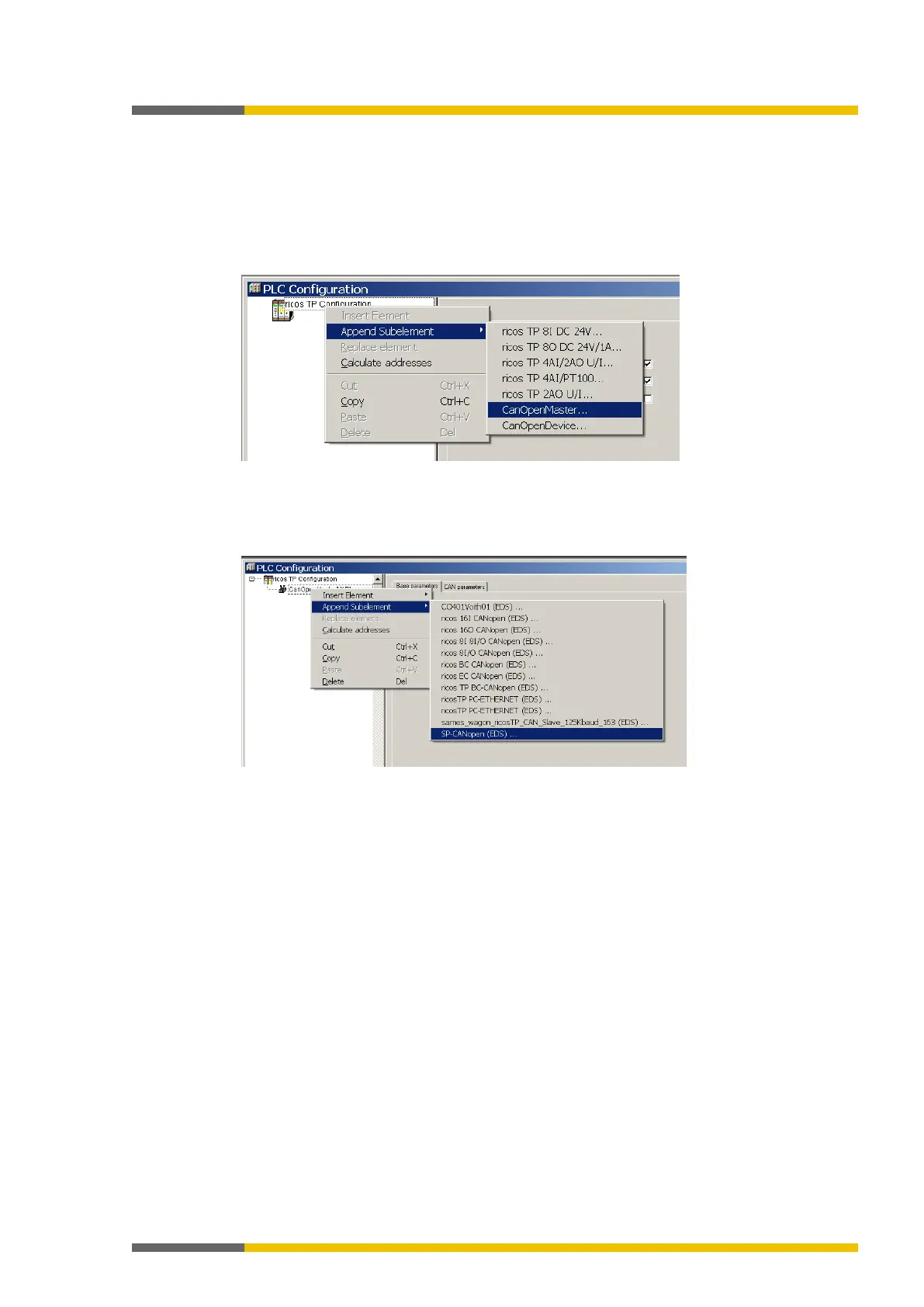
Illustration 50: Attaching a CanMaster with CoDeSys 2.3
Select the command
from one of the two menus under
A CanMaster will be attached to the controls.
Now select the CanMaster.
Click the CanMaster with the right mouse button or open the
menu.
Illustration 51: Attaching the SP-CANopen module with CoDeSys 2.3
In one of the two menus, under
, select the command
SP-
CANopen00000 (EDS)", to attach the SP-CANopen module to the CanMaster.
Step 3: Select and configure the process data objects (PDOs)
Once you have added the device to the automation network, you must configure the process
data objects to be used and how to transfer them.



 To Next Page