Operation
9270−1/A1
Winterthur Gas & Diesel Ltd.
23/ 28
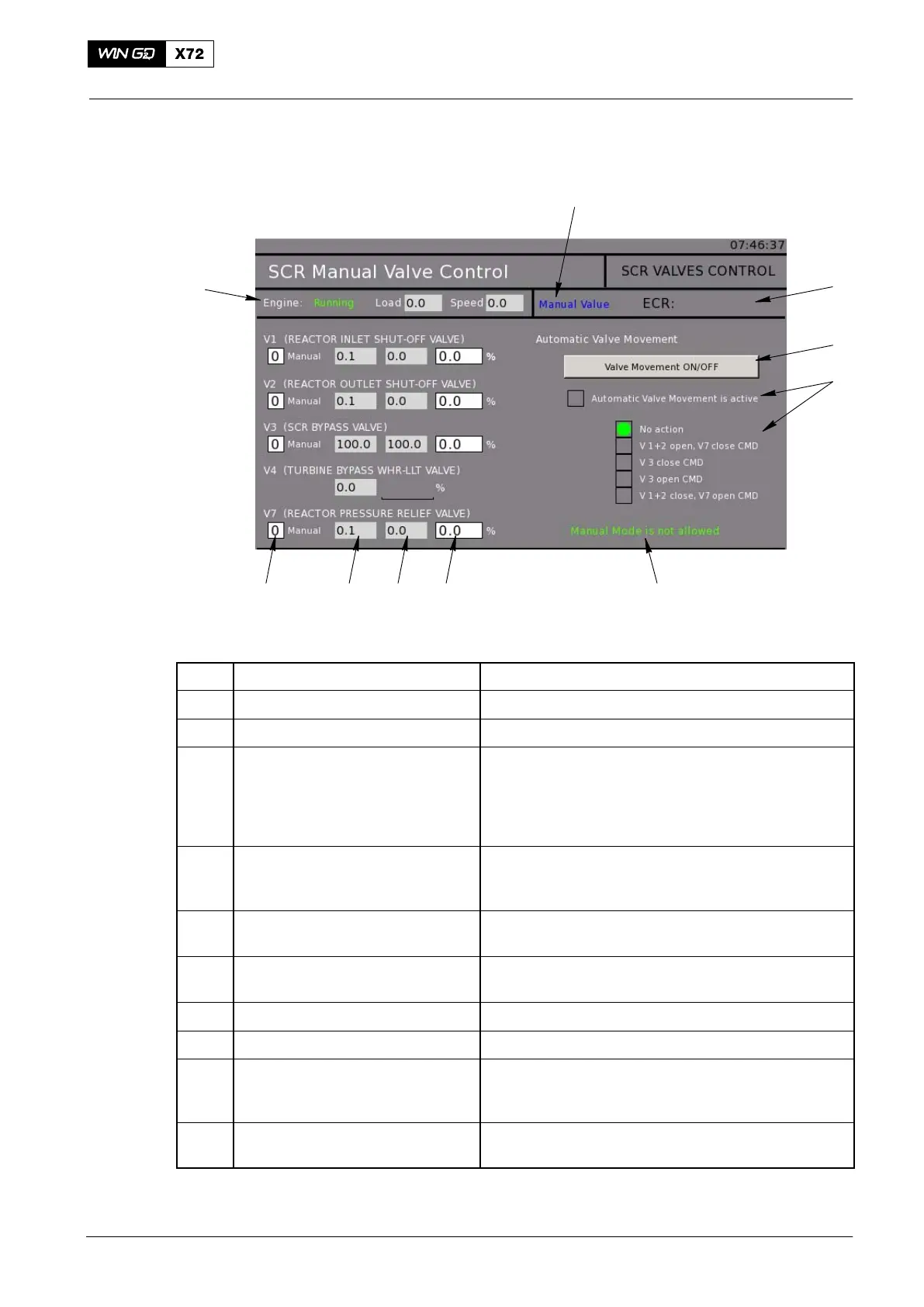
5.2.4 SCR Manual Valve Control Page
10
1
2
3
4
9
5
8 7 6
WCH03735
Fig. 19: SCR Manual Valve Control Page
Item Function Effect / Data
1 Status indication Operator input for use of manual value
2 Status indication Shows the control location
3 Button Push the button to set the automatic valve
movement to on or off. During engine stop, the
operator can force a valve movement to check if the
valve is serviceable. For the procedure, refer to
paragraph 5.4
4 Status indication Shows if the automatic valve movement is set to on.
Automatic state machine with feedback checks and
commands.
5 Indication Shows the selection of the manual mode. Shows
either allowed or not allowed.
6 Setpoint indication Shows the set valve setpoint (0% to 100%) from the
operator
7 Setpoint indication Shows the valve setpoint (0% to 100%)
8 Feedback indication Shows the valve feedback (0% to 100%)
9 Operator parameter You can set the parameter to
1=Manual setpoint activated or
0=Automatic
10 Status indication Shows the engine status. Shows either Running,
TIER mode or Load/Speed
2016−11
Selective Catalytic Reduction System



 To Next Page