January 2010
2-64
Phaser 7760 Color Laser Printer
007-104, 007-105
Revised
Status Indicator RAP’s
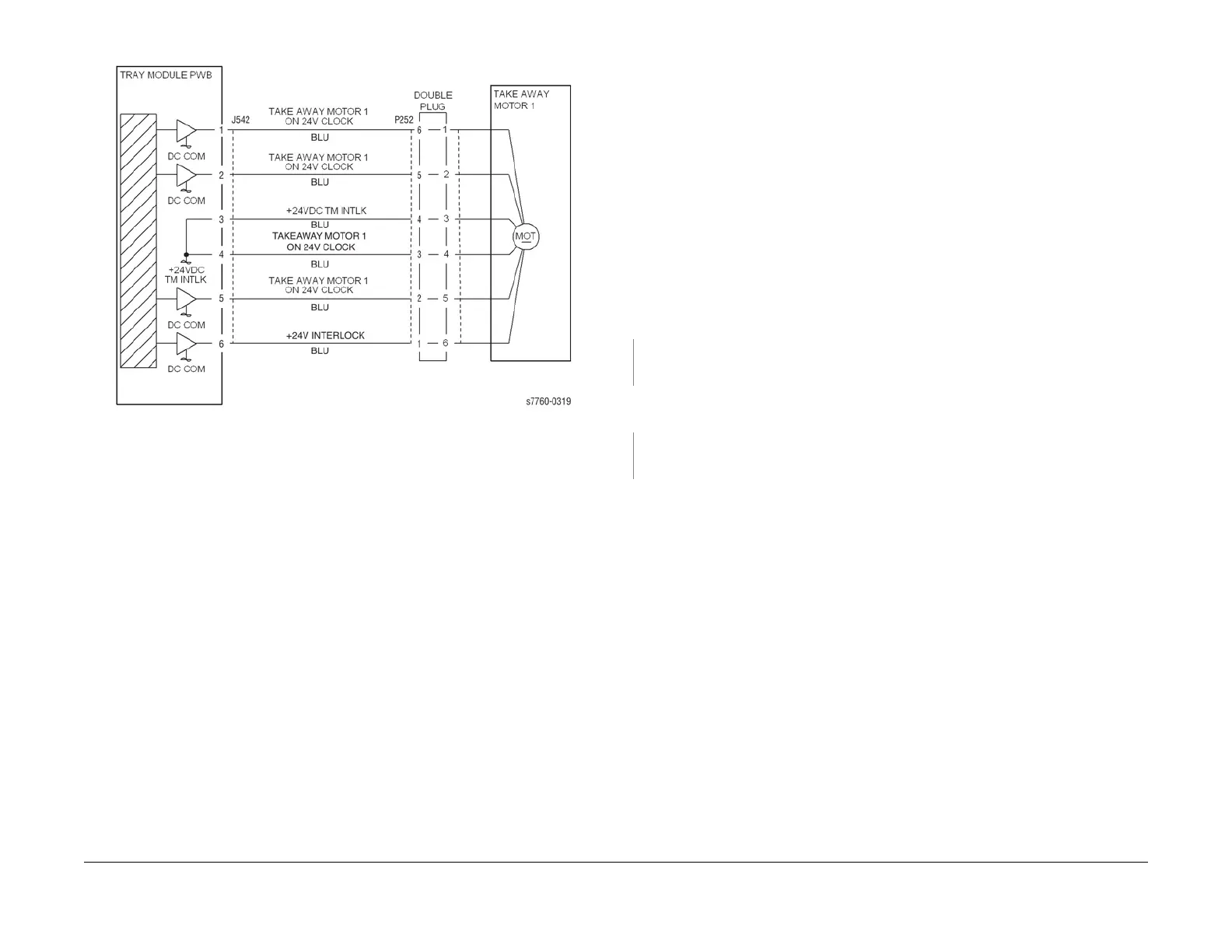
Figure 3 007-104 Takeaway Motor 1
007-105 Tray 2 Misfeed
The Tray 2 Feed Out Sensor does not detect paper after feeding from Tray 2.
Initial Actions
• Check condition and specification of paper in Tray 2.
• Check for intermittent misfeeds ensure paper type selection is correct (open tray, select
Change Description).
• Check the paper path for obstructions. Ensure that the Left Lower Cover (PL 2.3) latches
correctly.
• Check for wear and clean the Tray 2 Feed Roll, Takeaway Roll and the Pinch Roll.
Procedure
Open the Left Lower Cover (PL 2.3). Enter Service Diagnostics Menu: Printer Menu > Trou-
bleshooting > Service Tools > Printer Status Page > hold the Up and Down buttons simul-
taneously > Run Service Diagnostics > OK. Block and unblock the Tray 2 Feed Out Sensor
(PL 2.3). The display changes.
YN
Check the circuit of the Tray 2 Feed Out Sensor (Figure 1). Refer to Section 6, Transmis-
sive Sensor Procedure for troubleshooting procedure.
Close the Left Lower Cover. Perform the Paper Feed Motors test. The Tray 2 Feed/Lift
Motor (PL 2.4) energizes.
YN
Check the circuit of the Tray 2 Feed/Lift Motor (Figure 2). Refer to Section 2, OF 99-9 RAP
for troubleshooting procedure.
• Check the Tray 2 Feed / Lift Motor and its associated gears (PL 2.4) for damage, contam-
ination or misalignment.
• Ensure that the Tray 2 Chute (PL 2.3) is properly seated and not damaged.
• Ensure that the connectors shown in the circuit diagrams (Figure 1, Figure 2) are securely
connected and that the wires are not damaged.
• If these checks are OK, replace the I/F PWB (PL 9.1).
• If the problem persists, replace the Engine Control Board (MCU PWB) (PL 13.1).





 To Next Page