January 2010
2-63
Phaser 7760 Color Laser Printer
007-104
Status Indicator RAP’s
Revised
007-104 Tray 2 Feed Out Sensor On Jam
The Tray 2 Feed Out Sensor does not detect paper fed from Tray 3, 4, or 5 in time after the
Takeaway Sensor actuated.
Initial Actions
• Check condition and specification of paper in Tray 3, 4 and 5.
• Check for intermittent misfeeds ensure paper type selection is correct (open tray, select
Change Description).
• Check the paper path for obstructions. Ensure that the Left Lower Cover (PL 2.3) latches
correctly.
• Check for wear and clean the Takeaway Rolls and the Pinch Rolls.
Procedure
Open the Left Lower Cover (PL 2.3). Enter Service Diagnostics Menu: Printer Menu > Trou-
bleshooting > Service Tools > Printer Status Page > hold the Up and Down buttons simul-
taneously > Run Service Diagnostics > OK. Block and unblock Tray 2 Feed Out Sensor (PL
2.3). The display changes.
YN
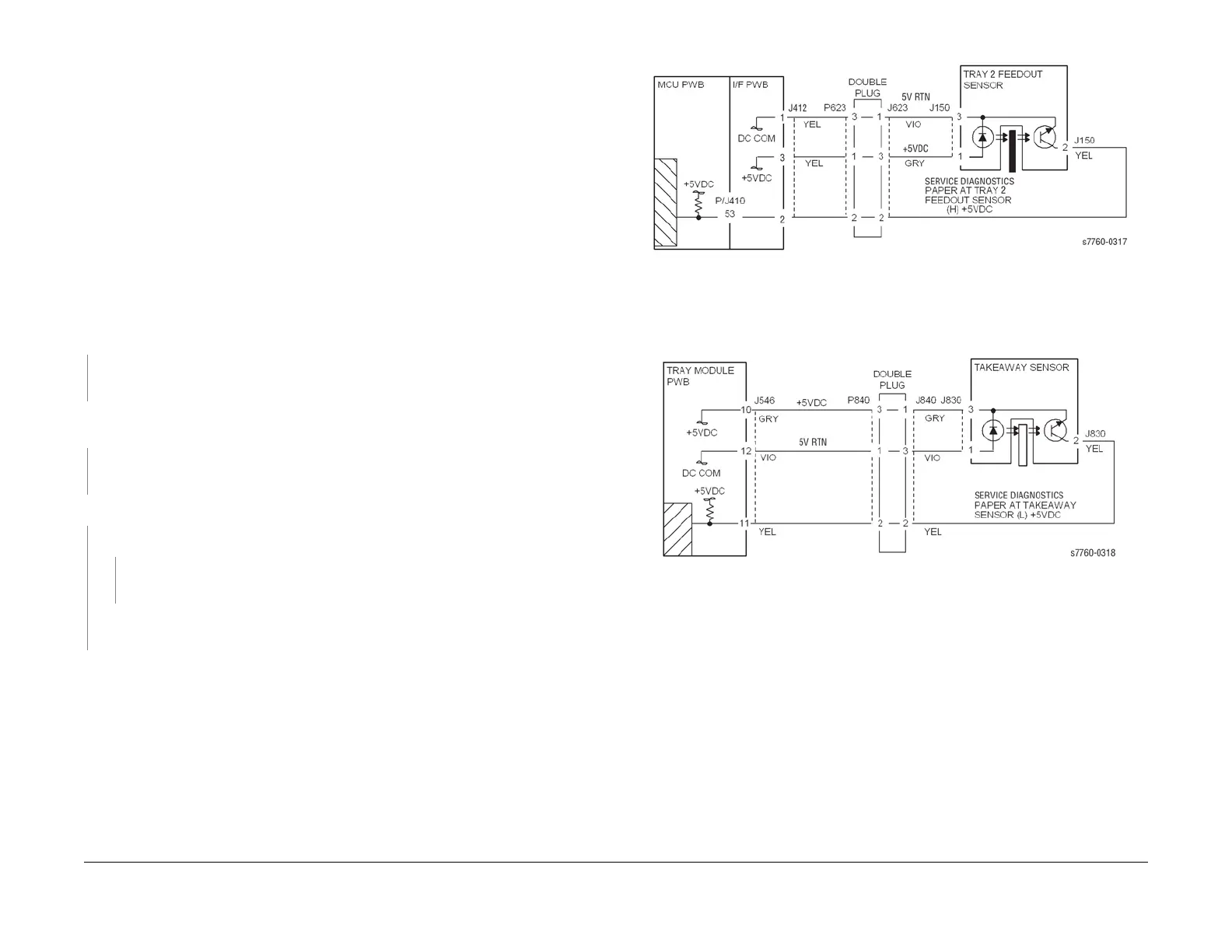
Check the circuit of the Tray 2 Feed Out Sensor (Figure 1). Refer to Section 6, Transmis-
sive Sensor Procedure for troubleshooting procedure.
Close the Left Lower Cover and open the Left Cover and cheat the Left Cover Interlock Switch
(PL 16.13). Block and unblock the Takeaway Sensor (PL 16.6). The display changes.
YN
Check the circuit of the Takeaway Sensor (Figure 2). Refer to Section 6, Transmissive
Sensor Procedure for troubleshooting procedure.
Perform the Tray Feed Sensors test. Both Takeaway Rolls (PL 16.6) rotate.
YN
Takeaway Motor 1 energizes.
YN
Check the circuit of the Takeaway Motor 1 (Figure 3). Refer to Section 2, OF 99-9
RAP for troubleshooting procedure.
Check Takeaway Motor 1 and its associated Gears (PL 16.15) for damage, contamination
or misalignment. Repair or replace as required. (Figure 3).
• Ensure that the Chutes (PL 2.3, PL 16.5, PL 16.6) are properly seated and not damaged.
• Check the Pinch Rolls (PL 2.3, PL 16.13) for damage or contamination.
• Ensure that the connectors shown in the circuit diagrams (Figure 1, Figure 2, Figure 3)
are securely connected and that the wires are not damaged.
• If the problem persists, replace the Tray Module PWB (PL 16.15).
Figure 1 007-104 Tray 2 Feed Out Sensor
Figure 2 007-104 Takeaway Sensor





 To Next Page