January 2010
2-40
Phaser 7760 Color Laser Printer
004-346, 004-347
Revised
Status Indicator RAP’s
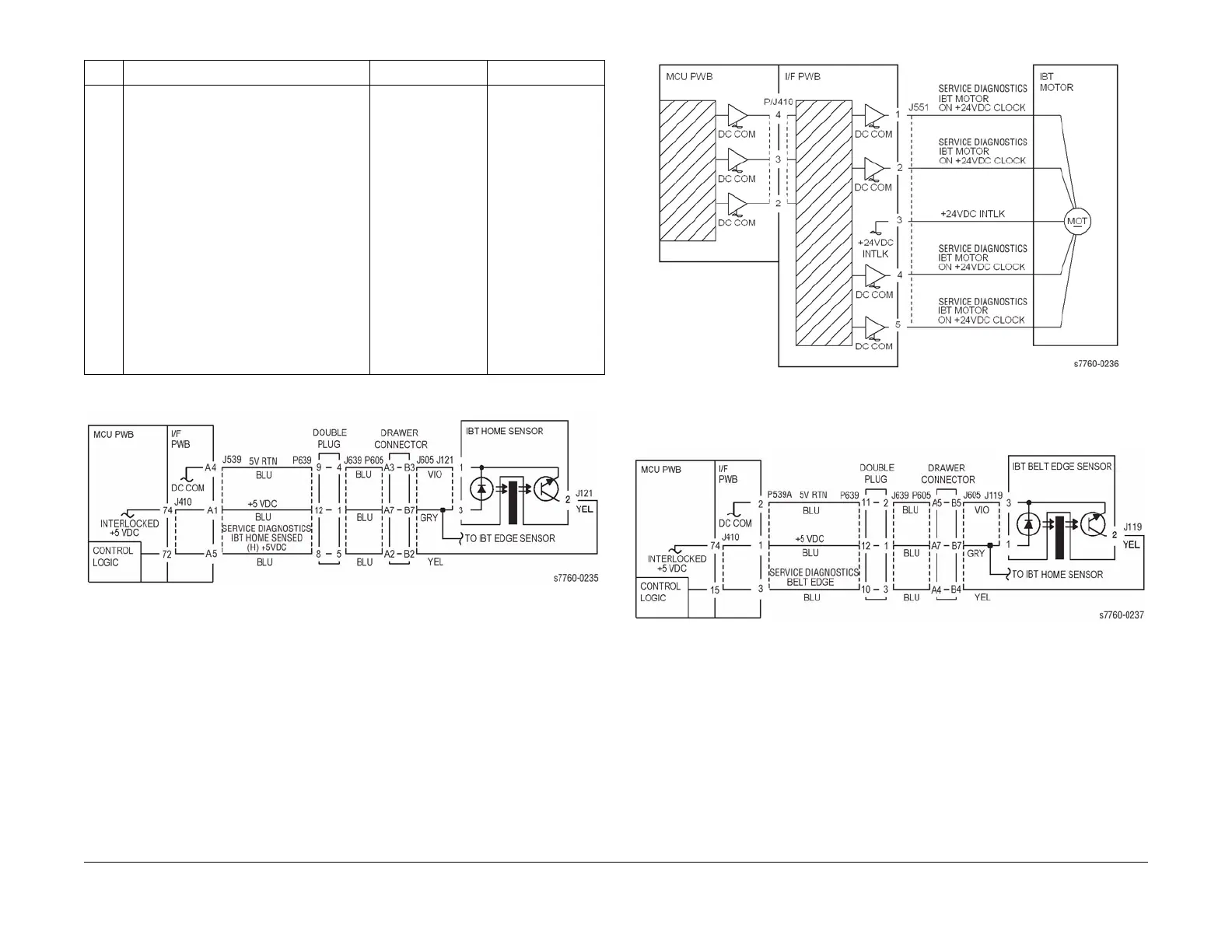
Figure 1 004-346, 004-347 IBT Home Sensor
Figure 2 004-346, 004-347 IBT Motor
Figure 3 004-346, 004-347 IBT Edge Sensor
14 1. Remove the Accumulator Belt Assem-
bly.
2. Enter Service Diagnostics Menu:
Printer Menu > Troubleshooting >
Service Tools > Printer Status Page
> hold the Up and Down buttons
simultaneously > Run Service Diag-
nostics > OK. Run the Accumulator
Belt Motor test.
3. Does the Motor run?
Diagnose and repair
the mechanical con-
dition binding the
Accumulator Belt
Assembly.
Since the Accumu-
lator Belt Drive
Motor is a servo
motor, there are no
voltage checks. This
failure can be
caused by 1 of 3
components.
Replace and test in
the following order:
1. Motor
2. Interface
Board (REP
1.8)
3. Engine Con-
trol Board
(MCU PWB)
(REP 1.2)
Table 2 Procedure
Step Actions and Questions Yes No

















 To Next Page