January 2010
2-41
Phaser 7760 Color Laser Printer
004-346, 004-347, 004-348
Status Indicator RAP’s
Revised
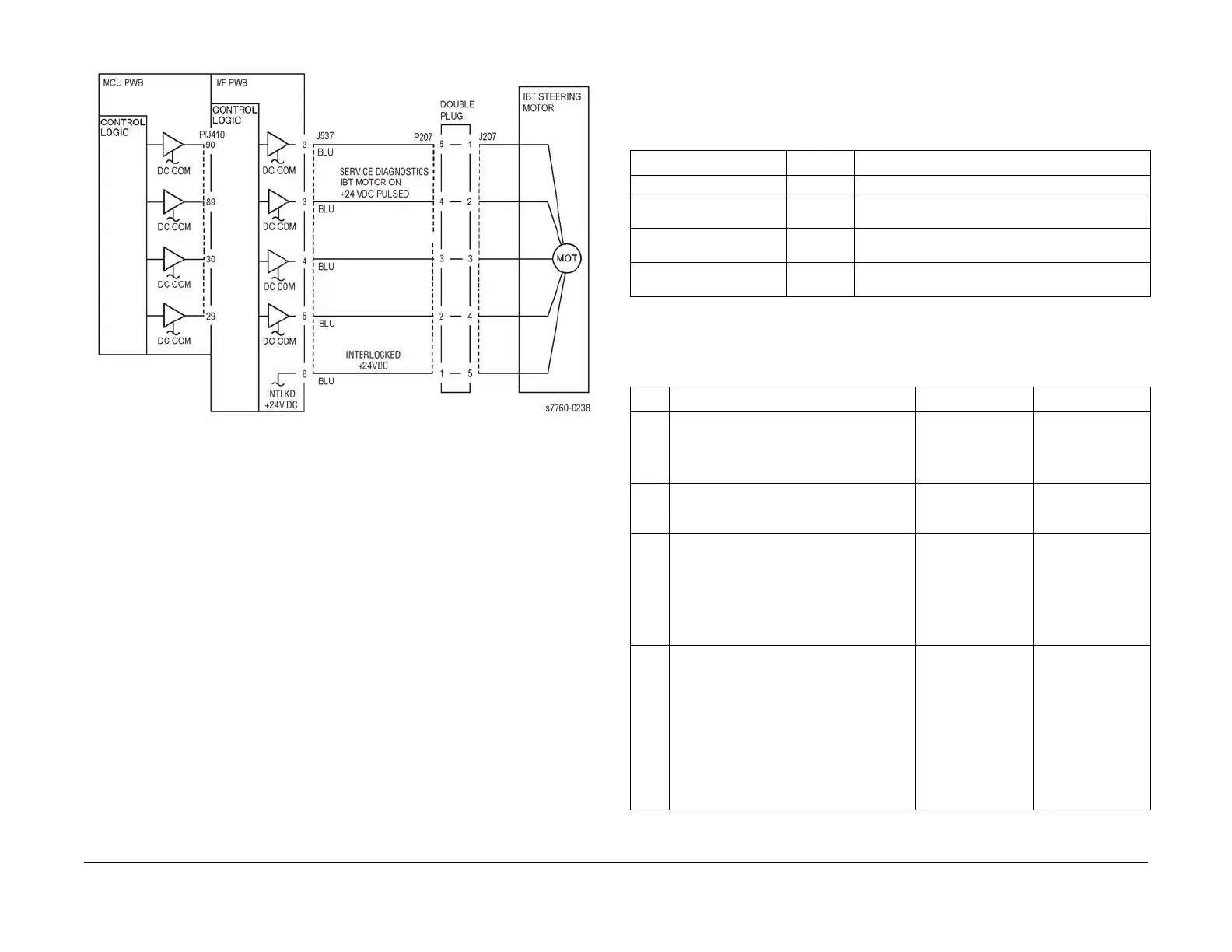
Figure 4 004-346, 004-347 IBT Steering Motor
004-348 IBT Belt Edge Sensor Fail
IBT Belt Edge not detected.
Troubleshooting References
Troubleshooting Procedures
Table 1 References
Applicable Parts Parts List Wiring and Plug/Jack References
Drive Assembly - Steering REP 1.3
Accumulator Belt PL 5.2 Section 7, IBT Belt Assembly Plug/Jack Locations -
Figure 11
I/F PWB PL 9.1 Section 7, I/F PWB, Main Motor, LVPS T11 Plug/Jack
Locations - Figure 16
Engine Control Board
(MCU PWB)
PL 13.1 Section 7, Engine Control Board (MCU PWB) Plug/
Jack Locations - Figure 15
Table 2 Procedure
Step Actions and Questions Yes No
1 1. Remove the Accumulator Belt Assem-
bly.
2. Inspect the connector for damage.
3. Is the connector damaged?
Replace the Accu-
mulator Belt Assem-
bly (REP 9.15).
Go to step 2.
2 Is the Edge Sensor Actuator touching the
Belt?
Replace the Accu-
mulator Belt Assem-
bly (REP 9.15).
Go to step 3.
3 Is the mating connector inside the printer
damaged?
Repair or replace
the wiring harness
between the con-
nector and J605
(refer to Section
7,IBT Belt Assembly
- Figure 11).
Go to step 4.
4 1. Reinstall the Accumulator Belt Assem-
bly.
2. Enter Service Diagnostics Menu:
Printer Menu > Troubleshooting >
Service Tools > Printer Status Page
> hold the Up and Down buttons
simultaneously > Run Service Diag-
nostics > OK. Run the Belt Edge Sen-
sor test.
3. Is the result OK?
Go to step 5. Run the Belt Edge
Learn and recheck.
If it still fails, go to
step 8.

















 To Next Page