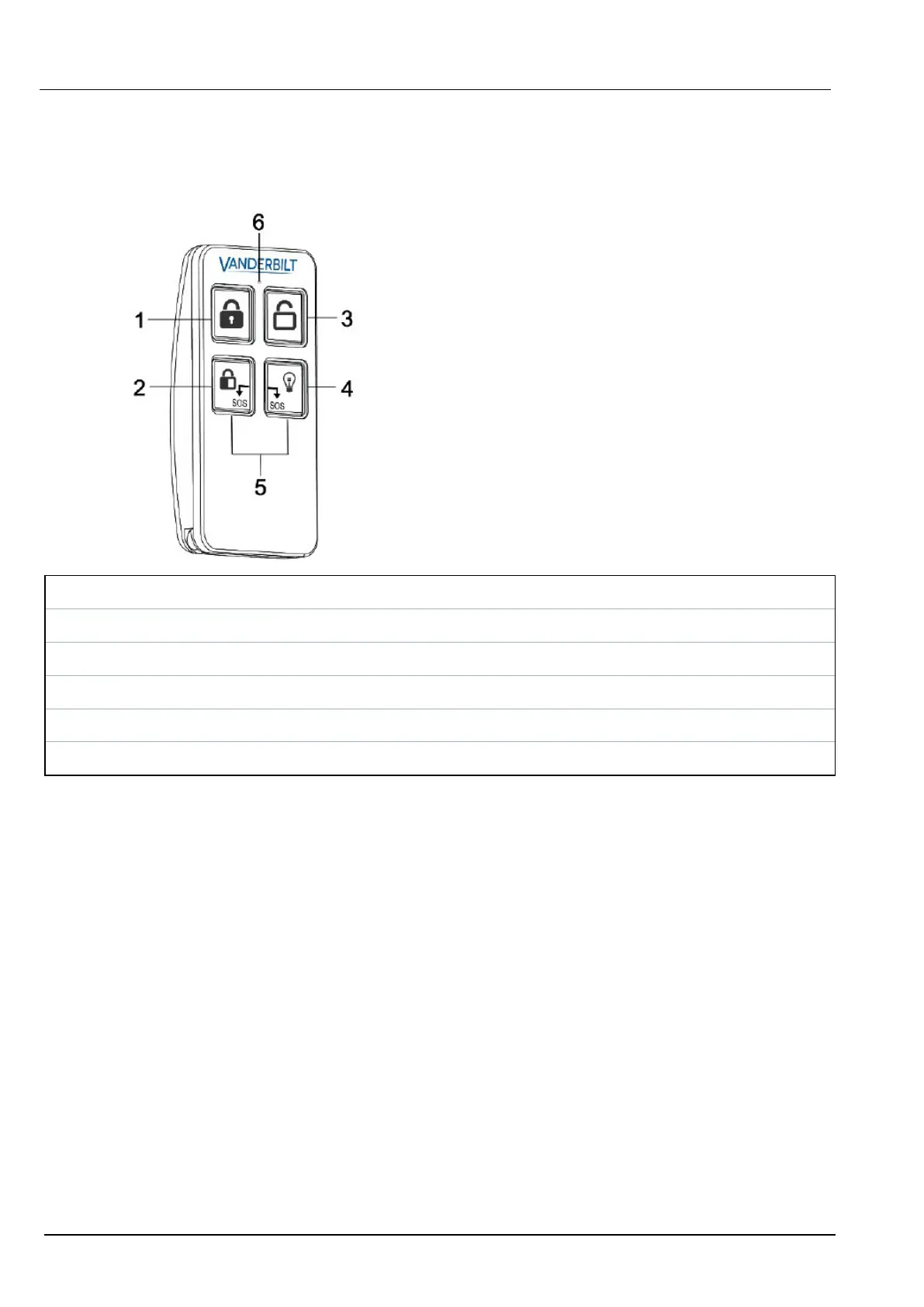
15.9.1.7 WRMT remote control
The WRMT 4-button Remote is a device which allows a user to remotely operate the SPC system. The
device supports UNSET, FULLSET, and PARTSET (A only) functionality, as well as the operation of
defined outputs and an SOS feature.
1 Fullset
2 Partset (A only)
3 Unset
4 Output
5 Panic/SOS
6 LED
Enrol a WRMT remote control
To enrol the WRMT:
1. In the SPC browser, select Users > Wireless FOB.
2. On the WRMT, press and hold both SOS buttons.
The LED blinks Red once and then Green.
3. Click Refresh on the Wireless FOB page to display the WRMT.
4. You can now assign the discovered WRMT to a system user.
To assign the WRMT to a user:
1. Go to Users > Users and click the Edit button beside the user you want to assign the WRMT to.
2. On the Edit user settings page, click the Unknown Fob button.
A list of unassigned fobs is displayed.
3. Click the Add button to assign the WRMT to the user.
4. On the Edit user settings page click Save.
SPC42/52/53/63 – Installation & Configuration Manual Engineer programming via the browser
© Vanderbilt 2023 153 I-200572
08.12.2023



 To Next Page