
 Need help?
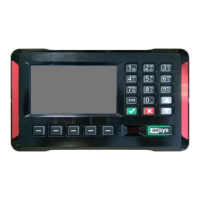
Do you have a question about the AESYS TC-430 and is the answer not in the manual?
Explains functionality of programmable soft keys.
Describes navigation through the system menus.
Essential tasks applicable to all system modes.
Controls onboard signs and content in route mode.
Manages service execution for trips and roadmaps.
Displays detailed information about the TC-430™ system hardware and software.
Monitors critical hardware parameters like temperature and voltage.
Provides diagnostic information for connected LED signs.
Displays current GPS satellite status and fix information.
Checks the connection status to Aesys® servers and cloud services.
Allows modification of the system access password.
Configures system date, time, and timezone settings.
Configures properties and behavior of LED signs and screens.
Configures vocal announcement equipment settings like volume and muting.
Configures network and communication interfaces.
Performs essential maintenance operations like software and firmware upgrades.
Reports detected failures of connected Aesys® devices.
Manages stop requests and provides feedback to driver and passengers.
Handles emergency events via an connected button/pedal.
Provides web services for file access and data access via HTTP.
 General
| Brand | AESYS |
|---|---|
| Model | TC-430 |
| Category | Control Unit |
| Language | English |

 To Next Page