Chapter6 Troubleshooting
167
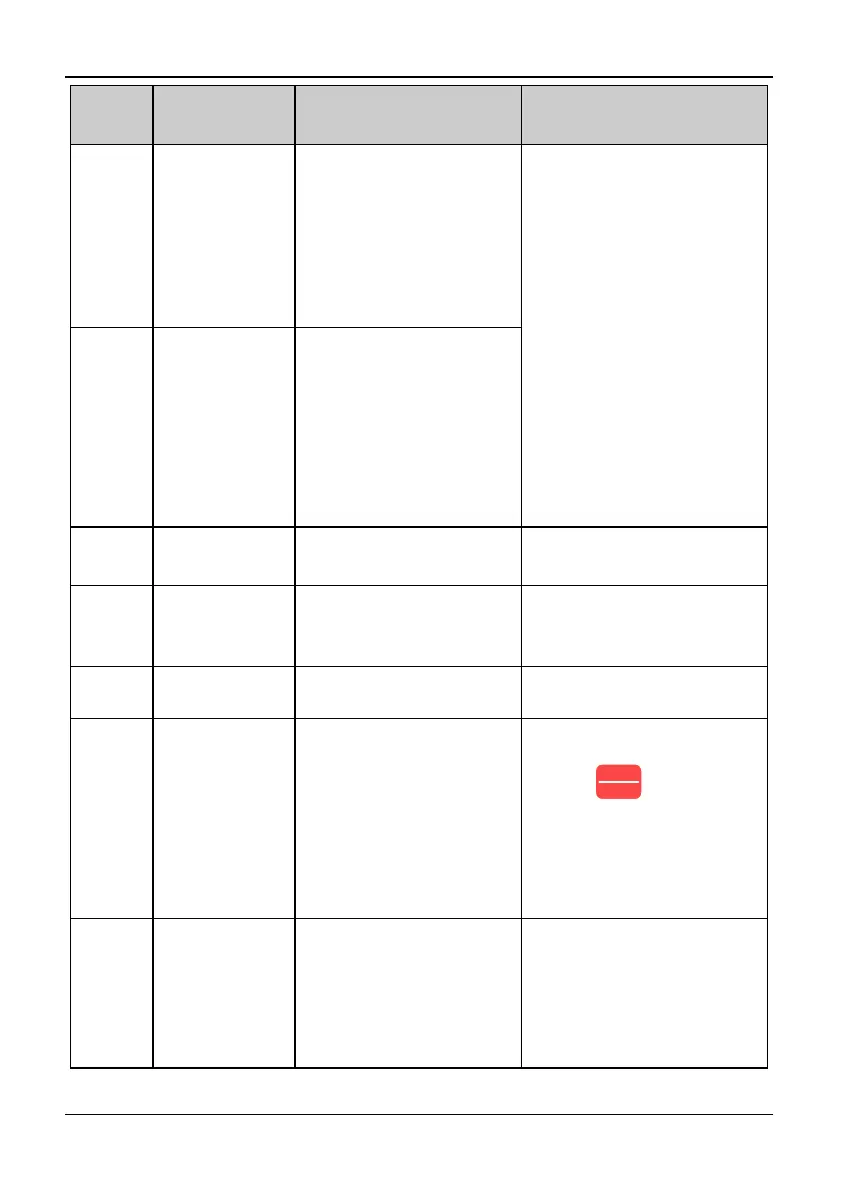
Fault
display
Name of
protection
Possible reasons of fault Actions
CCF1
Control circuit
fault0
●The inverter connect
keyboard once after
electrifying, then
transmitting fault
continue for 2 seconds
or above(during
operating)
●Reconnect the keyboard
●Check connection cable of
keyboard
●Replace the keyboard
●Replace the control board
CCF2
Control circuit
fault1
●Transmission between
the inverter and
keyboard is established
once after supplying
power, but later
transmission fault
continues for more than
2 seconds.
CCF3
EEPROM
fault
●EEPROM fault of the
control board
●Replace the control board
CCF4
AD
conversion
fault
●AD conversion fault of
the control board
●Replace the control board
CCF5 RAM fault
●RAM fault of the
control board
●Replace the control board
CCF6
CPU
disturbance
●Serious interference
●MCU of the control
board read-write error
●The communication
cable is reverse
connected or the
Data-chosen-switch is
dialed wrong
●Press
STOP
RESET
to reset
●Add a filter on the side of
power supply
●Seek for tech support
PCE
Parameter
copying error
②
●Copy wrong parameter
between the keyboard
and EEPROM of
control board
●EEPROM of control
board is damaged
●Recopy the parameter
●Replace the control board
●Seek for tech support


 To Next Page