Chapter 3 Operation
46
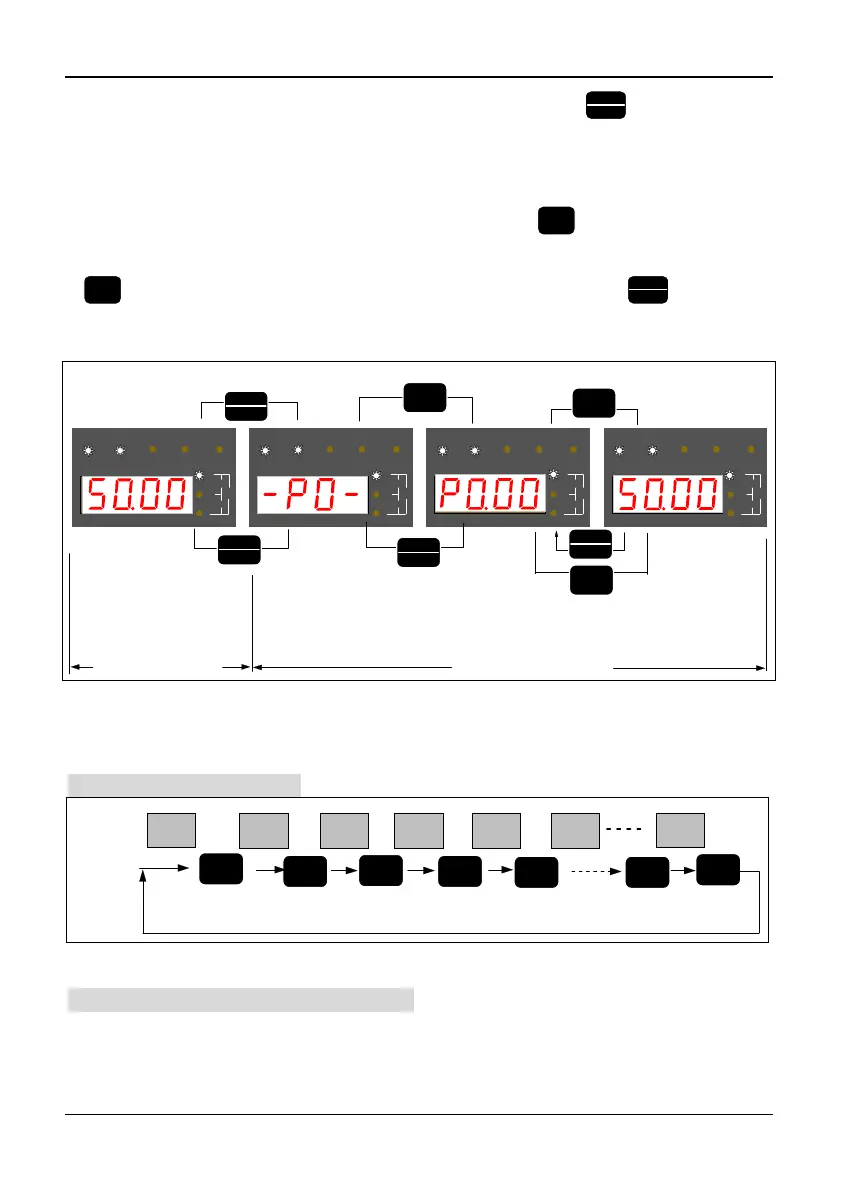
In stop, running fault or warning state, press the PRG/ESC key
PRG
ESC
, the inverter will
come into programming state.(If the user has set the user password, please see chapter
5.16, description of PF.00). In programming state, there are three display menus, see
figure 3-4. They are function group menu, function parameter number menu, and
function parameter value menu, press the “ENTER” key
ENTER
, the display menu will
be changed gradually. In function parameter value menu, press the “ENTER” key
ENTER
to save the value of the parameter, press the “PRG/ESC” key
PRG
ESC
to exit from
one menu to another.
RUN FWD REV TRIPREMOTE
r/m in
m/s
%A
V
Hz
RUN FWD REV TRIPREMOTE
r/m in
m/s
%A
V
Hz
RUN FWD REV TRIPREMOTE
r/m in
m/s
%A
V
Hz
RUN FWD REV TRIPREMOTE
r/m in
m/s
%A
V
Hz
programming state
ENTER
PRG/ESC
ENTER
the parameter
group number menu
Display parameters
value
of stop state and
running state
or
display fault code
and warning code
PRG
ESC
PRG
ESC
PRG
ESC
PRG
ESC
ENTER
ENTER
ENTER
the parameter
code number menu
the parameter
value menu
monitoring state
Figure 3-4 Display menus of programming state
3.1.5 Operation Method of Keyboard
Here are some examples of how to run the inverter by the keyboard:
Monitoring object switching:
50.00 45.0
50.00
1440
1440
0.000
>>
>>
>>
>>
>>
>>
50.00
Display
of LED
Operation
of key
>>
Actual output
frequency
Output frequency
b efo re co mpen sation
Output
current
Setting
frequency
Moto r
rotate speed
Seting
speed
Actual
length
Figure 3-5 Flow chart of monitoring object switching
Frequency adjustment at common running: (Example: change the setting frequency from
50.00 Hz to 40.00 Hz).



 To Next Page