Chapter 2 Installation and Wiring
33
no longer than 15 meters, otherwise it wouldn’t work properly. (Remove the original
keyboard of models of S2R4GB~3004GB/35R5PB, or the exterior can not work
properly)
Fig 2-32 Keyboard Interface CN2 on control
board
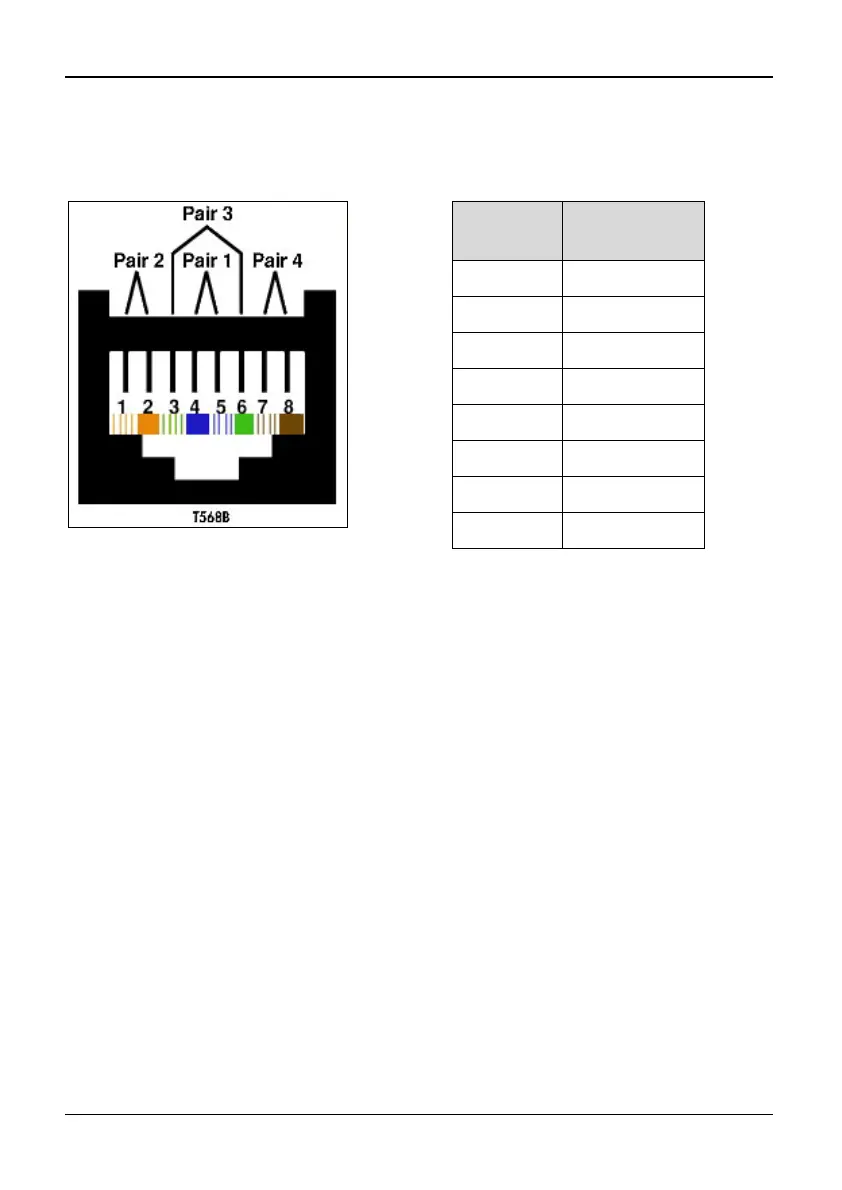
The cables connecting keyboard and control board use standard super-five-class network
cable. RJ-45 Interface uses through-line method, namely both sides are connected
according to EIA/TIA568B standard. You can make the cable by yourself if you need.
Notes:
1.Both sides of keyboard cable should be connected refer to Table 2-9. Otherwise, the
cable couldn’t work properly or even the keyboard would be damaged.
2.When the keyboard extension cable is longer than 1 m, which must use shielded
twist-pair network cable, RJ-45 interfaces of both sides of the cable should use
crystal with shielded metal shell, connect shielded metal shell to shielded layer.
Otherwise, it is likely to cause error action because of disturbance.
3.Be sure the extension cable of the keyboard is no longer than 15 meters, otherwise it
wouldn’t work properly.
Number
Corresponding
Color
1 White/Orange
2 Orange
3 White/Green
4 Blue
5 White/Blue
6 Green
7 White/Brown
8 Brown
Table 2-9 T568B standard connection



 To Next Page