6-2 Procedure Chapter 6 — Power Monitor, Option 5
6-2 MS20xxA VNA Master UG 10580-00166 Rev. C
3. Press the Enter key to complete the entry.
Display Power in dBm or in Watts
Press the Units soft key to toggle between dBm and Watts.
Relative Power
1. With the desired base power level input to the VNA Master, press the Relative soft key.
The power reading will show 100% because it is measuring the same power level.
2. If the power is lowered by 3 dB, then the relative power will show 50%.
3. If the power in Watts is increased from 1 to 2 Watts, then the relative power will show
200%.
In Figure 6-2, the
Units are set for dBm, the Relative Power function is Off, the Offset is 1 dBm,
and the
Zero function is set to Off. The figure is intended to illustrate the general layout of the
Power Monitor display.
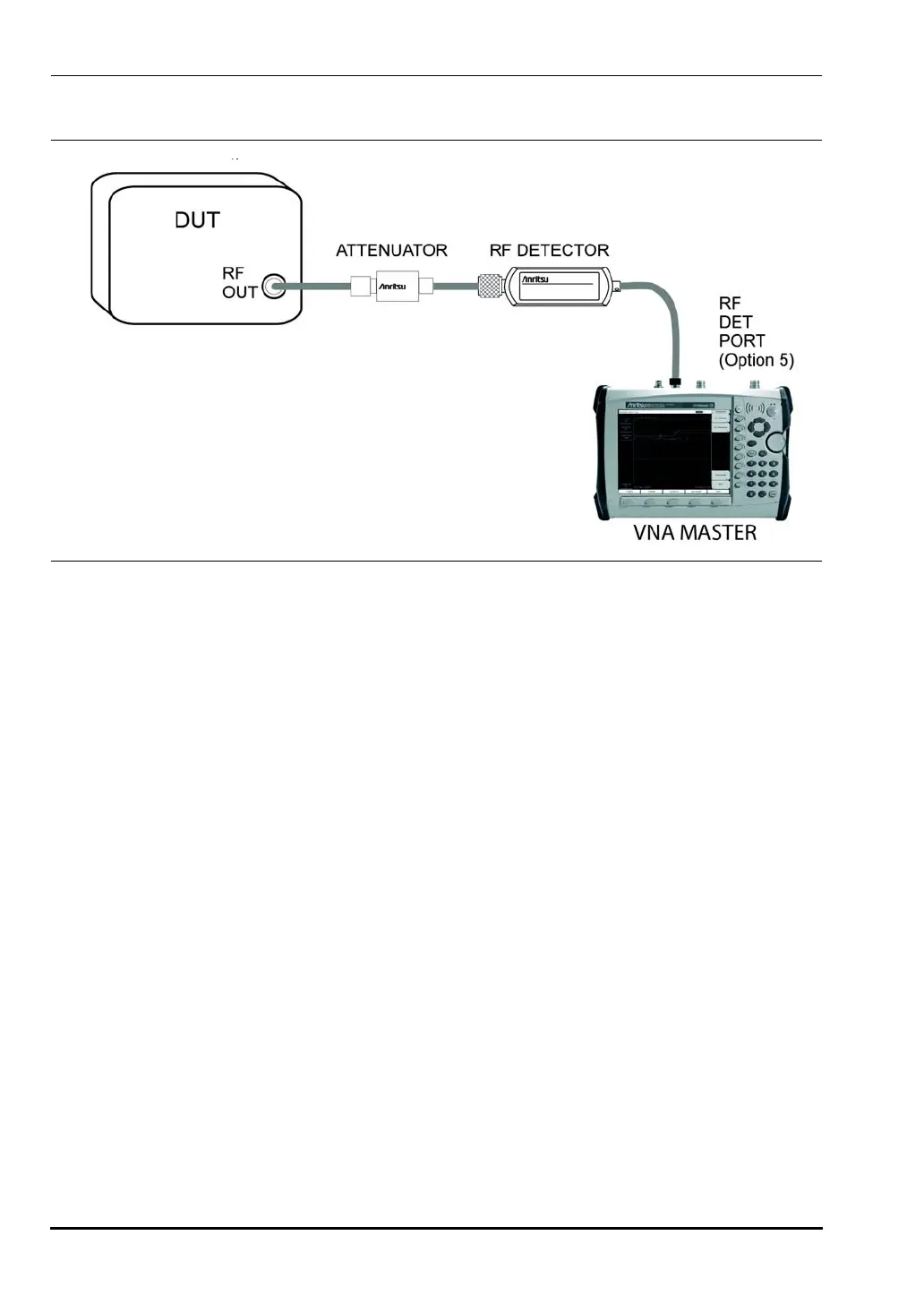
Figure 6-1. Power Measurement Setup With Attenuator
RFDET
PORT(Option
RF DETECTOR
DUT
RFOUT
ATTENUATOR
VNA MASTER
RFDET
PORT(Option
RF DETECTOR
DUT
RFOUT
ATTENUATOR
VNA MASTER
RFDET
PORT(Option
RF DETECTOR
DUT
RFOUT
ATTENUATOR
VNA MASTER
RFDET
PORT(Option
RF DETECTOR
DUT
RFOUT
ATTENUATOR
VNA MASTER
RFDET
PORT(Option
RF DETECTOR
DUT
RFOUT
ATTENUATOR
VNA MASTER
RFDET
PORT(Option
RF DETECTOR
DUT
RFOUT
ATTENUATOR
VNA MASTER
RFDET
PORT(Option
RF DETECTOR
DUT
RFOUT
ATTENUATOR
VNA MASTER
RFDET
PORT(Option
RF DETECTOR
DUT
RFOUT
ATTENUATOR
VNA MASTER
RFDET
PORT(Option
RF DETECTOR
DUT
RFOUT
ATTENUATOR
VNA MASTER
RFDET
PORT(Option
RF DETECTOR
DUT
RFOUT
ATTENUATOR
VNA MASTER
RFDET
PORT(Option
RF DETECTOR
DUT
RFOUT
ATTENUATOR
VNA MASTER
10580-00166C.book Page 2 Thursday, February 21, 2008 12:52 PM












 To Next Page