Chapter 4 — Spectrum Analyzer 4-25 Limit
MS20xxA VNA Master UG 10580-00166 Rev. C 4-37
4-25 Limit
To access the functions under the Limit menu, select the Shift key, then the Limit (6) key. The
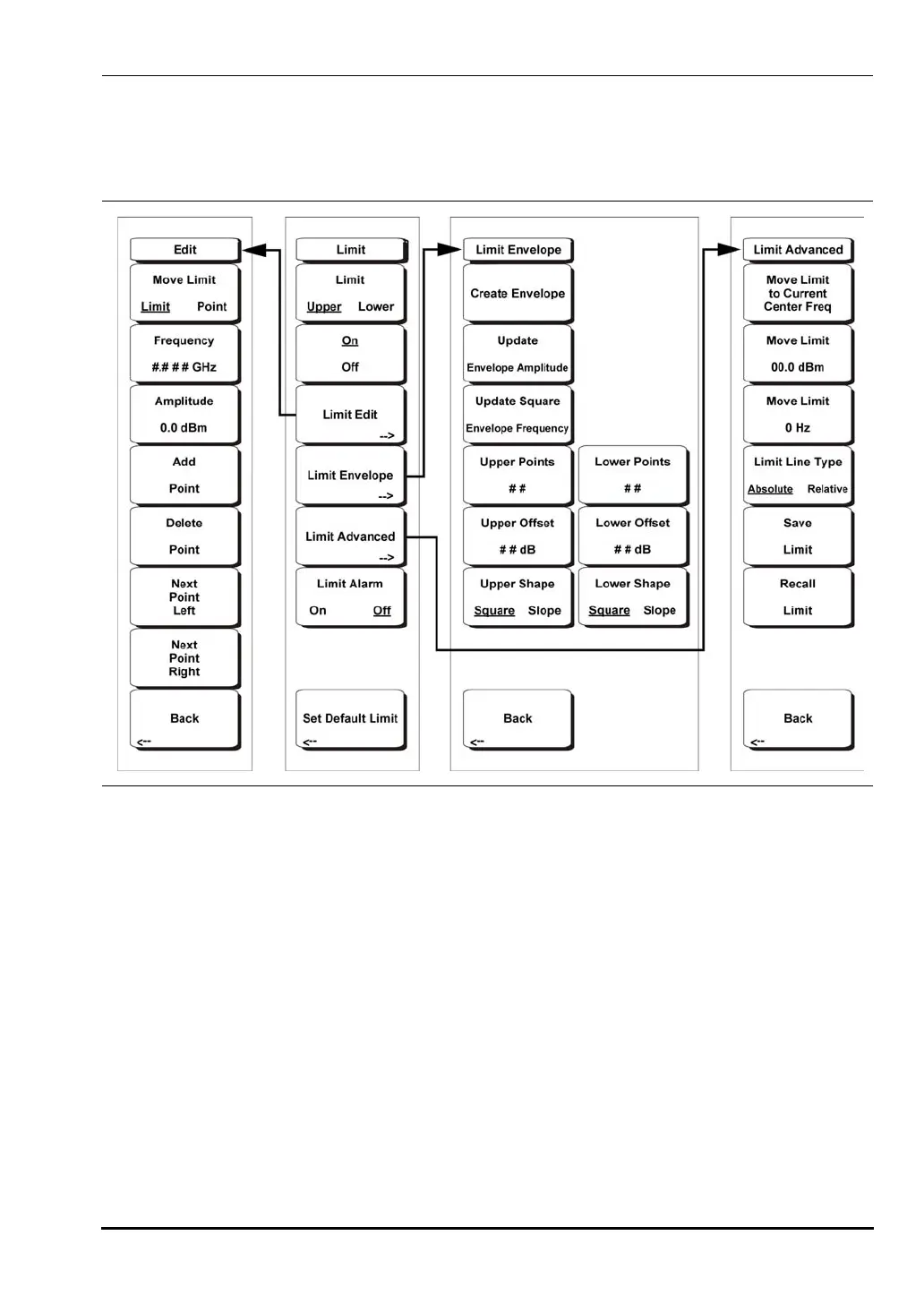
Limit menu soft keys are:
Two types of limit lines can be specified, lower limit lines and upper limit lines. Limit lines
can be used for visual reference only, or for pass/fail criteria using the limit alarm. For more
information on the Limit Alarm functions, see section “Limit Alarm On/Off” on page 4-42.
Limit alarm failures are reported whenever a signal is above the upper limit line or below the
lower limit line. Each limit line can consist of a single segment, or as many as 40 segments
across the entire frequency span of the instrument. These limit segments are retained
regardless of the current frequency span of the instrument, which allows the configuring of
specific limit envelopes at various frequencies of interest without having to re-configure them
each time the frequency is changed.
Limit Upper/Lower
This soft key selects which limit line will be active for editing. The limit line that is
currently selected for editing is underlined.
On/Off
This soft key turns the active limit line (upper or lower) on or off.
Figure 4-13. Limit Menu Soft Keys
10580-00166C.book Page 37 Thursday, February 21, 2008 12:52 PM













 To Next Page