Chapter 2 — Quick Start Guide 2-5 Typical Spectrum Analyzer Display
MS20xxA VNA Master UG 10580-00166 Rev. C 2-5
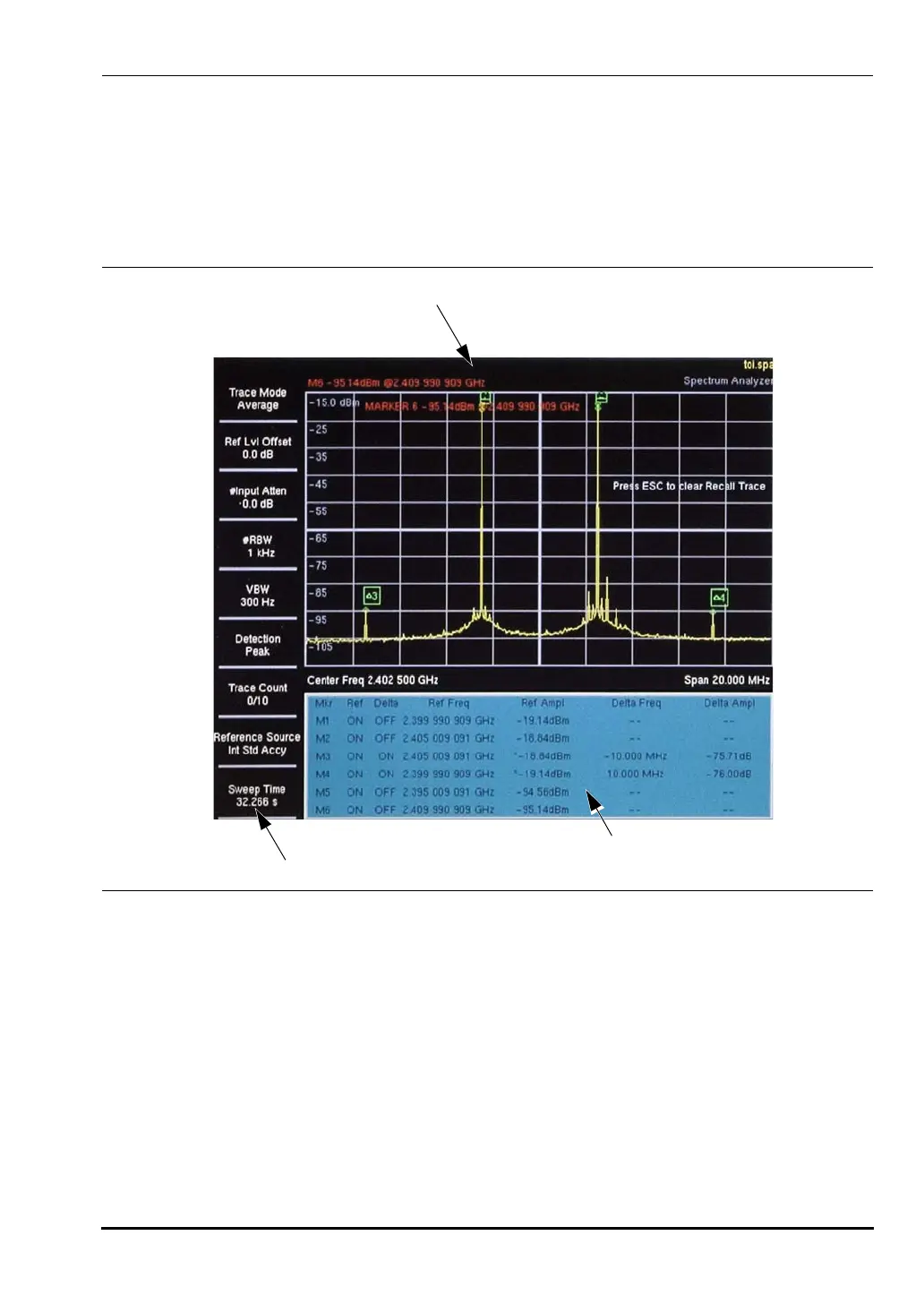
2-5 Typical Spectrum Analyzer Display
Figure 2-4 illustrates some of the key information areas of the Spectrum Analyzer display of
the VNA Master. Spectrum Analyzer functions are in MS203xA models only. For more
detailed key descriptions, refer to Chapter 4, “Spectrum Analyzer”. For measurement details,
refer to Section “4-3 Making Spectrum Analyzer Measurements” on page 4-2 and subsequent
sections.
2-6 Front Panel Keys
The term hard key refers to all of the buttons on the instrument face except for the vertical
row of gray buttons adjacent to the measurement display. The eight vertically arranged gray
buttons are called soft keys, and they are used to activate virtual soft key buttons within the
measurement display screen.
Esc Key
Pressing this key cancels any setting that is currently being made.
Figure 2-4. Spectrum Analyzer Display Overview
Display Area
Instrument
Settings
Summary
Optional Data Window
10580-00166C.book Page 5 Thursday, February 21, 2008 12:52 PM












 To Next Page