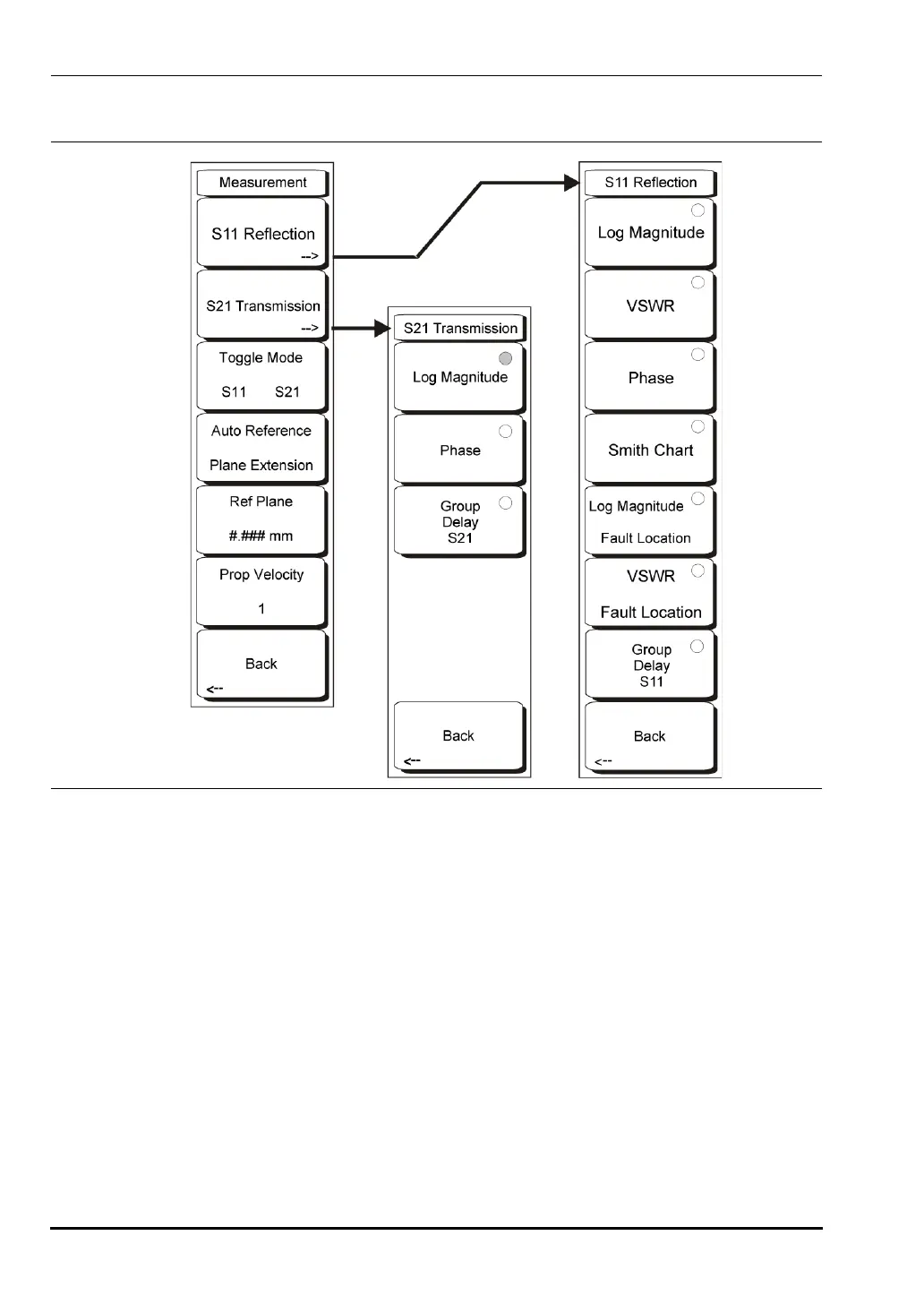
3-7 VNA Key Functions - Measurement Menu (VNA Menus) Chapter 3 — Vector Network Analyzer
3-42 MS20xxA VNA Master UG 10580-00166 Rev. C
Measurement Menu (VNA Menus)
While the VNA Master is in VNA mode and is set for the VNA Measurement application
option, press the
Measurement function hard key or press the Shift key then the Measure (4)
button. The Measurement menu is used to select the measurement format. For details about
setting this option, refer to “System Menu” on page 3-54. The nomenclature in the VNA
Menus is intended to be familiar to users who work with traditional bench top VNAs.
S11 Reflection
This soft key opens the S11 Reflection menu.
Log Magnitude
Directs the instrument to make a 1-port measurement and display the
magnitude result in dB. Return Loss is expressed as a positive number, in other
words, a larger numeric value represents more loss in the DUT.
VSWR
Directs the instrument to make a 1-port measurement and display the
magnitude result in Voltage Standing Wave Ratio (VSWR).
Figure 3-25. VNA Measurement Menu
10580-00166C.book Page 42 Thursday, February 21, 2008 12:52 PM













 To Next Page