CPS100 SERIES OPERATION MANUAL
SECTION 6:
Front Panel Operation
Entire Contents Copyright 2018 by Adaptive Power Systems, Inc. (APS) • All Rights Reserved • No reproduction without written authorization from APS.
APS CPS100 Series Power Source Operation Manual Page 121 of 231
The IEC 4-13 test option is suitable for pre-
compliance testing of products that require
CE marking.
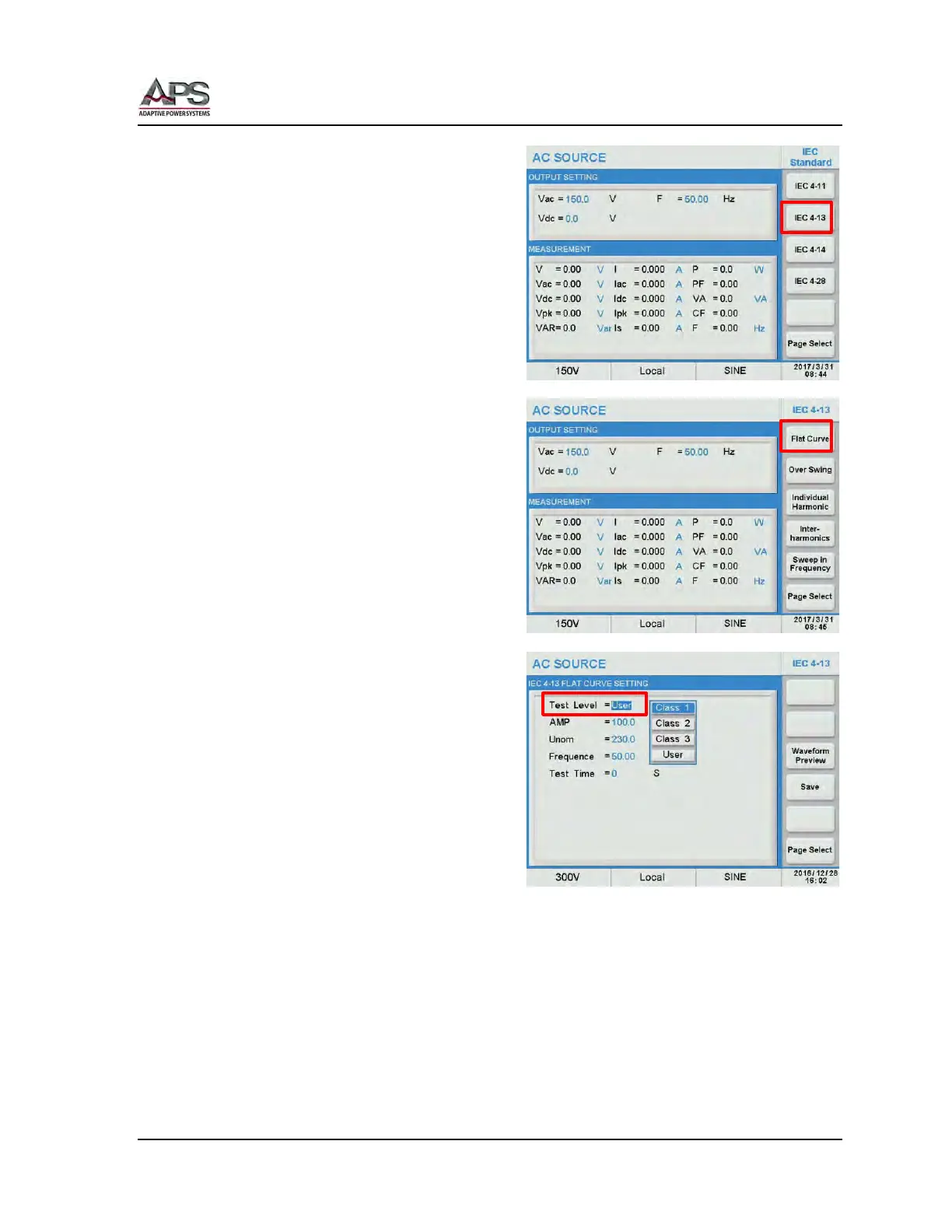
To set up and run an IEC 4-13 test, select the
IEC 4-13 soft key from the IEC Standard
menu.
The IEC 4-13 Menu contains the following
available soft keys:
• Flat Curve
• Over Swing
• Individual Harmonic
• Inter-harmonics
• Sweep in Frequency
These are all part of the IEC 61000-4-13 test
requirements.
IEC 4-13 Flat Curve Test
Press the Flat Curve soft key to display the
Flat Curve test screen. Available soft keys in
this screen are Trigger and Edit. Press the
Edit soft key to set the required test
selections for this test.
There are three standard product classes for
the IEC 61000-4-13. They are Class 1, Class 2
and Class 3. (Standard modes) Test levels and
durations for these product classes are
defined by the IEC 61000-4-13 standard.
There is also a User class, which allows
parameters to be changed. (User mode).
To select the appropriate product class for the unit under test, move the cursor to the “Test
Level =” field and press [Enter]. A drop down list with product class selections is displayed.
The following other test parameters are available:
• AMP: Voltage amplitude in percent of nominal voltage. Fixed at 100% in
standard modes.
• Unom: Nominal test voltage. Fixed at 230V in standard modes.
• Frequency: 50Hz or 60Hz in standard modes.



 To Next Page