CPS100 SERIES OPERATION MANUAL
SECTION 6:
Front Panel Operation
Entire Contents Copyright 2018 by Adaptive Power Systems, Inc. (APS) • All Rights Reserved • No reproduction without written authorization from APS.
APS CPS100 Series Power Source Operation Manual Page 122 of 231
• Test Time: Duration of the test. Range is from 0 ~ 9999. Zero means infinite
loop.
For User class, set these parameters as
desired. For classes 1 through 3, select the
required frequency – typically 50Hz – and the
Test Time.
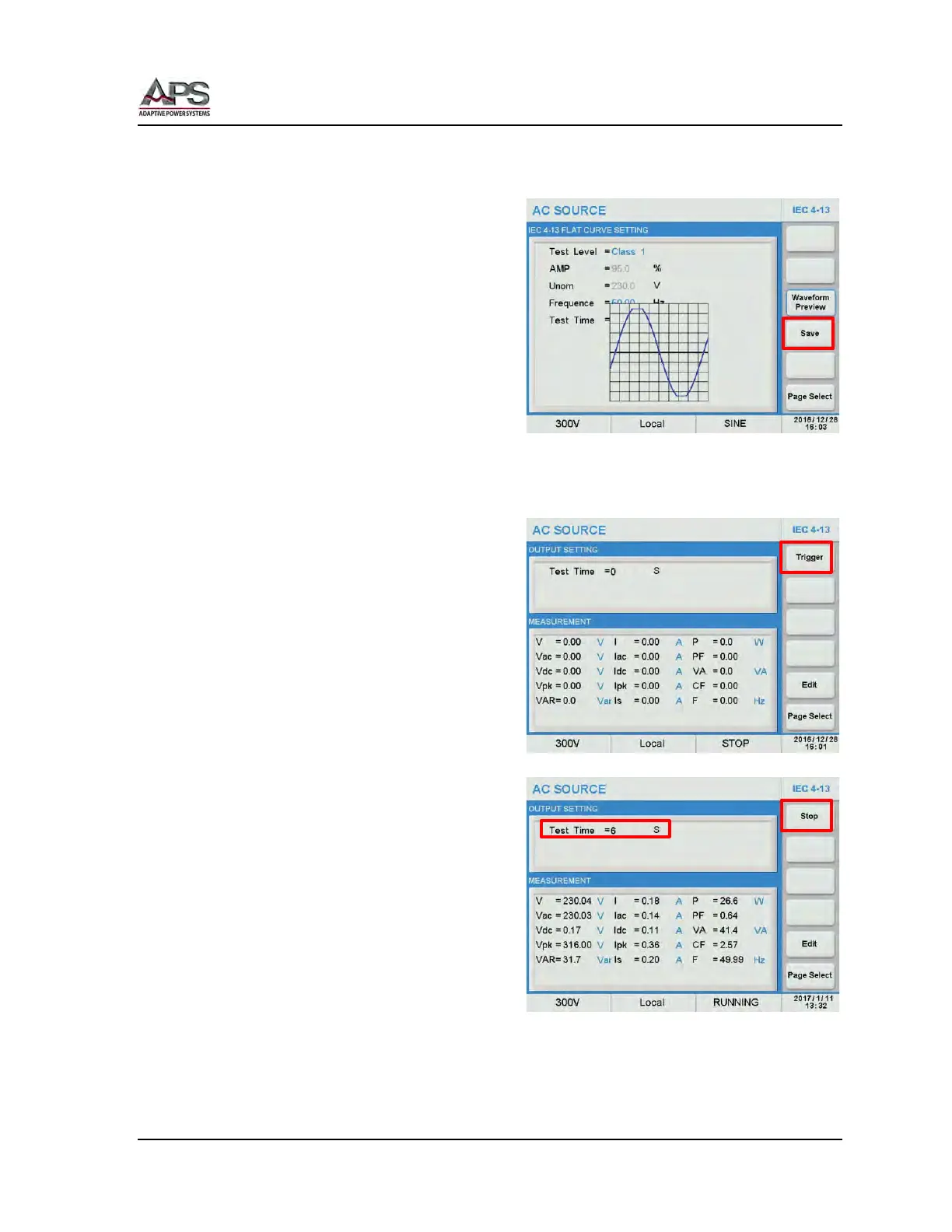
Press the Preview soft key to see a visual
representation of the test waveform. Press
again to clear the preview.
Once set, press the Save soft key to store the
test setting in non-volatile memory
Note: If the IEC 4-13 test setting is not
saved, it will be lost when the power
source is turned off.
Running the IEC 4-13 Flat Curve test
Return to the previous IEC 4-13 menu by
pressing the [Esc] key.
Press the Trigger soft key to apply the test to
the unit under test. Once pressed, it changes
to Stop.
The test will now run until completed. Total
test time is determined by the Test Time
setting.
The test time count down in seconds is
visible in the upper part of the IEC 4-13
screen.
At the completion of the test, the Stop soft
key will revert to Trigger. To abort a test in
progress, press the Stop soft key during a
test run



 To Next Page