CPS100 SERIES OPERATION MANUAL
SECTION 8:
Master Slave Operation
Entire Contents Copyright 2018 by Adaptive Power Systems, Inc. (APS) • All Rights Reserved • No reproduction without written authorization from APS.
APS CPS100 Series Power Source Operation Manual Page 176 of 231
Setting up a Unit as a Master
Multi-unit configurations require the use of
only one Master. After configuring the
Slave(2), proceed with set up of the Master
unit. This done from the MAIN menu
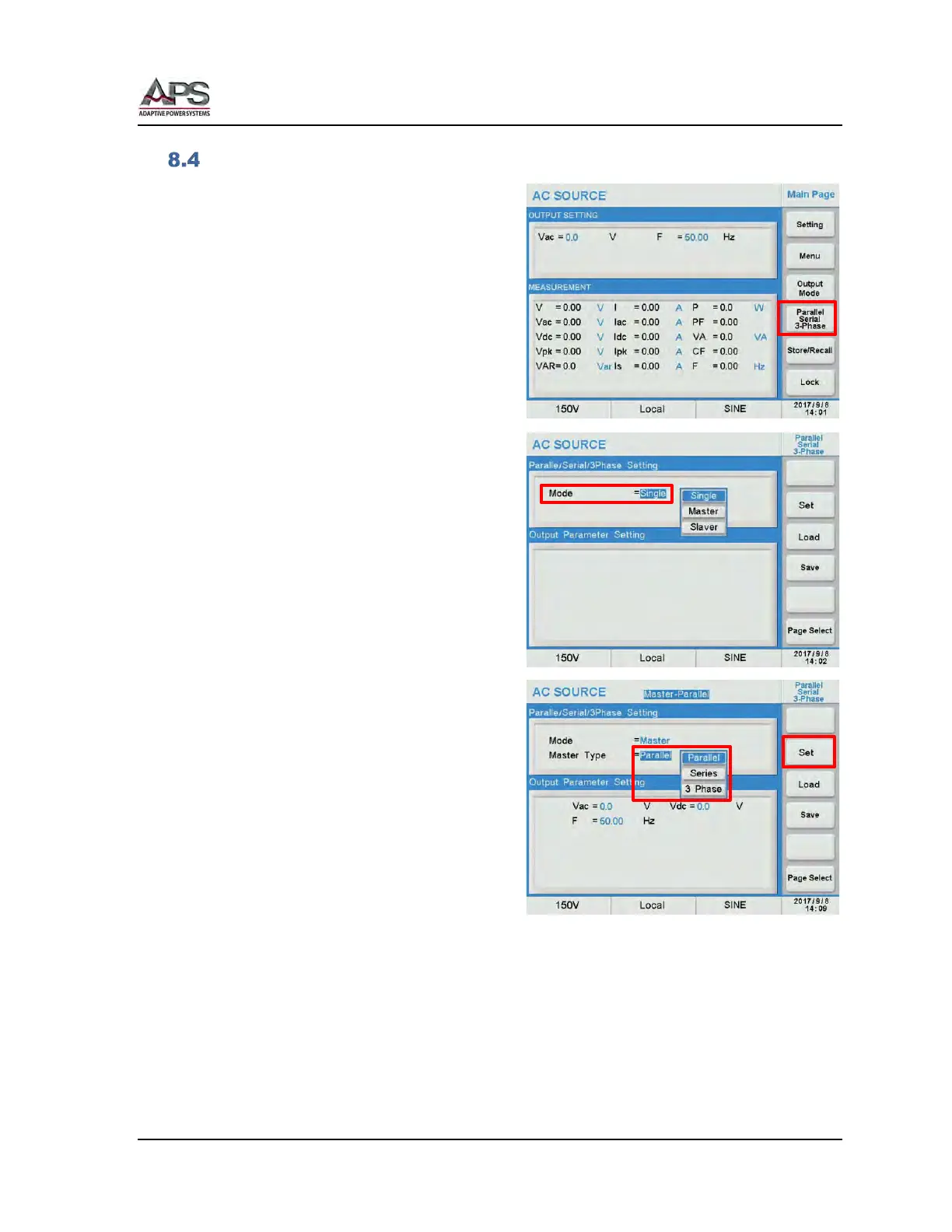
Press the Parallel / Series / 3-Phase soft key
to display the multi-unit menu.
Move the cursor position to the Mode field
in the top part of the screen.
Available unit modes are:
• Single Stand-alone operation
• Master Master unit
• Slave Slave unit
From the drop down list, select the Master
entry and press the [Enter] key to confirm.
The Master Type = field will now be visible.
The Master Type has three options:
• Parallel Parallel mode for up to 4
units
• Series Series mode for 2 units
• 3 Phase Three phase mode for 3
units
Select the required mode of operation from
this drop down list. In this example, Parallel
mode.
Next, press the Set soft key to save the Mode
and Slave type selection. This will lock this power
source into Master mode.



 To Next Page