CPS100 SERIES OPERATION MANUAL
SECTION 6:
Front Panel Operation
Entire Contents Copyright 2018 by Adaptive Power Systems, Inc. (APS) • All Rights Reserved • No reproduction without written authorization from APS.
APS CPS100 Series Power Source Operation Manual Page 86 of 231
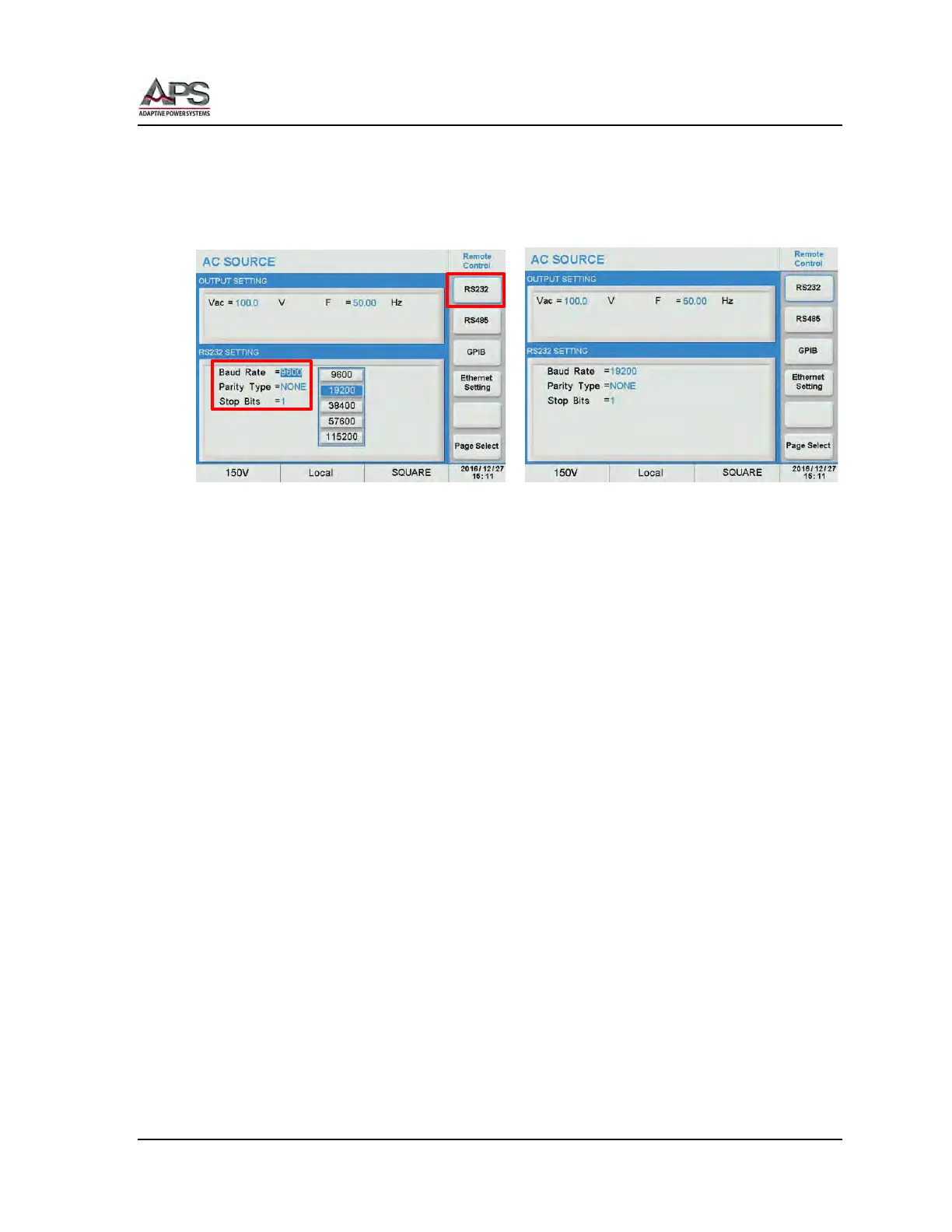
RS232 Settings
From the Remote Control screen, press the RS232 soft key to change RS232 interface
settings. Scroll through Baud rate, parity and Stop bits fields and use the shuttle to set the
desired values. Press the [Esc] key when done to back up to the Remote Control screen.
Parameter ranges are:
• Baud Rate: 9600, 19200, 38400, 57600, 115200
• Parity Type: None, Even, Odd
• Stop Bits: 1, 2
Note: This interface does not support XON/XOFF protocol or any hardware handshaking.
The controller should be configured to ignore the Handshaking Lines DTR (PIN 4,),
DSR (PIN 6) and RTS (PIN 9). If the port cannot be configured through software to
ignore the lines, the handshaking lines should then be jumped together in two
different pairs. Both pins 4 & 6 and pins 7 & 8 must be jumpered together at the
controller end of the cable.



 To Next Page