EFD1000 PFD Pilot’s Guide
CHAPTER 4, REFERENCE GUIDE
EFD1000 PFD Pilot’s Guide
EFD1000 PFD Pilot’s Guide Page 4-35A-01-184-00 REV B
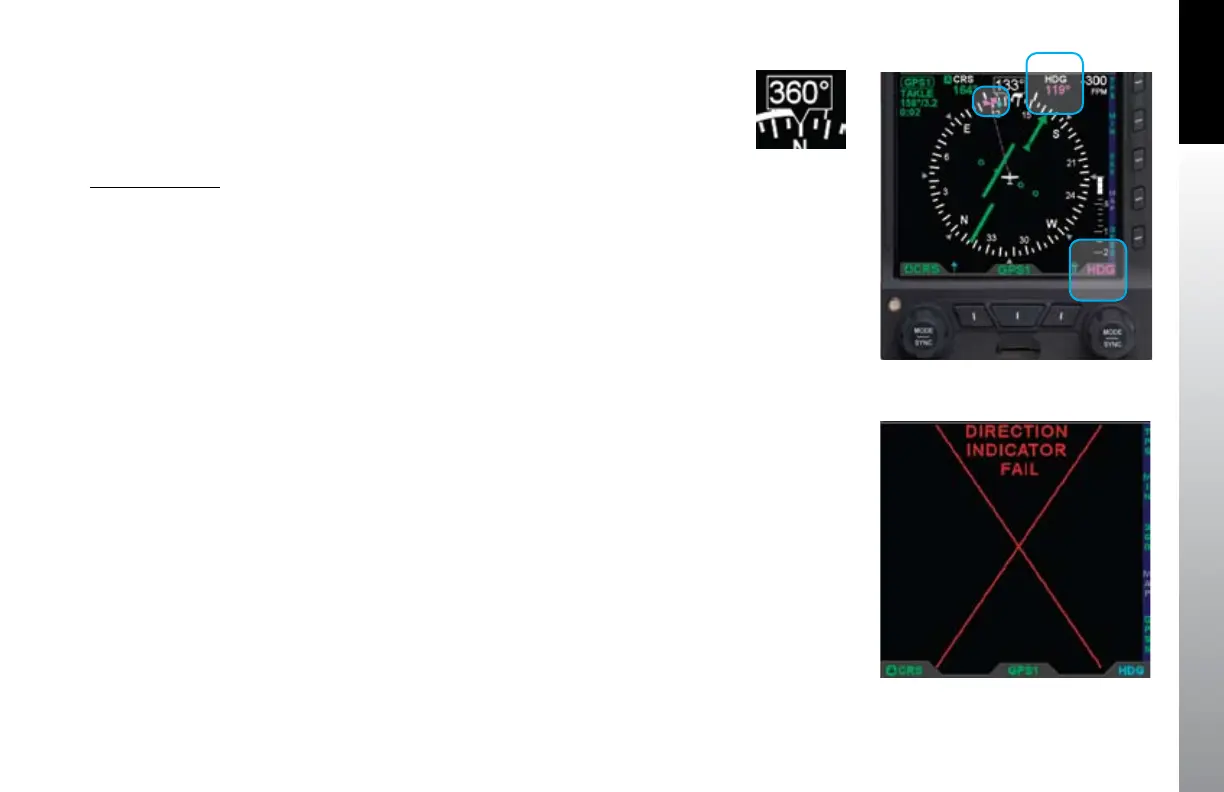
When selected for editing, the heading bug and the HDG value are shown in magenta.
Additionally, a dashed magenta line extends from the ownship symbol to the heading
bug, corresponding to the selected HDG value. When heading bug is SYNCed, the HDG
value is set to the current heading.
Heading Bug Set
1. Press the Right Knob until HDG displays above the Right Knob and the
Heading eld is enabled for editing, both rendered in magenta
(Figure 4-77).
2. Rotate the Right Knob to change the value of the Heading eld. Rotate
clockwise to increase, or counterclockwise to decrease, the value. Once the
HDG value is set, and after 10 seconds of inaction, the HDG eld is disabled
and both the label and eld are displayed in cyan.
4.3.10. Aircraft Heading Display
The aircraft heading is displayed in degrees magnetic (Figure 4-78).
If the aircraft’s heading is unavailable or invalid, all heading and navigation information,
including the CDI and bearing pointers (if previously displayed), is removed and
replaced with a single red “X” covering the entire lower display area, along with the
annunciation, DIRECTION INDICATOR FAIL (Figure 4-79).
Figure 4-77
Heading Selected to Edit
Figure 4-78
Direction of Flight
Numerical Display
Figure 4-79
Direction Indicator Fail



 To Next Page