EFD1000 PFD Pilot’s Guide
CHAPTER 4, REFERENCE GUIDE
EFD1000 PFD Pilot’s Guide
EFD1000 PFD Pilot’s Guide Page 4-11A-01-184-00 REV B
4.1.3.2. Selected Altitude
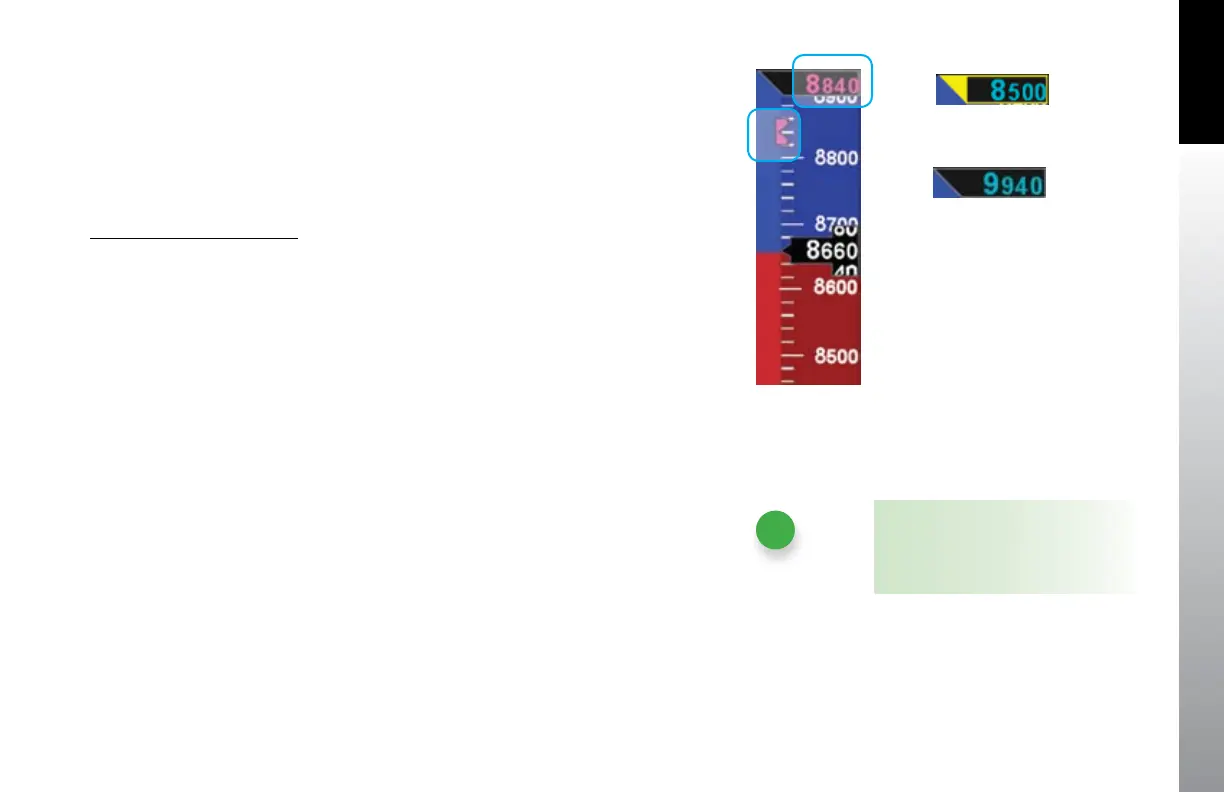
The Selected Altitude value is displayed at the top of the Altitude Tape. The Selected
Altitude range is 100 to 51,000 feet, in 20 foot increments. The default value for the
Selected Altitude value is 100 feet, or the previously set value. Additionally, an altitude
bug is displayed adjacent to the Altitude Tape and at the selected altitude, when within
the visible range of the current altitude.
Set Selected Altitude (Bug)
1. Press the Right Knob until ALT displays above the Right Knob and the
Selected Altitude numerical eld and bug are enabled for editing, all rendered
in magenta (Figure 4-19).
2. Rotate the Right Knob to change the value of the numerical Altitude eld.
Rotate clockwise to increase, or counterclockwise to decrease, the value.
Once the correct value is selected, and after 10 seconds of inaction, the eld
is disabled and the label, eld, and bug are rendered in cyan.
4.1.3.3. Altitude Level-O and Deviation Alert
The altitude level-o alert is ARMED and rendered on-screen as a yellow alert ag
next to the Selected Altitude value when the aircraft is within 15 seconds or 200 feet
(whichever is greater) of the selected altitude (Figure 4-20). If an optional Sonalert tone
generator device is installed, a one-second tone also sounds. Once the current altitude
is within ± 25 feet of the selected altitude, the alert ag extinguishes and the selected
altitude is CAPTURED (Figure 4-21).
After reaching the selected altitude, if the aircraft’s current altitude diers from the
selected altitude by more than 200 feet, the yellow alert ag ashes. If an optional
Sonalert tone generator device is installed, a one-second tone also sounds.
NOTE
Rotating the knob quickly will change
the altitude value in larger increments.
Figure 4-19
Altitude Bug/Alerter Field Enabled
Figure 4-20
Altitude Alert
Figure 4-21
Selected Altitude Capture and
Aircraft Level-o



 To Next Page