CHAPTER 4, REFERENCE GUIDE
EFD1000 PFD Pilot’s Guide
Page 4-2 A-01-184-00 REV B
EFD1000 PFD Pilot’s Guide
EFD1000 PFD Pilot’s Guide
4.1. Attitude Display
4.1.1. Attitude Indicator
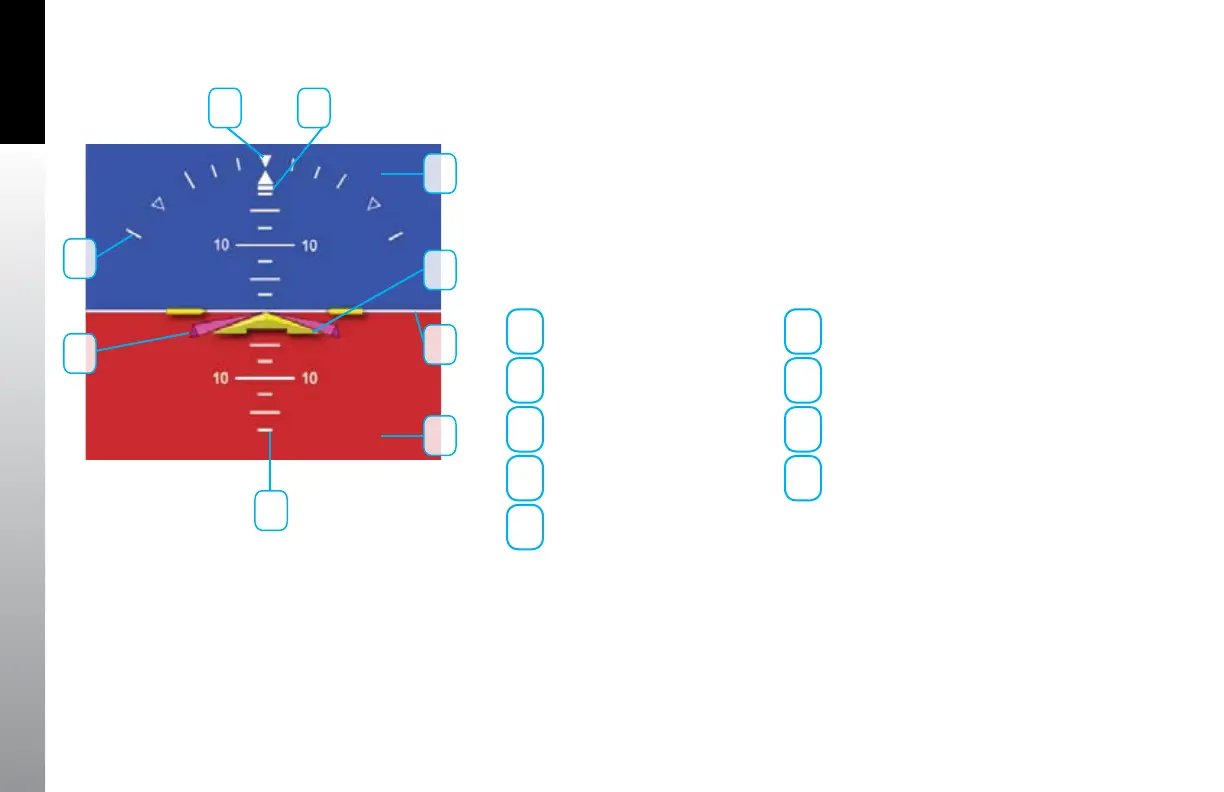
The Attitude Indicator consists of an aircraft reference symbol on a blue (sky) and brown
(ground) background. The white horizon line separates the sky from the ground and
extends to the edge of the display. The Roll Scale curves over the top of the Attitude
Indicator while the Pitch Scale extends vertically in the middle. The slip/skid rectangle is
directly underneath the roll pointer (Figure 4-1).
1
Sky
6
Flight Director
2
Aircraft Reference Symbol
7
Roll Scale
3
Horizon Line
8
Roll Pointer
4
Ground
9
Slip/Skid Indicator
5
Pitch Scale
The Attitude Indicator cannot be disabled by the pilot. The Aircraft Reference Symbol is
xed relative to the Attitude Indicator and overlays all other Attitude Indicator symbols.
A pitch oset adjustment (+/- 10°) is provided to installers to compensate for variations
in installations and slight panel tilts.
Figure 4-1
Attitude Indicator
1
2
3
4
5
6
7
8 9



 To Next Page