CHAPTER 4, REFERENCE GUIDE
EFD1000 PFD Pilot’s Guide
Page 4-26 A-01-184-00 REV B
EFD1000 PFD Pilot’s Guide
EFD1000 PFD Pilot’s Guide
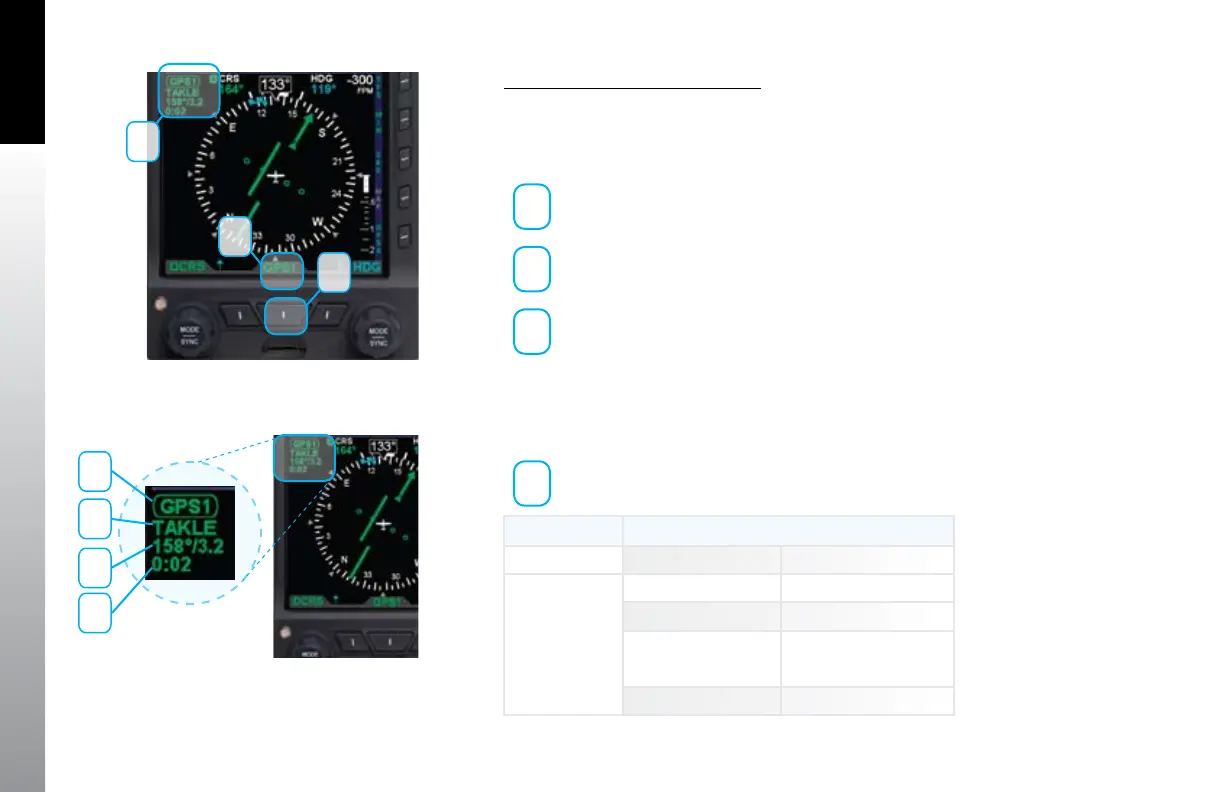
Select The CDI Navigation Source
Press the CDI Navigation Source Select button until the desired navigation •
source is displayed above the button (e.g., GPS1, GPS2, VLOC1, VLOC2)
(Figure 4-56).
1
CDI Source Select Button
2
CDI Source Label
3
CDI Source Information Block
Whenever the CDI navigation source navigation data is valid, a navigation information
block for the currently selected navigation source is shown in the upper left corner of
the lower display as described in Figure 4-57 and shown in Table 4-4.
1
CDI Source
Figure 4-56
Navigation Source Information Block
Figure 4-57
CDI Navigation Source
Information Block
Radio Mode Information Block Label
GPS GPS1 or GPS2
VHF VOR VOR1 or VOR2
Localizer LOC1 or LOC2
Localizer Back LOC1(BC) or
LOC2(BC22w)
ILS ILS1 or ILS2
Table 4-4
VHF NAV Radio
1
2
3
1
2
3
4



 To Next Page