CHAPTER 3, FLYING THE EFD1000 PRO PFD
EFD1000 PFD Pilot’s Guide
Page 3-10 A-01-184-00 REV B
EFD1000 PFD Pilot’s Guide
EFD1000 PFD Pilot’s Guide
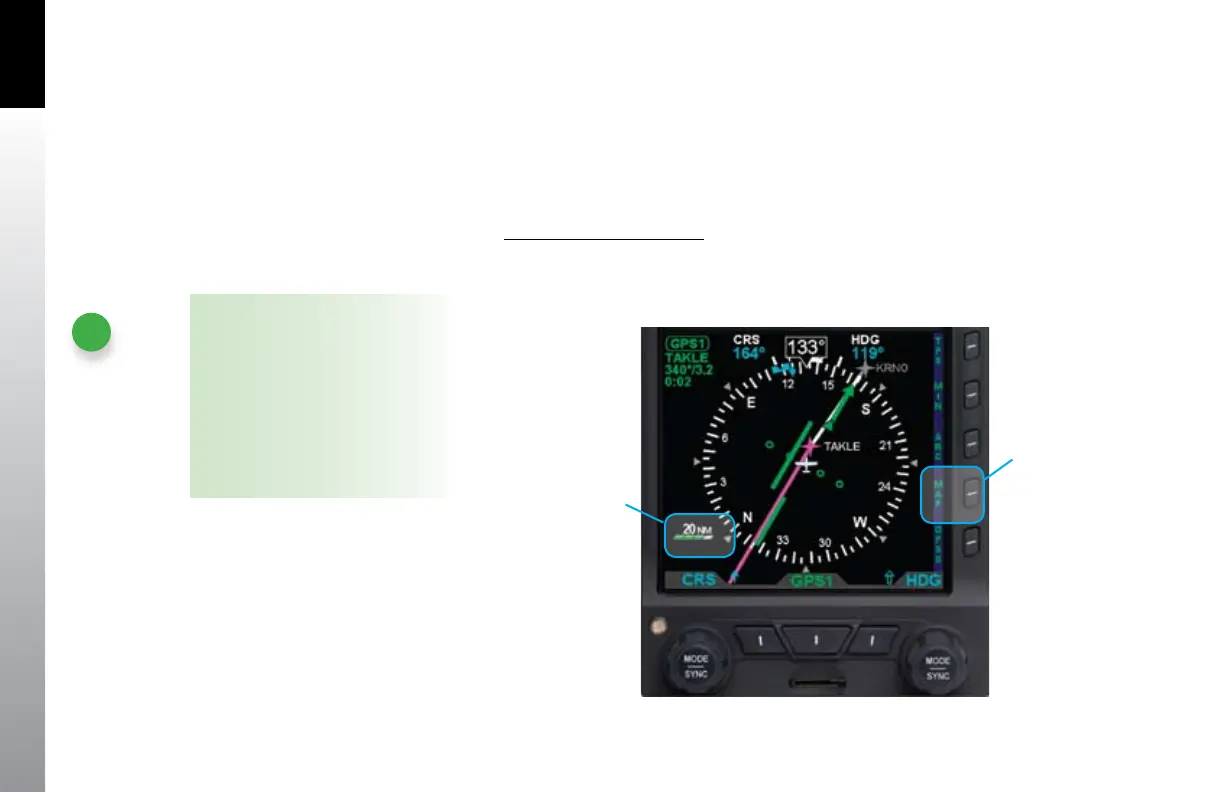
For even better situational awareness, we choose to display the basemap of our ight
plan legs and waypoints. We press the MAP Hot Key to bring up the base map. We
use the Range Control buttons to select the 20 NM. range, which will give a good
perspective for intercepting our course to ZUN. Our initial ight plan leg, from the
airport to ABQ VOR is shown in magenta, with subsequent legs and waypoints shown
in white.
Select Map Level of Detail
Push the MAP Hot Key (fourth hot key) to cycle through and select the •
desired level of detail. Each time the hot key is pressed, the Map Display Level
changes to the next option (Figure 3-14).
NOTE
The icons and ight plan legs
rendered for each of the map display
levels (High, Medium, and Low) are
based on the selected map range.
Detailed information is provided, in
Section 5.2 of this guide. In addition,
some of the icons can be manually
recongured, as discussed in that
same section.
Figure 3-14
Changing the Map
Display Level
The Feature Display
Level Icon Changes
Press the MAP
HOT KEY



 To Next Page