EFD1000 PFD Pilot’s Guide
CHAPTER 4, REFERENCE GUIDE
EFD1000 PFD Pilot’s Guide
EFD1000 PFD Pilot’s Guide Page 4-13A-01-184-00 REV B
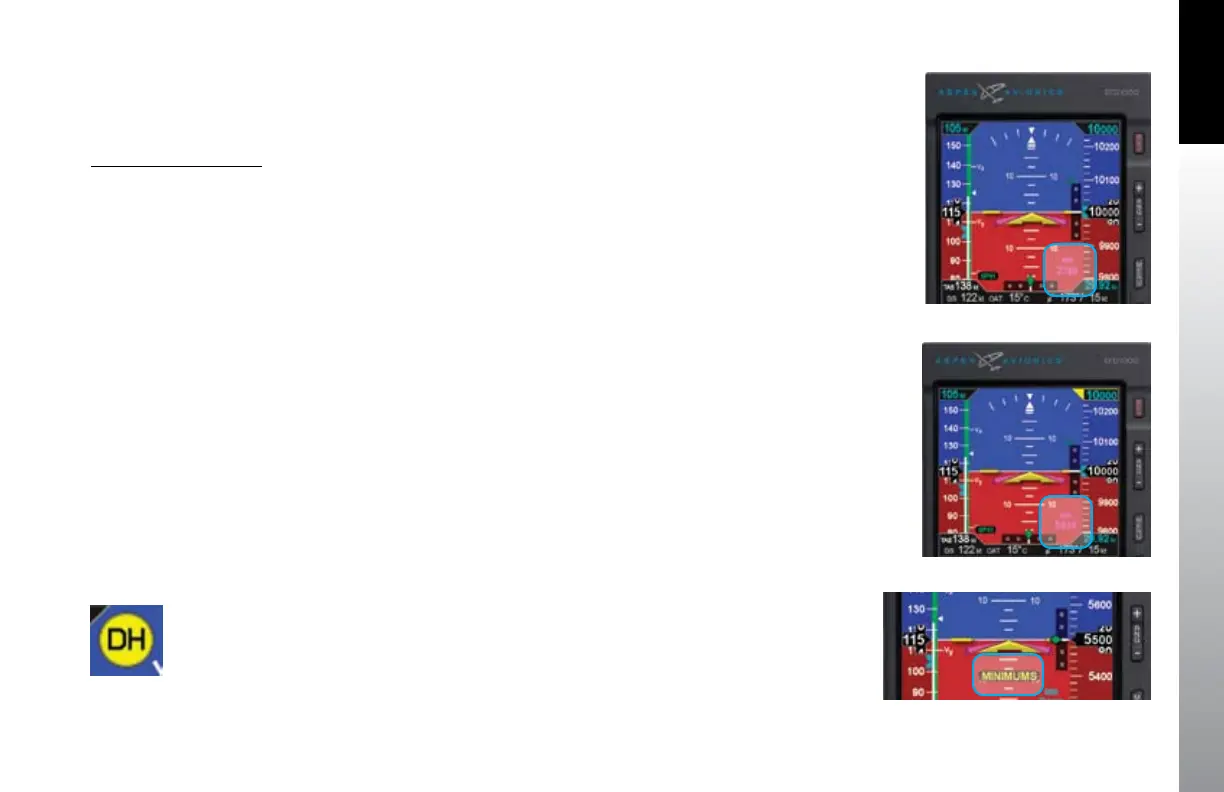
Figure 4-24 MIN Field Enabled
Figure 4-25 New MIN Setting
The range for the MIN data eld is 0 – 15,000 feet, in increments of 10 feet.
Synchronizing sets the MIN data eld value to the current altitude (Section 2.2.1.3).
The default value is 100 feet or the previously set value.
Set Altitude Minimum
1. Press the Right Knob until MIN displays above the Right Knob and
the MINIMUMS eld is enabled for editing, both rendered in magenta
(Figure 4-24).
2. Rotate the Right Knob to change the value of the MINIMUMS eld. Rotate
clockwise to increase, or counterclockwise to decrease, the value. Once the
correct value is selected, and after 10 seconds of inaction, the eld is disabled
(Figure 4-25).
If the aircraft’s altitude becomes lower than the MINIMUMS eld’s setting, the
MINIMUMS annunciation displays below the Aircraft Reference Symbol and, if
congured, the Sonalert tone sounds three times (Figure 4-26). If the aircraft reaches
an altitude 100 feet greater than the MINIMUMS eld setting, the MINIMUMS alert is
removed.
4.1.3.5. Decision Height Annunciation
If a radar altimeter is installed and connected to the EFD1000 PFD, a Decision Height
annunciation displays whenever the external input commands the DH annunciator ON.
The Decision Height alert is a xed-position, yellow “DH,” displayed near the upper right
corner of the Attitude Indicator (Figure 4-27).
Figure 4-26 Minimums Alert Active
Figure 4-27
DH Alert Active



 To Next Page